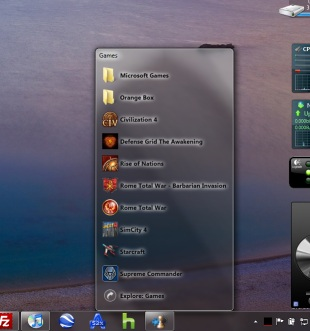
A long time ago I covered a method to create stacks in Windows 7 that resemble their OS X counterpart. The method was a bit tricky one and was more of a hack out of a Windows XP and Vista application. 7stacks solves that issue and creates simple to use yet native looking stacks in the Windows 7 taskbar. The feature list is awesome:
- In 7 and Vista, 7stacks uses Aero, making the stacks look like part of Windows itself.
- Browse subfolders within a stack, just like in OS X Snow Leopard.
- 3 different styles of stacks: Normal, Grid, and Menu
- Normal displays a stack of icons vertically, with a text description next to it.
- Grid displays a “squarish” grid of icons only; useful when displaying a large number of items like document folders.
- Menu displays a cascading menu of items, with a very small icon and a name next to it. Hover over subfolders to browse inside those folders.
- In Windows 7, create a new stack by right-clicking on any stack and selecting “Create New Stack” from the JumpList entry.
- In Menu mode, 7stacks doesn’t even need to be in a toolbar. You can use it right from your desktop, or any other folder.
- Pin up to 10 different stacks on the Windows 7 taskbar
This application is awesome and saves a lot of clicks if you sue it well, but one major drawback is that it doesn’t render image or video thumbnails, which makes it a bit useless when making shortcuts to such folders. Although, you can browser folders in the stack view as well, which is a plus if you have non-media folders setup as stacks. The cascading start menu like menu is a great addition as well.
Download 7stacks
Check out the demo video below by Lee Mathews of Download Squad


7 comments