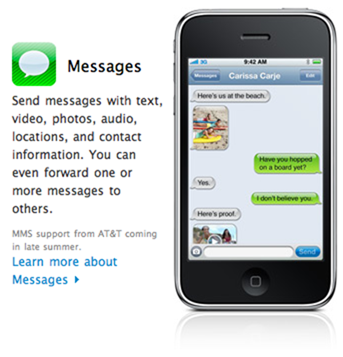
 A lot of people have contacted me that they’ve lost the MMS feature in their iPhone 3G/3GS after updating to iOS 4, jailbroken or not. The problem here seems to be that after upgrading to iOS 4, the MMS service settings are erased. There are a couple of ways to fix this issue.
- Reset Network Settings. Go to Settings > General > [scroll down] Reset > Rest Network Settings
- Reset All Settings. Go to Settings > General > [scroll down] Reset > Rest All Settings
- Check if MMS is turned on in Settings > Messages
- Restore your iPhone using iTunes, and set it up as a new iPhone instead of restoring the backup.
- Check if you have new carrier settings available. Go to Settings > General > About to check.
- Find the MMS settings for your Carrier on Google, and set them up in Settings > General > Network > Cellular Data Network > MMS
These fixes should help you get going again with MMS. If you’re still unable to get it working, let us know in the comments and we’ll try to help you out.
As an alternative, you can always use email or iMessage to send photos and videos to your friends. The benefit of MMS over email or iMessage is that your contact does not need to be on the same phone or have a data package. Most operators allow receiving and sending MMS without subscribing to a data service, so in such instances, it is useful to ensure that MMS works fine on your iPhone.
The above solution has been tested to work fine on iPhone 3GS. If it does not work on your particular iPhone model or cellular operator, let us know in the comments below and we will try our best to help you out.

This site has turned into a phone/iPhone site :o/
yup, change of focus.
Great, I also write on phone and you site inspires me, really.
Great, I also write on phone and you site inspires me, really.
This doesn't work.. I reset the settings on my phone but When I go to Settings>General>Network there are just 3 an on/off switches (1 for 3G, 1 for Cellular Data and 1 for Data Roaming). Other than that there are tabs for VPN and Wi-Fi… I'm guessing this cellular Data settings would be in VPN but I don't understand any of the technical settings in that tab!
That's odd. Between the cellular data and data roaming switches, there should be Cellular Data Network. I see it on my iPhone 3G, and I don't have MMS working/enabled.
Ok so what do you think I should do. Everything was fine before on my iPhone 3G.. I used to access the internet all the time, but I just don't know what to do about this?
if u setup as new phone how do u get contacts back
same problem as above as rahim. ive even tried downloading swirlymms2 but it wont work because every time i try to open it it says i need to reboot my phone and even after i do that it still doesnt work. any solution anyone may have to allow me to get mms would be awesome. i have a jailbroken iphone 3g on tmobile
any one have working mms settings for tmobile/
Doesn't work, and now i've lost the ability to view network settings. Also lost all network keys for wifi.
You can sync them again
after update to version 4 the i went to setting/ general and find general is no longer working. any one have the experience and can some one knows how to fix it >
I need to know the mms settings for t-mobile UK!!
Try rebooting. Or restore and rejailbreaking will fix that.
you can get your internet back by wifi through safari, open unlockit.co.nz then set up your profile from your country then email yourself, open the email in iphone and hey presto. dunno about the mms, theres no fix yet
this doesn’t work for me on AT&T
I'm having the same problem. I no longer have a cellular data network option and I'm on Cincinnati bell. Also, half of the time, I can't answer calls when they're coming in and my contacts take about a minute to pull one up. I've reset settings, re-jailbroken, restored from scratch, etc… always the same problem. I now have data working by using the iphone configuration utility, but the rest is really bugging me out.
Hey it worked!!! Thx
This doesn't work either… I dunno what to do.. I'm stuck with no internet when there's no wifi around! please anyone come up with a fix for this issue? can we expect this in iOS 4.01 that is rumored for release soon!
have you installed the t-mobile prepaid/flexpay from cydia? if you did, uninstall it. as soon as i installed that, i lost my cellular data network tab. when i uninstalled it, i got the tab back.
Settings -> General -> Network -> Cellular Data Network -> Under mms, fill inn APN, MMSC and MMS Proxy for your carrier. Then the Camera sign will appear again next to your textbox in messages!
I have tried everything and it still wont work. My phone is jail broken. Is there something on Cydia that I could install?
en las opciones de mensaje, no me aparece la opcion de mms, desde que actualize la version 3g a la version oficial 4, se me desaparecio la opcion de enviar mensajes, multimedia, alomejor esto es un truco de apple a los que dieron jb para detectar quien le esta haciendo a los iphones, no creen?
None of the settings resets worked and I'm not about to lose everything on my phone to keep it jailbroken and get MMS. Guess I've just got to roll back to being unjailbroken and lose multitasking on my 3G
for the fix go here http://www.youtube.com/user/ANTONIODS2000
i have no data network option to fill in apn mmsc and mms??
This is a fix for every body i just did it an it worked all u have to do is restore your iphone an after its restores set it up as a new iphone.. it just worked for me i just did it!!!
Reset network settings. Still the same. Softbank has the settings hidden too!
bingo. first one worked
it works, but why does it reset after i reboot. every time i reboot i have to reinstall and do all the steps over again.
When i get to step 3 to go find the mms it does still not show up
hey redsnow works thanks now if only they fix the springboard crashes
well guys, i had the same problem with my factory unlocked Iphone 3gs and i fixed it without having to reset the network or the phone, that's how:
1. Go to settings
2.Scroll to messages
3. Turn MMS Messaging off
4. Turn MMS Messaging on
Now your MMS is back to business :-)
the first step worked for me – thank you so much!
Worked great for me too! And my previously sluggish 3g/iOS 4 iPhone sped up by about 100 times.
I can send out pics but I can't receive them please please help me
hey mine didnt work i tried these steps and had my phone jailbroken. What could i do to fix this? should i restore it???
But i Looose, My Contacts and Pictures.
1 – didnt work
2 – didnt work
3 – i have no choice to turn on/off
4 – ugghh havent tried yet
5 – says “carrier – unavailable”
Same here!
I have iPhone 3G jailbroken.
MMS not working on new iphone 4. Will the “reset all settings” options under general reset voice mail or other internet settings?
not sending or receiving texts / mms. solutions?
In New Zealand we just got an iPhone 4 and 3Gs sending MMS by putting the right settings in the “general – network -cellular data” menu. easy!! and sending between themselves no problem.
Can send regular text messages, but will not send or receive picture messages iphone 4 AT&T