Sn0wbreeze, a redsn0w like jailbreak tool for iPhone and iPod Touch was recently released as a beta. It lets you create custom jailbroken firmware for your device. Unlike blackra1n, it’s not as simple to follow. We would recommend blackra1n to everyone looking to jailbreak their iPod Touch, but for those interested, here’s a detailed guide to creating a custom jailbroken 3.1.2 firmware using sn0wbreeze.
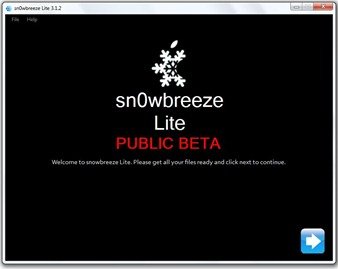 Important: This release of sn0wbreeze only supports the following devices:
- iPhone 2G
- iPhone 3G
- iPhone 3GS ( old bootrom and non-MC )
- iPod Touch 1G
- iPod Touch 2G ( non MC )
We don’t know if and when other models will ever be supported down the line.
- Download the latest version of iTunes. ( currently, version 9 is the latest )
- Make sure you have .Net 3.5 installed if you’re using Windows XP or Vista. You don’t need to check if you’re using Windows 7. You can check for .Net 3.5 from this website, if you need to install it, visit this link.
- Download sn0wbreeze.
- If you had already updated your iPod Touch to OS 3.1.2, I suggest you do it now. If you haven’t, connect it to your computer and launch iTunes to check for updates. Once you’ve updated to iPhone OS 3.1.2, you’ll need to copy the firmware file to your desktop. Visit this location on your computer: C:\Users\{your windows user name}\AppData\Roaming\Apple Computer\iTunes\iPod Software Updates and copy the IPSW file ( firmware file ) to your desktop.

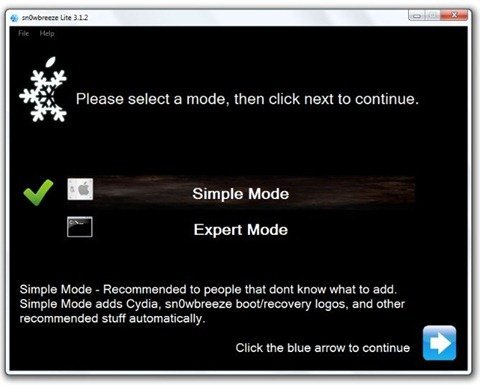
- Open sn0wbreeze and select simple mode. Expert mode is disabled in beta.
- Sn0wbreeze will ask for the firmware file. Click on browse and open the firmware file.
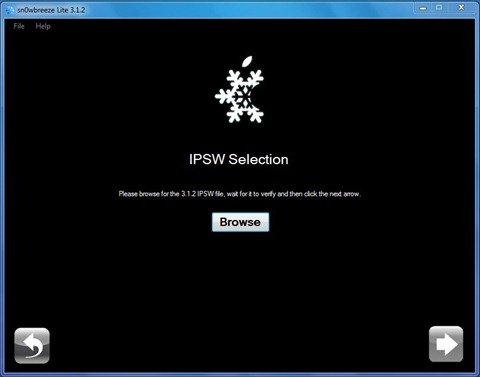
- Once the firmware file has been processed and verified, click on next to start the firmware modification.
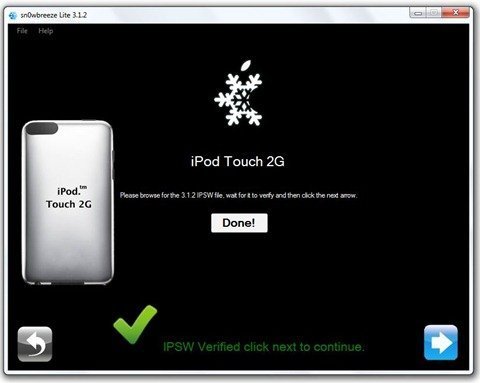
- Now sn0wbreeze will jailbreak the firmware. This can take a long time.
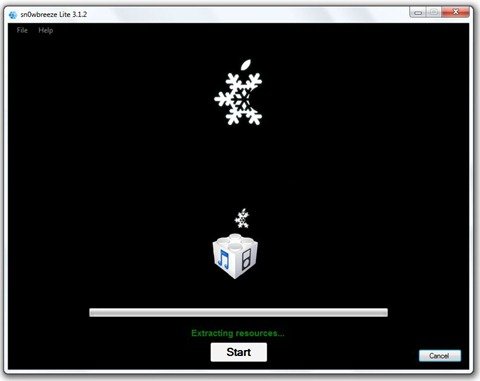
- Once the process is completed, you’ll have to restore your iPod Touch using this jailbroken firmware. Connect iPod Touch to your computer and launch iTunes. Hold Shift and left click on the Restore button as shown below. iTunes will then ask you for the location of the firmware which you want to use to restore your iPod Touch. Select the jailbroken firmware on your desktop.
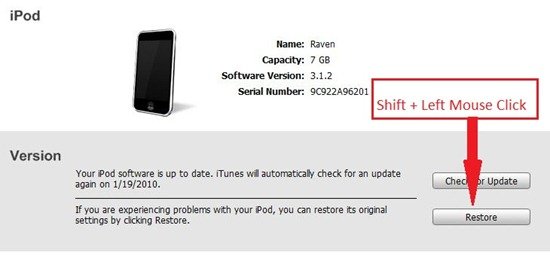
- Wait until iTunes completes the process of restoring your iPod Touch. When your iPod Touch restarts, it’ll be jailbroken. Enjoy!
Note:
- If something goes wrong, restart the process.
- If you have to restore your iPod Touch to the original firmware, just click the restore button normally and iTunes will get the job done.
- Remember to back up your data.
- If something goes wrong with your iPod Touch, it’s your fault, not ours. If you don’t know what you’re doing, don’t do it.
If you have any questions, put them in the comments below. Remember to read the complete instructions before posting your question, else you might not get any answer. If you want an easier method to jailbreak your iPod Touch using blackra1n, follow this guide.
Important: iPhone OS 3.1.3 has been released for the iPhone and iPod Touch. We’ve got a new guide up on how to jailbreak iPhone 3.1.3 and iPod Touch 3.1.3 with redsn0w 0.9.4. Don’t upgrade to iPhone OS 3.1.3 if you’re using an unlocked iPhone 3G/3Gs or a jailbroken iPod Touch 2G (MC Model)/3G. The redsn0w guide is for iPhone 2G/3G jailbreak and iPod Touch 1G/2G ( non-MC Models) only.


alternative link
this jailbreak its untethered for the ipod touch 3.1.2 ???
this jailbreak its untethered for the ipod touch 3.1.2 ???
I’ve tried this so many times and every time I do it, Cydia never opens up. When I select the iPod Touch 3.1.2 firmware, it says that the iPod needs to already be jailbroken. So I tried updating to 3.1.2, jailbreaking with Blackra1n, then creating a custom ipsw with Sn0wbreeze, then I restored to the newly made firmware, and now Cydia won’t open. What do I do?
where is the firmware? i downloaded snowbreeze, but i can not find the firmware on my computer, windows xp
is this still a tethered jailbreak? someone please respond! thanks!
Worked great on my 1st gen touch!! Thanks
What is the difference between blackr1n jailbreak and snowbreeze? Which is better? Asssuming I am capable of doing both.
My iPod is freezed.and than i want to restore and jailbreak. HOW CAN I DO IT?
Thanks, It was very easyly done on my ipod
How do u jailbreak it with3.12
I used Black Ra1n to jailbreak my tpod touch 3g and everything went well untill i accidentally restored my ipod.
now the black ra1n or cydia icon wont show up on my ipod…What should i do???
how cAN I COPY THE IPSW INTO MY DESK TOPS WERE DO I COPY IT FROM IF ITS ALREADY INSTALLED IN MY IPOD
It’s sokpoy how clever some ppl are. Thanks!