You can finally jailbreak iPod Touch 2G or 3G with OS 3.1.2 or 3.1.3! Spirit is an untethered jailbreak for iPhone with OS 3.1.2/3.1.3, iPad OS 3.2 and iPod Touch 3.1.2/3.1.3. It’s as easy to use as blackra1n. Finally, you’ll be able to upgrade to the latest OS and jailbreak it without having to deal with the tethered jailbreak problems which required you to jailbreak it again on every reboot.
It doesn’t matter if your iPod Touch model is MC or non-MC, Spirit just works! It even works with 3.1.2, so you don’t really need to upgrade your OS. Make sure you’ve backed up your SHSH blobs before jailbreaking, though. Better safe than sorry.
Jailbreak iPod Touch with OS 3.1.3
- Download the latest version of iTunes. (9.1.1 at the time of writing)
- Download Spirit
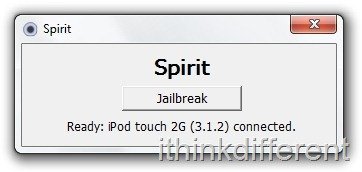
- Run Spirit and click Jailbreak.
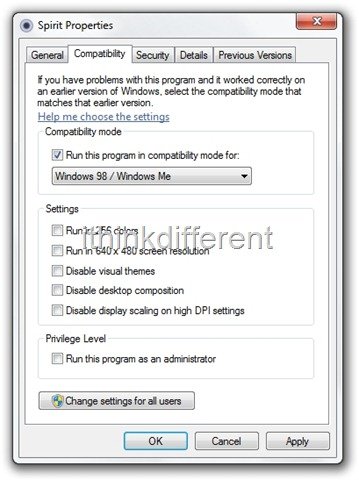
If you get error code c0000005, set compatibility mode to Windows 95/Me as shown below:
- When the jailbreak is done, the app will show you the status. Your iPod Touch should automatically reboot and you’ll have an untethered jailbreak! Congrats!


Once jailbroken, you can open up Cydia and download all your favorite apps and tweaks to customize your iPad touch. We regularly cover popular and must-have jailbreak tweaks and will continue to do so, so stay tuned.
If you any issues/problems with the jailbreak, don’t hesitate to leave your question in the comments below and we’ll be glad to help you out. Make sure you read the guide properly, though!


THANK U SOOOOOO MUCH:))
My iPod is on still on the loading screen, even though the computer said it wasn't done! I think it was because I tried using blackra1n earlier. Please help!
Merci beaucoup!!!! Thank you soo much!!!!
Mine jailbreaked in like 2 seconds. Awesome.
I did it but know it is stuck in the loading thing with the purple cloud things on my ipod screen.
this gay thing is slowing my ipod
You must run the jailbreak again to restore it, if you restore with iTunes, it will deleted ALL OF YOU FILES!
it says please connect device and i already plluged in ipod
Try restarting your iPod and then try again.
I did it but know it is stuck in the loading thing with the purple cloud things on my ipod screen.!! It would always stay on that page and i can't even shut my ipod! HEELP ! What should I do???
Immediately After I Attempted To Jailbreak My iPod, It Failed And Error c000035a Appreared. Nothing Else Came Up. Can Someone Help Me?
I want to jailbreak my itouch 3g. My only prob is that I am playing an online game in which you accumulate levels and stats throughout. If I jailbreak am I going to lose all the data and have to start over? If there is any chance of losing it, I do not want to jailbreak!! Please let me know Thanks!!
Mine is still stuck on the cloud too.
Good job it woks better than Blackra1n
My ipod touch 2g non-mc is also stuck on the loading screen. no buttons work. i-tunes can find it, and sync with it, however. So, what now? Let it run itself down, try to do a restore?
I ran the Jailbreak on my iPod Touch 3.1.3 w/ 32 gb, and now I can't log into the web or download the Cydia applications. I haven't figured out the winterboard deal either. I get the notation of “Operation could not be completed. Invalid argument”. yes, I'm a little bummed out by this. Any help?
I have a problem where everytime I download a new application, 6 or so blank pages appear. I hold on a random spot on one of the blank pages and the page is full of “invisible icons” that open up safari. When I delete them, they appear as bookmark ” “.
I jailbreaked just fine, but no outside apps work. they all give me the same error message. It tells me I cannot install the app because an unknown error occured (0xe88001) Am I missing something?
how long does it take to reboot?