An M6 Mac mini dock stand adds front USB-A ports, a card reader and an M.2 SSD slot, while a plain stand or mount only changes where the mini sits. The M6 Mac mini has no USB-A ports, so a dock stand is the easiest way to plug in older keyboards, drives and card readers.
Dock stands differ in video output and drive bays, and Thunderbolt connections come from the USB-C and Thunderbolt hubs instead. Drives that need more than a dock’s 10Gbps slot belong in the best external SSDs.
iThinkDifferent may earn a commission from purchases made through links in this article.

| Product | Price | Discount | Why we picked it | Buy |
|---|---|---|---|---|
 Satechi Mac mini M6 Hub and Stand with NVMe SSD Enclosure | $69.99$99.99 | 30% OFF | Slim hub standAn aluminum base with UHS-II SD and an M.2 slot. | Check on Amazon |
 NOVOO Mac mini Dock and Stand with NVMe SSD Enclosure | $36.79$49.99 | 26% OFF | Magnetic SSD bayA one-press power button and an M.2 slot up to 8TB. | Check on Amazon |
 TobenONE 13-in-1 Mac mini Dock with NVMe SSD Enclosure | $66.48$84.99 | 22% OFF | Dual display dockDisplayPort 4K 144Hz and HDMI 4K 60Hz. | Check on Amazon |
 UGREEN Mac mini Dock and Stand with NVMe SSD Enclosure | $49.99$62.99 | 21% OFF | Port-rich stand11 ports and an M.2 slot up to 8TB. | Check on Amazon |
 SNANSHI Vertical Mac mini Stand | $13.59$16.99 | 20% OFF | Vertical standHolds the mini upright on a weighted metal base. | Check on Amazon |
 RayCue Mac mini Dock with HDMI Hub and NVMe SATA SSD Enclosure | $47.59$55.99 | 15% OFF | NVMe and SATASupports both SSD types up to 8TB. | Check on Amazon |
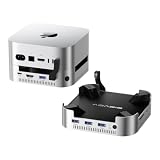 ACASIS Mac mini Dock with 2-Bay NVMe SSD Enclosure | $77.51$91.19 | 15% OFF | Two SSD baysUp to 16TB across two NVMe drives. | Check on Amazon |
 Acer Mac mini Dock Hub with NVMe SSD Enclosure | $59.99$69.99 | 14% OFF | 4K 144Hz HDMIHDMI 2.1 output plus an M.2 slot up to 8TB. | Check on Amazon |
 AODUKE Mac mini VESA Mounting Bracket with Safety Lock | $35.99$39.99 | 10% OFF | VESA mountLocks behind a monitor with a combination lock. | Check on Amazon |
 Stouchi Mac mini Dock Stand with NVMe SATA SSD Enclosure | $49.99$54.99 | 9% OFF | HDMI and SATA4K 60Hz HDMI plus NVMe and SATA M.2 support. | Check on Amazon |
 Qwiizlab Aluminum Stand for Mac mini M6 | $19.99 | Current price | Simple standRaises the mini 1.42 inches with a power button cutout. | Check on Amazon |
 HIDEit Mac mini Mount | $37.99 | Current price | Wall and desk mountA steel mount for a wall, under a desk or VESA. | Check on Amazon |
 Bylitco Under Desk Mount for Mac mini with Password Lock | $23.99 | Current price | Locking under-desk mountA combination lock and a padded metal frame. | Check on Amazon |
The Satechi Mac mini M6 Hub and Stand Is 0.8 Inches Tall and Takes an M.2 SSD Up to 4TB

The Satechi Mac mini M6 Hub and Stand has the fastest card reader of the docks here, a UHS-II slot rated at up to 312MB/s, in a base that is only 0.8 inches tall. It adds two USB-A 3.2 ports at up to 10Gbps, one USB-A 2.0 port and a dedicated power button.
The M.2 slot takes single-sided 2230, 2242, 2260 and 2280 NVMe drives at up to 10Gbps, but not drives with heatsinks or double-sided drives. A screw, a screwdriver and a thermal pad come in the box, with a 2-year warranty. With three USB-A ports and no video output, it suits a desk that needs a card slot more than extra ports.
The UGREEN Mac mini Dock and Stand Has Two 10Gbps USB-C Data Ports and an SSD Slot Up to 8TB

The UGREEN Mac mini Dock and Stand is an 11-in-1 with three 10Gbps USB-A ports, two 5Gbps USB-A ports and two 10Gbps USB-C data ports. A UHS-I SD and TF reader runs at up to 170MB/s, slower than the Satechi’s reader.
The M.2 slot takes NVMe drives from 2230 to 2280 at 10Gbps, up to 8TB. A lever on the base presses the power button so the mini starts without lifting it, and the dock draws power from the mini or from an external adapter. UGREEN recommends the adapter for multi-device setups, so plan on using it if several USB-A drives stay plugged in.
The Stouchi Mac mini Dock Stand Has 4K 60Hz HDMI and Takes Both NVMe and SATA SSDs

The Stouchi Mac mini Dock Stand sits next to the RayCue Mac mini Dock as a dock with one 4K 60Hz HDMI port and support for both NVMe and SATA drives. Two USB-A 3.2 ports run at 10Gbps, and two USB-A 2.0 ports handle a keyboard and mouse.
The M.2 enclosure takes NVMe or SATA drives from 2230 to 2280 at 10Gbps, up to 8TB, and the SD and TF slots read at up to 170MB/s. Stouchi says the plastic body and shielding keep Wi-Fi stable with the dock plugged in. The base has a power button, four anchor points that hold the mini in place and a 2-year warranty.
The Acer Mac mini Dock Adds an HDMI 2.1 Port With 4K at 144Hz

The Acer Mac mini Dock Hub has an HDMI 2.1 output rated for 4K at 144Hz with HDR, where the RayCue, Stouchi and ACASIS docks stop at 4K 60Hz. It also has 10Gbps USB-C and USB-A ports and a 3.5mm audio jack.
The M.2 slot takes NVMe and SATA SSDs up to 8TB, and the aluminum body acts as a passive heatsink for the drive. A 5V 3A power adapter is in the box, and Acer advises plugging power in before the peripherals so a large SSD does not drop out. Its SD and TF readers top out at 104MB/s, well below the Satechi’s 312MB/s.
The TobenONE 13-in-1 Dock Pairs DisplayPort at 4K 144Hz With HDMI at 4K 60Hz

The TobenONE 13-in-1 Dock is the only dock here with both DisplayPort and HDMI outputs, at 4K 144Hz and 4K 60Hz. Five USB ports, SD and microSD readers and a 3.5mm audio jack fill out the rest of the 13 ports.
The M.2 slot takes NVMe drives up to 8TB at 10Gbps and does not support SATA. A built-in power button saves lifting the mini. The rear USB-C port carries data only, so video comes only from the DisplayPort and HDMI outputs.
The RayCue Mac mini Dock Supports Both NVMe and SATA SSDs Up to 8TB

The RayCue Mac mini Dock takes both NVMe and SATA M.2 drives up to 8TB, so an older SATA drive can move into it. It is a 10-in-1 with a 4K 60Hz HDMI port, 10Gbps USB-A and USB-C ports and two 5Gbps USB-A ports.
SD and TF readers, a 3.5mm audio jack and a USB-C charge port make up the rest, and the enclosure fits drives from 2230 to 2280. RayCue advises plugging power into the rear USB-C port when a drive is installed, to avoid disconnects. The single HDMI port supports one external monitor.
The ACASIS Dock Holds Two NVMe SSDs for Up to 16TB in RAID 0

The ACASIS Mac mini Dock is the only dock here with two M.2 bays, which reach up to 16TB at 917MB/s in RAID 0 or 8TB at 474MB/s in other modes. It adds a 4K 60Hz HDMI port, 10Gbps USB-A ports and SD and TF 3.0 readers at up to 104MB/s.
A 65W power adapter and a 40Gbps cable are in the box, and ACASIS says the adapter limits disconnects and drive failure. Two cooling fans switch on automatically and are rated at about 52dB. ACASIS warns against plugging or unplugging SSDs while the dock is powered on.
The NOVOO Dock Uses a Magnetic SSD Enclosure and a One-Press Power Button

The NOVOO Mac mini Dock and Stand has a magnetic SSD enclosure and a one-press power button on the base. The enclosure takes NVMe drives up to 8TB at 10Gbps.
USB-C and USB-A ports run at 10Gbps, and SD and TF slots and a 3.5mm audio jack sit alongside them. NOVOO backs the dock with a 2-year warranty, the same length as Satechi and Stouchi. It has no video output, so it fits a desk where the displays stay on the mini’s own ports.
The Qwiizlab Aluminum Stand Lifts the M6 Mac mini 1.42 Inches for Airflow

The Qwiizlab Aluminum Stand raises the mini 3.6 cm (1.42 inches) and adds no ports, which makes it the plain alternative to every dock above. The space underneath holds peripherals and lets air reach the mini.
A small cutout keeps the power button reachable, and four silicone mats on top and four on the bottom stop scratches and slipping. The stand fits only the M6, M5 Pro, M4 and M4 Pro models.
The SNANSHI Vertical Mac mini Stand Turns the M6 Mac mini on Its Side for Easy Power Button Access

The SNANSHI Vertical Mac mini Stand is the only stand here that holds the mini upright, which frees desk space and moves the bottom power button to the side. A weighted metal base with silicone pads keeps the stand steady when cables pull on it.
A cushioned groove holds the mini without scratching the case. SNANSHI says standing the mini up also improves Wi-Fi and Bluetooth reception by moving the antenna away from the desk surface. The stand fits the M6, M5 Pro, M4 and M4 Pro models.
The AODUKE VESA Bracket Hangs the M6 Mac mini Behind a Monitor With a Combination Lock

The AODUKE Mac mini VESA Mounting Bracket sits between a monitor and its VESA stand, so the mini hangs behind the screen with a combination lock holding it in place. The aluminum bracket measures 285 by 118 by 52.5 mm, and nine pads protect the finish.
Screws and spacers in several sizes are in the box. The bracket only works with monitor stands that have 75 by 75 mm or 100 by 100 mm hole spacing.
The HIDEit Mac mini Mount Works on a Wall, Under a Desk or Behind a VESA Monitor

The HIDEit Mac mini Mount holds the mini on a wall, under a desk or behind a monitor with 75 mm or 100 mm VESA spacing. It cradles the mini from three sides, so the vents stay clear and every port stays reachable.
The mount is cut from 16-gauge steel with a black powder-coat finish, and drywall screws and anchors are in the box. HIDEit says the M4, M4 Pro, M6 and M5 Pro minis share the same 5 by 5 by 2 inch enclosure, so it fits all of them. Unlike the AODUKE and Bylitco mounts, it has no lock.
The Bylitco Under Desk Mount Locks the Mac mini Under a Desk or Behind a Monitor

The Bylitco Under Desk Mount is the locking option for hanging the mini under a desk, where the AODUKE bracket only goes behind a VESA monitor. A combination lock secures the mini in the metal frame.
Soft padding protects the case from scratches and vibration, and openings leave room for cables, ports and airflow. Bylitco sells it for the M4, M5 and M6 Pro Mac minis, so confirm the fit for the base M6 Mac mini before drilling into a desk.
Which M6 Mac mini Dock or Stand to Buy Depends on Cards, Displays and Drives
Card readers and drive bays decide most dock stand choices. The Satechi Mac mini M6 Hub and Stand has the fastest card reader at up to 312MB/s, and the ACASIS Mac mini Dock is the only one with two SSD bays. The Acer Mac mini Dock Hub, Stouchi Mac mini Dock Stand and RayCue Mac mini Dock also take SATA drives.
Displays decide the rest. The Acer dock outputs 4K at 144Hz over HDMI 2.1, the TobenONE 13-in-1 Dock adds both DisplayPort and HDMI, and the Stouchi, RayCue and ACASIS docks each add one HDMI port at 4K 60Hz. The Satechi, UGREEN and NOVOO docks have no video output.
A desk that already has the ports it needs can skip the dock. The Qwiizlab Aluminum Stand lifts the mini 1.42 inches, the SNANSHI Vertical Mac mini Stand stands it on its side, and the AODUKE, HIDEit and Bylitco mounts hide it behind a monitor or under the desk. The rest of the desk is in the M6 Mac mini desk setup accessories.
My Pick Is the Satechi Mac mini M6 Hub and Stand
I would buy the Satechi Mac mini M6 Hub and Stand for the fastest card reader and front USB-A ports in a base 0.8 inches tall. For a desk with many USB-A accessories, I would go with the UGREEN Mac mini Dock and Stand, and for a monitor hanging off the dock I would pick the Acer Mac mini Dock Hub with its 4K 144Hz HDMI port. If the ports already sit where I want them, I would buy the Qwiizlab Aluminum Stand and leave the dock out.
Questions About Stands and Docks for the M6 Mac mini
Do these docks include an SSD?
No. Every dock with an M.2 slot is an empty enclosure, so you add a drive in a size it supports. The Satechi, UGREEN and Acer slots take 2230, 2242, 2260 and 2280 drives.
Are dock stand SSD slots as fast as the Thunderbolt 4 ports?
No. The enclosures run at up to 10Gbps, while each of the mini’s three Thunderbolt 4 ports runs at up to 40Gb/s.
Can a dock stand add more displays?
Five docks have a video output, namely the Acer, TobenONE, Stouchi, RayCue and ACASIS. The M6 Mac mini keeps its three-display limit, and up to two of those displays can run over one Thunderbolt port.
Which docks for the M6 Mac mini support SATA SSDs?
The Acer Mac mini Dock Hub, Stouchi Mac mini Dock Stand and RayCue Mac mini Dock take both NVMe and SATA M.2 drives. The TobenONE 13-in-1 Dock does not support SATA.
Which docks for the M6 Mac mini have an SD card reader?
The Satechi, UGREEN, Stouchi, Acer, TobenONE, RayCue, ACASIS and NOVOO docks all have SD slots. The Satechi’s UHS-II reader is the fastest at up to 312MB/s.
What ports does the M6 Mac mini have?
It has three Thunderbolt 4 ports at up to 40Gb/s and two USB-C ports on the front at up to 10Gb/s. None of its ports are USB-A.
How big is the M6 Mac mini?
It measures 5.0 inches wide, 5.0 inches deep and 2.0 inches tall, and it weighs 1.5 pounds.
Newsletter
Never miss an Apple story
One email a day, the news that matters. No spam, unsubscribe anytime.
You're subscribed
We sent a confirmation to your inbox — check spam if you don't see it.

Product prices and availability are accurate as of the date and time indicated and are subject to change.
As an Amazon Associate I earn from qualifying purchases.


