
| Product | Price | Discount | Why we picked it | Buy |
|---|---|---|---|---|
 UGREEN Revodok Max 208 Thunderbolt 4 Dock | $179.99$249.99 | 28% OFF | Thunderbolt plus USB-AThree Thunderbolt 4 ports and three 10Gbps USB-A ports. | Check on Amazon |
 Anker 555 USB-C Hub 8-in-1 | $38.99$49.99 | 22% OFF | USB-C hubTwo USB-A ports, a 10Gbps USB-C port and a card reader. | Check on Amazon |
 UGREEN Revodok Pro 6-in-1 USB-C Hub | $24.99$31.99 | 22% OFF | 6-in-1 hubTwo USB-A ports and a USB-C port at 10Gbps with HDMI. | Check on Amazon |
 UGREEN Revodok Pro 9-in-1 USB-C Hub | $39.99$42.94 | 7% OFF | 9-in-1 hubSD and TF readers, 10Gbps ports and 4K 60Hz HDMI. | Check on Amazon |
 CalDigit TS4 Thunderbolt 4 Dock | $379.99 | Current price | Most ports18 ports on one Thunderbolt 4 cable. | Check on Amazon |
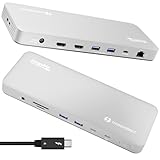 Plugable Thunderbolt 4 Dock TBT-UDM | $199.95 | Current price | Dual HDMI13 ports with two HDMI outputs and a UHS-II card slot. | Check on Amazon |
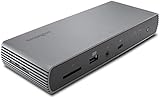 Kensington SD5700T Thunderbolt 4 Dock | $249.95 | Current price | Desk mount pickThree Thunderbolt 4 ports with VESA holes and a lock slot. | Check on Amazon |
 OWC Thunderbolt Hub 5-Port | $149.99 | Current price | Compact ThunderboltThree Thunderbolt 4 ports and one USB-A in a small hub. | Check on Amazon |
 Satechi Thunderbolt 4 Slim Hub Pro | $199.99 | Current price | Slim aluminum hubThunderbolt 4 hub with a UHS-II SD slot and a 150W supply. | Check on Amazon |
 Belkin Connect Thunderbolt 4 Core Hub | $149.99 | Current price | Small Thunderbolt hubFour Thunderbolt 4 ports and one USB-A with a 96W supply. | Check on Amazon |
The M6 Mac mini Has Three Thunderbolt 4 Ports, Two Front USB-C Ports and One HDMI Port
Here is what the M6 Mac mini gives you before any hub is added:
- Back: three Thunderbolt 4 (USB-C) ports at up to 40Gb/s, one HDMI port and 2.5Gb Ethernet
- Front: two USB-C ports with USB 3 speeds up to 10Gb/s and a 3.5 mm headphone jack
- Displays: up to three external displays, using the HDMI port and the Thunderbolt ports
A Thunderbolt dock keeps the full 40Gb/s on one port, which matters for fast external drives. A plain USB-C hub is enough for USB-A accessories and card readers. The mini already has HDMI and fast Ethernet, so those ports on a hub only matter when you want them at the hub end of the cable.
The CalDigit TS4 Adds Eight USB Ports, Two Card Readers and 2.5GbE to One Thunderbolt Port

The CalDigit TS4 is an 18 port dock with three Thunderbolt 4 ports at 40Gb/s, three USB-C and five USB-A ports at 10Gb/s, SD and microSD UHS-II card readers, 2.5GbE Ethernet, a DisplayPort 1.4 output and three audio jacks. Charging is rated at 98W and a 0.8 meter certified cable is in the box. Pick it if you want one cable to carry a large port count and plan to keep the dock on the desk for years.
The Plugable TBT-UDM Dock Offers 13 Ports Including Two HDMI Outputs

Plugable lists one downstream Thunderbolt 4 port at 40Gbps, one USB-C port, four USB-A ports, SD and microSD UHS-II slots, Ethernet, a 3.5mm jack and two HDMI outputs. It needs no drivers and the maker includes lifetime support from a North American team. Pick it if you want to run monitors through the dock and keep the mini’s own ports free.
The Kensington SD5700T Gives Each of Its Three Thunderbolt 4 Ports 15W and Has VESA Mounting Holes

The Kensington SD5700T has three downstream Thunderbolt 4 ports, four USB-A ports (one 1.5A charging port and three at 10Gbps), an SD 4.0 UHS-II reader, Gigabit Ethernet and an audio combo jack. A 180W power supply and a 0.8 meter Thunderbolt 4 cable are included. It has a lock slot, VESA mounting holes and a three-year warranty. Pick it if you want to bolt the dock under a desk or lock it down.
The UGREEN Revodok Max 208 Has Three Thunderbolt 4 Ports, Three USB-A Ports and a 140W Power Brick

The UGREEN Revodok Max 208 is an 8-in-1 dock with one upstream and three downstream Thunderbolt 4 ports (40Gbps, 15W each), three USB-A 3.2 ports at 10Gbps, Gigabit Ethernet and a DC input. The 140W GaN charger comes in the box. UGREEN lists the Mac mini as compatible, except the 2018 Intel model. Pick it if you want Thunderbolt expansion and USB-A in one compact vertical box.
The OWC Thunderbolt Hub Turns One Port Into Three Thunderbolt 4 Ports and One USB-A Port

This 5-port hub has three Thunderbolt 4 ports at 40Gb/s and one USB 3.2 Gen 2 Type-A port at 10Gb/s. It supports up to 60W power delivery, one 8K display or two 4K displays, and has an adjustable LED and a Kensington Nano security slot. Pick it if you mainly need more Thunderbolt ports for drives and displays.
The Satechi Thunderbolt 4 Slim Hub Pro Ships With a 150W GaN Supply and a 0.8 Meter Cable

Satechi builds it from passively cooled aluminum and lists Thunderbolt 4 ports at up to 40Gbps, USB-A at up to 10Gbps, a UHS-II SD slot rated at 312MB/s, Gigabit Ethernet and daisy-chaining of up to six devices. Dual 4K 60Hz or a single 8K 30Hz display is supported. Pick it if you want a slim hub with a card slot that sits flat next to the mini.
The Belkin Connect Thunderbolt 4 Core Hub Is a Five Port Hub With a 96W Supply

Belkin’s hub has four Thunderbolt 4 ports at up to 40Gbps and one USB-A port, and it can daisy-chain up to six devices. It supports dual 4K at 60Hz or a single 8K display at 30Hz and delivers up to 96W. A Thunderbolt 4 cable and a power supply are included. Pick it if you want a small hub that tucks next to the mini.
The Anker 555 USB-C Hub Adds Two USB-A Ports, a 10Gbps USB-C Port and a Card Reader

The Anker 555 has a built-in 7.48 inch USB-C cable, one USB-C data port and two USB-A ports at 10Gbps, a 4K 60Hz HDMI port, Ethernet and microSD and SD slots. Only the HDMI port carries video. Anker backs it with an 18-month warranty. Pick it if you want USB-A ports and a card reader from one of the mini’s USB-C ports.
The UGREEN Revodok Pro 9-in-1 Combines 10Gbps USB Ports, SD and TF Readers and 4K 60Hz HDMI

The nine ports are 4K 60Hz HDMI, Gigabit Ethernet, USB-A and USB-C data ports at up to 10Gbps, SD and TF card readers and a USB-C power input. That power port charges only and carries no data or video. Pick it if you want one hub with both card slots and fast USB ports.
The UGREEN Revodok Pro 6-in-1 Gives the M6 Mac mini Two USB-A Ports and One USB-C Port at 10Gbps

This 6-in-1 hub has two USB-A 3.2 ports and one USB-C 3.2 port at 10Gbps, 4K 60Hz HDMI, Gigabit Ethernet and a 100W power input. It has no card reader. Pick it if all you need is a few extra USB ports.
My Pick Is the CalDigit TS4 for a Full Desk and the UGREEN Revodok Pro 9-in-1 for Basic Expansion
If I were setting up a desk with a fast drive, a card reader and several accessories, I would buy the CalDigit TS4 and run everything over one Thunderbolt 4 cable. The Kensington SD5700T is the one I would choose if the dock had to be mounted under a desk. For a mini that only needs USB-A and a card slot, the UGREEN Revodok Pro 9-in-1 covers both from one of the front USB-C ports. The mini already has HDMI and Ethernet, so I would skip a hub purely for those ports.
Questions About Hubs for the M6 Mac mini
Does the M6 Mac mini have USB-A ports?
No. It has five USB-C ports, three Thunderbolt 4 ports on the back and two USB-C ports with USB 3 speeds on the front.
Do I need a Thunderbolt dock or is a USB-C hub enough?
A USB-C hub covers USB-A drives, receivers and card readers. A Thunderbolt dock keeps up to 40Gb/s on one port for fast drives and extra displays, such as the external SSDs for the M6 Mac mini.
How many displays can the M6 Mac mini run?
It runs up to three external displays, as covered in the M6 Mac mini three display limit.
Which hubs for the M6 Mac mini have an SD card reader?
The CalDigit TS4, Plugable TBT-UDM, Kensington SD5700T, Satechi Thunderbolt 4 Slim Hub Pro and Anker 555 USB-C Hub have SD slots, and the UGREEN Revodok Pro 9-in-1 has SD and TF readers.
Which hubs for the M6 Mac mini support daisy-chaining?
The Satechi Thunderbolt 4 Slim Hub Pro and the Belkin Connect Thunderbolt 4 Core Hub each list daisy-chaining of up to six devices.
How big is the M6 Mac mini?
It measures 2.0 inches tall, 5.0 inches wide and 5.0 inches deep, and it weighs 1.5 pounds.

Product prices and availability are accurate as of the date and time indicated and are subject to change.
As an Amazon Associate I earn from qualifying purchases.


3 comments