
| Product | Price | Discount | Why it is a great deal | Buy |
|---|---|---|---|---|
 Logitech MX Anywhere 3S for Mac Logitech MX Anywhere 3S for Mac | $69.99$89.99 | 22% OFF | Compact mouse8K DPI tracking on any surface including glass. | Check on Amazon |
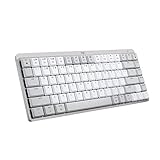 Logitech MX Mechanical Mini for Mac Logitech MX Mechanical Mini for Mac | $129.99$159.99 | 19% OFF | Mechanical MiniLow-profile tactile quiet switches and up to 15 days of battery. | Check on Amazon |
 Logitech MX Ergo S Advanced Wireless Trackball Mouse Logitech MX Ergo S Advanced Wireless Trackball Mouse | $99.99$119.99 | 17% OFF | TrackballA 20 degree tilt with Bluetooth and a USB receiver. | Check on Amazon |
 Apple Magic MouseBlack Apple Magic MouseBlack | $86$99 | 13% OFF | Apple mouseA Multi-Touch surface that charges over USB-C. | Check on Amazon |
 Apple Magic TrackpadBlack Apple Magic TrackpadBlack | $130$149 | 13% OFF | TrackpadA Force Touch glass surface with Multi-Touch gestures. | Check on Amazon |
 Logitech MX Keys S for Mac Logitech MX Keys S for Mac | $119.99$129.99 | 8% OFF | Backlit Mac layoutThree-device Bluetooth with smart backlighting. | Check on Amazon |
The M6 Mac mini Has Bluetooth 6 and Five USB-C Ports, So Bluetooth Accessories Are the Easiest Fit
Here is how an accessory connects to the M6 Mac mini:
- Bluetooth: the Apple N1 chip provides Bluetooth 6, and Bluetooth keyboards, mice and trackpads pair without any hardware
- USB-C: two front ports and three Thunderbolt 4 ports on the back handle charging cables and wired keyboards
- USB receivers: a dongle such as Logitech’s Logi Bolt needs a USB-A port, which means a hub or an adapter
Most of the wireless options below also charge over USB-C, so a single cable from the mini tops them up.
The Apple Magic Keyboard With Touch ID and Numeric Keypad Brings Touch ID to a Full-Size Layout

This extended Apple Magic Keyboard has Touch ID for logins and purchases, document navigation keys, full-size arrow keys and a numeric keypad for spreadsheets. It pairs automatically with a Mac that has Apple silicon and runs for about a month or more between charges. A woven USB-C cable in the box charges it from one of the mini’s ports. Pick it if you work in spreadsheets or want the full layout with Touch ID.
The Apple Magic Keyboard With Touch ID Is the Compact Option With the Same Fingerprint Sensor

The compact Apple Magic Keyboard has the same Touch ID sensor without a numeric keypad. It pairs automatically with Apple silicon Macs, runs for about a month between charges and includes a woven USB-C cable. Touch ID is a feature the mini cannot offer on its own. Pick it if you want fingerprint login and a narrower keyboard that leaves more room for the mouse.
The Logitech MX Keys S for Mac Pairs With Three Devices and Lights Up as Your Hands Approach

The Logitech MX Keys S for Mac has a Mac key layout, spherically dished keys, backlighting that adjusts to the room and Smart Actions shortcuts in the Logi Options+ app. It pairs with up to three Apple devices over Bluetooth Low Energy and charges over USB-C, with up to 10 days on a charge with the backlight on. Pick it if you use a Mac mini alongside an iPad or a MacBook.
The Logitech MX Mechanical Mini for Mac Uses Tactile Quiet Switches in a Compact Body

This low-profile mechanical keyboard uses Tactile Quiet switches with a bump you can feel and barely hear. It has smart backlighting, pairs with up to three Macs or iPads over Bluetooth Low Energy and charges over USB-C. Logitech rates it for up to 15 days with the backlight on and up to 10 months with it off. Pick it if you want mechanical feel without the noise.
The Keychron K3 Version 2 Is a 75% Wireless Mechanical Keyboard With QMK Remapping

The Keychron K3 Version 2 is an ultra-slim 75% keyboard with a reinforced aluminum body and Brown switches. It connects to three devices over Bluetooth 5.1 or to one by USB-C cable, and the Keychron Launcher web app remaps any key through QMK firmware. It has a Mac layout, and extra keycaps for both Windows and Mac are included. Pick it if you want a compact mechanical board you can remap.
The Apple Magic Mouse Pairs Automatically and Charges Over USB-C

The Apple Magic Mouse has a Multi-Touch surface for swiping between web pages and scrolling documents, and a rechargeable battery that lasts about a month or more. It pairs automatically with a Mac and includes a woven USB-C cable. Pick it if you want the mouse that matches the mini and relies on gestures.
The Apple Magic Trackpad Adds Force Touch and Multi-Touch Gestures to the M6 Mac mini

The Apple Magic Trackpad has an edge-to-edge glass surface with pressure sensors for Force Touch and the full set of Multi-Touch gestures. It is wireless, rechargeable over USB-C and lasts about a month or more between charges. It works with Mac, iPad and Apple Vision Pro. Pick it if you want laptop-style gestures at a desktop.
The Logitech MX Master 4 for Mac Adds Haptic Feedback and an Actions Ring

The Logitech MX Master 4 for Mac has a Haptic Sense Panel that gives customizable feedback on actions, an Actions Ring overlay that places shortcuts at the cursor and a MagSpeed wheel that scrolls 1,000 lines per second. Logitech says its Quiet Clicks make 90% less noise. It charges over USB-C while you work and has a thumb wheel and an ergonomic tilt. Pick it if you want a full-size mouse for long work sessions.
The Logitech MX Anywhere 3S for Mac Is a Compact Bluetooth Mouse That Tracks on Glass

The Logitech MX Anywhere 3S for Mac has an 8K DPI sensor that tracks on any surface, including glass, a MagSpeed scroll wheel and Quiet Clicks. It pairs with up to three Apple devices over Bluetooth Low Energy and charges over USB-C. Pick it if you move between the mini and a laptop and want one small mouse for both.
The Logitech MX Ergo S Is a 20 Degree Tilted Trackball With Bluetooth and a USB Receiver

The Logitech MX Ergo S is a thumb-controlled trackball with a 20 degree tilt, six programmable buttons and a precision mode button. It connects over Bluetooth or the included Logi Bolt USB receiver, so the Bluetooth route avoids the mini’s missing USB-A port. Logitech rates it for up to 120 days on a full charge and sizes it for medium to large hands. Pick it if you want less wrist and forearm movement.
My Pick Is the Apple Magic Keyboard With Touch ID and the Logitech MX Master 4 for Mac
For a keyboard, I would buy the Apple Magic Keyboard with Touch ID, because the mini has no fingerprint login of its own. The Logitech MX Keys S for Mac is the one I would choose for a desk shared with an iPad or a MacBook. For a pointer, the Logitech MX Master 4 for Mac is the one I would use all day. I would take the Apple Magic Trackpad instead if I missed laptop gestures.
Questions About Keyboards and Mice for the M6 Mac mini
Do I need a USB receiver for the M6 Mac mini?
No. The mini supports Bluetooth 6, so Bluetooth keyboards and mice connect directly. A receiver needs a USB-A port, which the mini does not have.
Does Touch ID work on the M6 Mac mini?
Yes. The Apple Magic Keyboard with Touch ID works with Mac models that have Apple silicon, and it handles logins and purchases.
Can I charge a wireless keyboard or mouse from the mini?
Yes. The Apple accessories include a woven USB-C cable that charges them from a USB-C port on the Mac, and the Logitech models charge over USB-C too.
Which keyboards for the M6 Mac mini are mechanical?
The Logitech MX Mechanical Mini for Mac uses low-profile Tactile Quiet switches, and the Keychron K3 Version 2 is a 75% mechanical keyboard with Brown switches.
Which mouse for the M6 Mac mini tracks on glass?
The Logitech MX Anywhere 3S for Mac has an 8K DPI sensor that tracks on any surface, including glass.
Which wireless chip does the M6 Mac mini use?
The Apple N1 chip, which provides Bluetooth 6.

Product prices and availability are accurate as of the date and time indicated and are subject to change.
As an Amazon Associate I earn from qualifying purchases.


