WhatsApp cloud backup is rolling out to some iPhone beta testers, and it lets you store your chat history on WhatsApp’s servers instead of iCloud. Once you pick WhatsApp as your backup provider, you cannot also keep an iCloud backup of your chats.
WhatsApp gives you 2 GB for free, while the 5 GB that comes with iCloud is shared with your photos, files and device backups, so moving chats off iCloud can help if you often need to free up iCloud storage. WABetaInfo found the option in WhatsApp beta 26.45.10.71 on TestFlight, and WhatsApp is adding it to more accounts over the coming weeks.
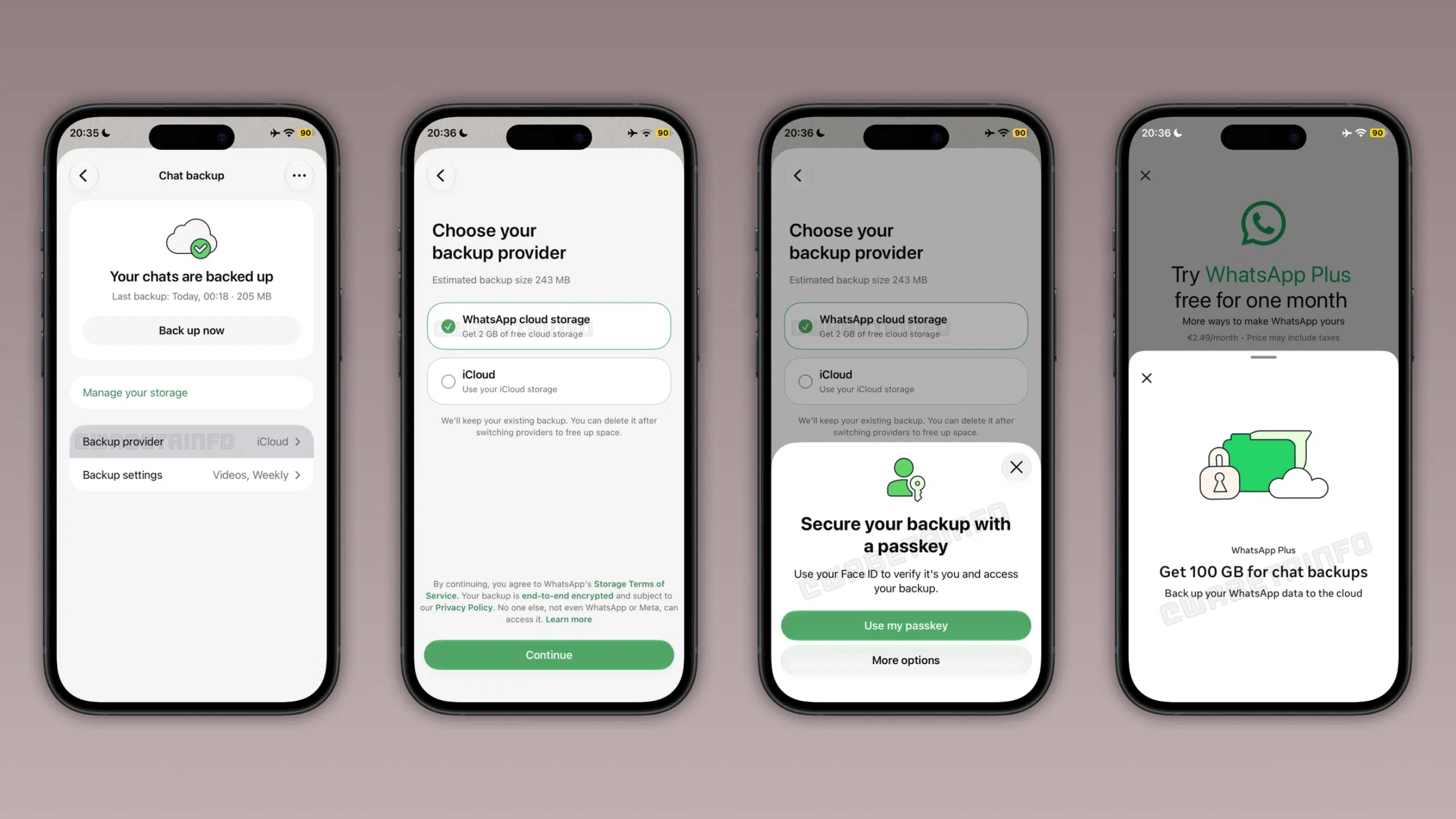
WhatsApp Cloud Backup Starts at 2 GB
If your backup grows past the free 2 GB, WhatsApp stops the backup and asks you to delete chats and media or buy a plan. You can upgrade from WhatsApp Settings by tapping Chats, Chat backup, Manage your storage and Get more cloud storage.
The Meta One plans sit under Subscriptions in the same Settings screen, where you tap your current subscription and then Explore plans.
Storage plans
- Free: 2 GB of storage
- WhatsApp Plus: 100 GB, at $2.99 per month in the United States
- Meta One Core: 2 TB, at $7.99 per month
- Meta One Premium: 4 TB, at $19.99 per month
If you cancel a subscription, WhatsApp keeps your backup, but you cannot make a new one until you get back under 2 GB or resubscribe. After 120 days without a successful backup, you may no longer be able to restore it.
Backups Are Always End-to-End Encrypted
Every WhatsApp cloud backup is end-to-end encrypted, and neither WhatsApp nor Meta can read it. On iCloud you have to switch on end-to-end encryption yourself.
You can secure the backup with one of WhatsApp’s passkeys, a 64-digit encryption key or a password. You need to remember that choice, because it is the only way to open your backup later.
You Can Switch Providers From Settings
To turn the backup on for the first time, open WhatsApp Settings, tap Chats, Chat backup and Cloud backup, choose WhatsApp and tap Turn on backups. If you already back up to iCloud, you can switch by tapping Backup provider in the same Chat backup screen and selecting WhatsApp. The same screen lets you decide whether the backup includes videos in your chats and your status archive.
When you restore, WhatsApp brings back your messages first and your photos, videos and other media in the background. If you tap Skip media restore, you cannot restore that media later.
Both WhatsApp cloud storage and iCloud keep one backup per phone number, so each new backup replaces the last one and you cannot restore an older copy.


