It didn’t take long for the iPhone Dev Team to come up with a jailbreak solution for iPhone OS 3.1.3 which was recently released for iPhone 2G, 3G, 3GS, iPod Touch 2G and 3G. redsn0w 0.9.4 jailbreaks and unlocks iPhone 2G, jailbreaks iPhone 3G, iPod Touch 1G and iPod Touch 2G (non-MC Models). If you have other models, we suggest that you hold back from upgrading to firmware 3.1.3.
Here’s a step by step guide to jailbreaking iPhone 2G and 3G (don’t do it if y
Jailbreak iPhone OS 3.13
- Download iTunes 9.0.3. This is the latest version of iTunes available so upgrade to it before starting to be sure you don’t run into any issues.
- Download redsn0w 0.9.4 ( download link at the end of the post )
- Download and install iPhone OS 3.1.3 on your iPhone or iPod Touch using iTunes.
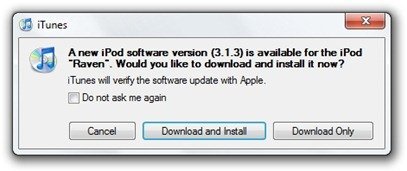
- Navigate to the following location on your computer C:\Users\{your windows user name}\AppData\Roaming\Apple Computer\iTunes\iPod Software Updates and copy the iPhone OS 3.1.2 IPSW file (iPhone OS firmware) file to your desktop for easy access.

- Run redsn0w 0.9.4 and click on browse. Point it to the iPhone OS 3.1.2 firmware you just copied to your desktop.
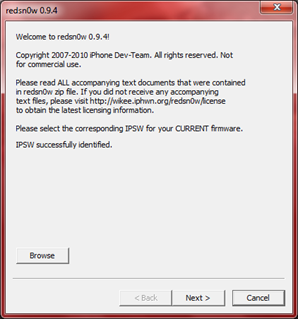
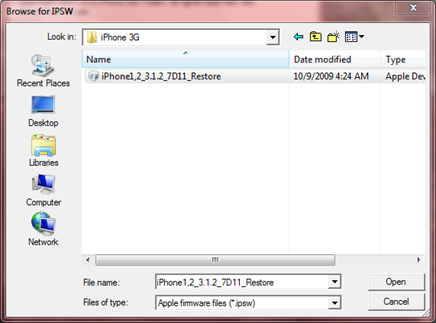
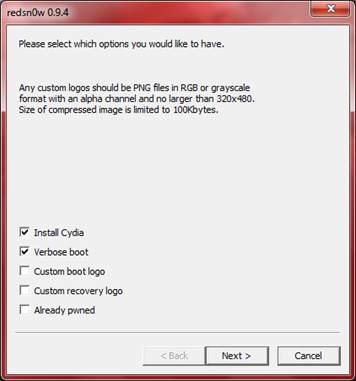
- After redns0w has validated the firmware, it will show some options such as Install Cydia, Verbose boot etc. Make sure to check Install Cydia and Already pwned.
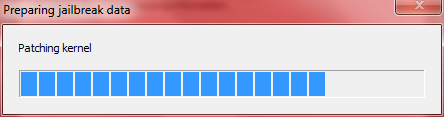
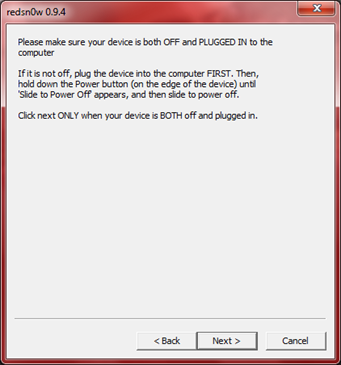
- Turn off your iPhone or iPod Touch and connect it to your PC. Hit next in redsn0w. It’ll start patching the kernel of your iPhone firmware file.
- Start your iPhone or iPod Touch in recovery mode by pressing both the power and home button until the help message on redsn0w disappears. If you had shut down your device as told in step 7, this process will be faster.
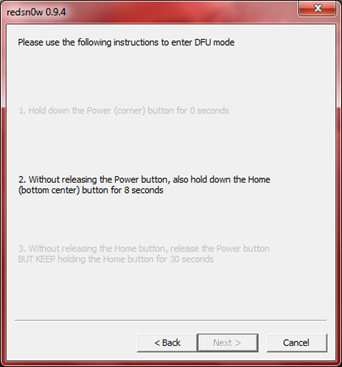
- Click next again. Now you’ll have to hold the power and while holding it, press the home button but don’t release it. After a few seconds, let go of the power button but keep the home button pressed until the firmware installation starts.
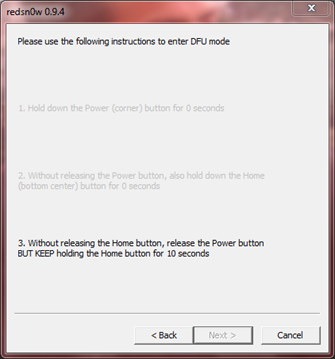
- Now it’ll take some time for the process to complete.


As noted above, don’t try this on your iPhone 3G if you don’t want to lose the unlock. So stay away from OS 3.1.3 till then!
[Thanks to iHackintosh for the screenshots!]
Download Links:
Download iTunes 9.0.3
Download redsn0w 0.9.4
Download iOS 3.1.2 for iPhone 2G
Download OS 3.1.2 for iPhone 3G


Cool that i can jailbreak my iPod touch now^^
Sorry for my bad english :D
are we able to jailbreak a 3gs with the redsn0w if we don’t need the unlock?
No.
sorry…it is a little confusing….If I have just purchased a new 3rd gen Touch, I cant jailbreak if I already updated to 3.1.3?
It clearly says don’t try this on a 3rd gen touch yet. New, old, updated or not doesn’t matter.
ey my iPhone 3Gs updated via iTunes but when I put the file on my Desktop (iPhone2,1_3.1.3_7E18_Restore) then I go to browse via the redsn0w 0.9.4 window, it keeps coming up with, Unable to recognize specified IPSW. So what do I do now cause my T-Mobile Sim card will not work in my phone anymore because of this update.
Hurry Plz Help I need my phone!
Hi Sukii
****Run redsn0w 0.9.4 and click on browse. Point it to the iPhone OS 3.1.2 firmware
Dont point to ((iPhone2,1_3.1.3_7E18_Restore) FIRMWARE
Hi Salem,
I understand what ur saying but how do I get the firmware ipsw cause that is all I saw to download. Can you plz send me the link to download the Firmware?
TY
Sukii
Hey my iPhone 3Gs updated via iTunes but when I put the file on my Desktop (iPhone2,1_3.1.3_7E18_Restore) then I go to browse via the redsn0w 0.9.4 window, it keeps coming up with, Unable to recognize specified IPSW. So what do I do now cause my T-Mobile Sim card will not work in my phone anymore because of this update.
Hurry Plz Help I need my phone!
TY
Read the instructions properly.
I am a certified PC Technical Engineer, I know very well how to follow sensitive instructions. Therefore, I am telling you that I followed the instructions completely & now that my iPhone has been updated to the 3.1.3 version my phone is reading the 5.12.1 firmware & your instructions only produced the stop result of it will not go pass the, Unable to recognize specified IPSW in the redsn0w 0.9.4 window. What should I do now?
LOL … if you knew how to follow instructions mr certified pc technical engineer you wouldv’e read that it doesn’t support the 3GS … lol.
Sukll
Please refer to the part about the downgrade.
By technical engineer do you mean repair man?
by the way buddy… it says to get the 3.1.2 software… idiot…
same problem here but when i go look for the iphone3.1.2 restore but it doesnt show up it only show up the iphone3.1.3 restore only
when can i jailbreak 3rd gen ipodtouch
Didn’t work. Keeps saying unable to recognize specified IPSW. Help?
I agree I have been trying it several times doing as per instructions & I cannot go any further because of the, Unable to recognize specified IPSW. By the way I have WIN 7 on my PC does that matter?
For all of you getting the ‘unable to recognize specified IPSW’ message you should NOT be clicking the 3.1.3 IPSW, you should be clicking the 3.1.2 instead (similar to the 3.0 -> 3.01 situation)
However since Sukii, you appear to have a 3GS this ‘trick’ won’t work
it is only for iPhone 2G/ iPhone 3G / iPod touch 1G and Non-MC ipod touch 2G
…if your on a 3GS you need to downgrade first, and in order to downgrade you need to have grabbed your sig with sauriks util
Bear in mind if you do manage to downgrade and then Jailbreak, you still won’t have an unlock due to upgraded Baseband, same applies for the iPhone 3g until, and if an exploit is released
Mart, you seem smart, what does it mean when a message comes up when you pressed the download redsnow 0.9.4 saying 403- Forbidden
the instructions say to use 3.1.2 software , not 3.1.3 (even though you have updated to 3.1.3, redsn0w 0.9.4 isn’t programmed to recognize the latest firmware, but works properly by using 3.1.2), which is why Imran told you to read the instructions (which was somewhat rude rather than just giving you the answer).. anyhow.. even after you jailbreak it there still isn’t an unlocking tool for you to use your t-mobile sim card, which is again in the instructions. hope this helps
TY so much Pointbrink!
Yes he is rude but thats how some geeks r cause they know we depend heavily on them. However, if he is a real geek then he would’ve had the solution for those of us who lost our unlocked 3GS phones due to this Apple upgrade.
Have a good one & if you get any good news for unlocking the 3GS new versions plz holla @ me!
Thanx again!
Sukii,
maybe the author is rude ( i honestly dont think so, because all he did was tell you to use your little brain and READ the article – is that so hard for you? or do you have to be baby-fed? ), maybe he is a geek ( although, you stated that you are a certified PC technical engineer ( a geek ) – LOL – and you can’t follow a simple guide? – in my mind that makes you a deek ), but YOU are clearly incapable of doing simple tasks as reading and following a guide.
Besides, i dont think you know squad about “pc technical engineering” so lets just say you’re a liar. And it’s people like you that make my day by fking up their precious iPhone.
To get on topic – thank you Imran for this extremely EASY to follow guide.
Oh Ok. Sorry. Mine is a 3rd gen so I guess that’s why :(
yo i tried this process and it just stays on the waiting for reboot and thats about it, i tried the steps and just stays theres
make sure you have got the correct 3.1.2 firmware file for your device I have been making that mistake for a day or two now and finally realised and it worked first time
I have been trying to jailbreak my 3g. My redsn0w doesnt tell me to hold any buttons for 10 seconds it only says hold power and home buttons till you see the help message. after that it does it’s thing but the iphone screen goes blank. and then finally it tells me that the rest of the process takes place on my iPhone. and its done my screen is still blank and stays blank. any help?
IT CLEARLY SAYS DON’T TRY WITH IPHONE 3GS, JUST 3G!!!!!! sukii ur screwed!!!!!!
Dear All,
I believe they say to use redsn0w on firmware version 3.1.2 and not 3.1.3. We are only expected to upgrade to 3.1.3 but reds0w is to be used on 3.1.2 firmware.
Steven
Hi, where can I get the 3.1.2 ipsw file from? In my appdata, I accidently updated to 3.1.3, so now there is no 3.1.2 file there :(
Please help me, as I am unable to use any of my cracked apps now :(
Should Verbose boot be checked? In the screen shot it is, but in the instructions it is not mentioned as a must
I’ve tried this process now three times with my 2G iPhone and I keep getting the same results.
After I see progress bars on my WinXP PC for patching the kernel and restarting my device, RedsnOw greets me with the message “The rest of this process tkaes place on your device. Done!” with the option to Finish.
The screens pictured above in steps 8-9 are never visible.
Once I click finish my phone reboots and it displays the “connect to iTunes” screen.
Help please?
Yah , i confirm the jailbreak doesnt work on a ipod touch 3g on MC series !!!! Blackrain stay the best for jailbreak !! be patient !!!! Go work GeoHot !!!!! we wait for Rc4 ;P
ok it tells you where to look for the software updates for vista and win 7,where would i find this in XP?
i hava an iphone 3gs 32gb, and i updated it to 3.1.3 without noticing what will happen..
i tried everything like the instructions, and after the program says ‘done.’ e pressed finish, and nothing happaned. now i have turned it off and turned it on again and its the same..
i need it unlocked.. what can i do?
do i have to wait for new software or what?
hug.
So my old 2 g can still be unlocked sweet how sad we only remember geohot and the frodo look alike dude when apple decides to throw us he finger. Thanks frodo and geohot maybe is better to wait until ipad is released
For all of you getting the ‘unable to recognize specified IPSW’ message you should NOT be clicking the 3.1.3 IPSW, you should be clicking the 3.1.2 instead (similar to the 3.0 -> 3.01 situation)
However since Sukii, you appear to have a 3GS this ‘trick’ won’t work
it is only for iPhone 2G/ iPhone 3G / iPod touch 1G and Non-MC ipod touch 2G
…if your on a 3GS you need to downgrade first, and in order to downgrade you need to have grabbed your sig with sauriks util
Bear in mind if you do manage to downgrade and then Jailbreak, you still won’t have an unlock due to upgraded Baseband, same applies for the iPhone 3g until, and if an exploit is released
I don’t have 3.1.2 update, but i do have 3.1.1 and it can’t reconize
I don’t have 3.1.2 update, but i do have 3.1.1 and it can’t reconize