It didn’t take long for the iPhone Dev Team to come up with a jailbreak solution for iPhone OS 3.1.3 which was recently released for iPhone 2G, 3G, 3GS, iPod Touch 2G and 3G. redsn0w 0.9.4 jailbreaks and unlocks iPhone 2G, jailbreaks iPhone 3G, iPod Touch 1G and iPod Touch 2G (non-MC Models). If you have other models, we suggest that you hold back from upgrading to firmware 3.1.3.
Here’s a step by step guide to jailbreaking iPhone 2G and 3G (don’t do it if y
Jailbreak iPhone OS 3.13
- Download iTunes 9.0.3. This is the latest version of iTunes available so upgrade to it before starting to be sure you don’t run into any issues.
- Download redsn0w 0.9.4 ( download link at the end of the post )
- Download and install iPhone OS 3.1.3 on your iPhone or iPod Touch using iTunes.
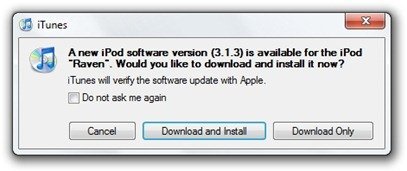
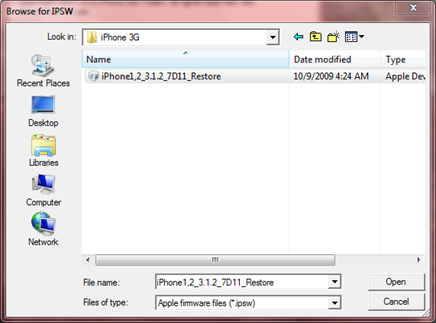
- Navigate to the following location on your computer C:\Users\{your windows user name}\AppData\Roaming\Apple Computer\iTunes\iPod Software Updates and copy the iPhone OS 3.1.2 IPSW file (iPhone OS firmware) file to your desktop for easy access.

- Run redsn0w 0.9.4 and click on browse. Point it to the iPhone OS 3.1.2 firmware you just copied to your desktop.
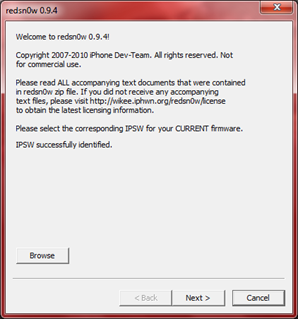
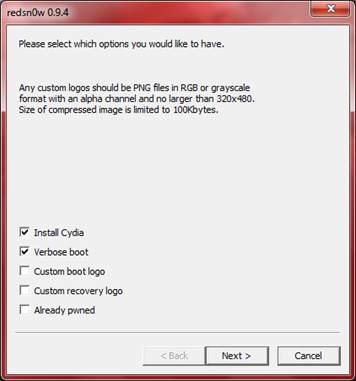
- After redns0w has validated the firmware, it will show some options such as Install Cydia, Verbose boot etc. Make sure to check Install Cydia and Already pwned.
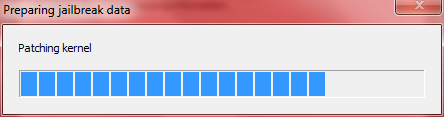
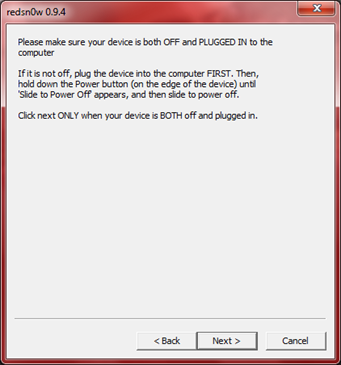
- Turn off your iPhone or iPod Touch and connect it to your PC. Hit next in redsn0w. It’ll start patching the kernel of your iPhone firmware file.
- Start your iPhone or iPod Touch in recovery mode by pressing both the power and home button until the help message on redsn0w disappears. If you had shut down your device as told in step 7, this process will be faster.
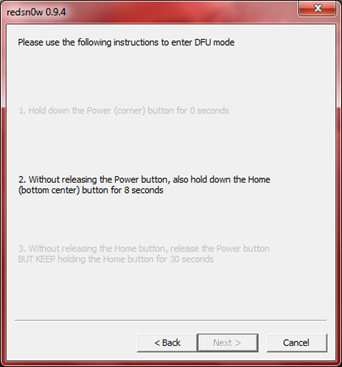
- Click next again. Now you’ll have to hold the power and while holding it, press the home button but don’t release it. After a few seconds, let go of the power button but keep the home button pressed until the firmware installation starts.
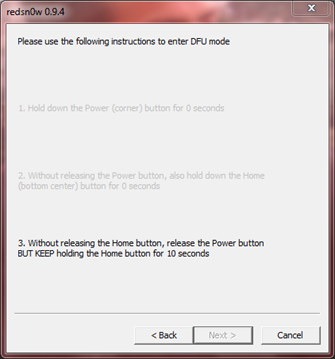
- Now it’ll take some time for the process to complete.


As noted above, don’t try this on your iPhone 3G if you don’t want to lose the unlock. So stay away from OS 3.1.3 till then!
[Thanks to iHackintosh for the screenshots!]
Download Links:
Download iTunes 9.0.3
Download redsn0w 0.9.4
Download iOS 3.1.2 for iPhone 2G
Download OS 3.1.2 for iPhone 3G


DO NOT select already pwned then just follow the
tutorial. Note 6 and 7 are in the wrong order.
Basically, DO NOT SELECT ALREADY PWNED!
The best thing is to shift click restore and downgrade to 3.1.2 and following this you need to use blackra1n to jailbreak it. And if you are using vista or windows 7 you need to go to the task manager and kill all of the iTunes relates servaces ( one will automatically restart diring jailbreaking and this is needed to you can just exit the task manager ) and when blackra1n starts you need to hold down the home button I’ll it is done ( when it says entering recovery mode ) and then everything should work as it has for me. If it says please conntect to iTunes it’s jammed up. Close the window and retry don’t worry everything is there even if you forgot and it’s 3.1.3 it can still recover it if blackrain says it’s sucessful. It just won’t be jailbroken
When I browse for the file, redsnow says “unable to recognize specified ISPW”. Any help?
I also get this message. The firmware in my folder has _RESTORE at the end. Would that make a difference?
You have to use 3.1.2 firmware for 3.1.3 I think.
How do u download redsnow?
I can’t seem to reach step 9. Anyone can help?
The link to redsn0w didn’t work…
Seems as I cannot find the 3.1.3 update in the AppData folder. I updated my 8GB iPod Touch 3G when my new HDD was working. I already tried the factory settings it kept OS 3.1.3. Thank you Roadie for the link. :)
I have just bought a ipod touch 3.1.3.
But i do not know how to downgrade it to 3.1.2 and download the jailbreak. Can someone help me with it by sending me the links to download the various necessary information and the procedures to do it please via email: milkshake11@gmail.com
Your kindness is appreciated. Thanks.
I have just bought a ipod touch 3.1.3.
But i do not know how to downgrade it to 3.1.2 and download the jailbreak. Can someone help me with it by sending me the links to download the various necessary information and the procedures to do it please via email: milkshake11@gmail.com
Your kindness is appreciated. Thanks.
Hey yeah
if you want to jailbreak 3.1.3 with Redsn0w you need
1) itouch or iphone
*CANNOT BE the itouch 2nd gen MC, itouch 3rd gen, or the iphone 3gs*
2) firmware 3.1.2 (you use it as sort of a loophole)
*Can be Downloaded from >> http://www.felixbruns.de/iPod/firmware/
3) now just follow the steps as shown above! :)
Will it work if the model number starts with MB?
So if you tried to JB a 3rd Gen, what would happen to the device? I was about to do it and saw davin’s comment. I do not want to risk it, as I paid $200 for it, and don’t have the money to get a new one. So I’d be screwed if I JB’d my 3rd Gen.
Also is there one for the 3rd gen yet?
redsn0w wont recognize my firmware. anyone no y??
Can you use this for iPod touch 3rd gen with 3.1.3?
If redsn0w does not see the firmware, you have to make sure it’s a ipsw file, you have to go to folder options and make sure that you can see the file extensions of commong known files or whatever, change it from .zip to .ipsw
then you will find it
http://modmyi.com/forums/iphone-news/687811-blackra1n-released-jailbreak-3-1-2-all-devices.html
this might work for u all
If you have a iPod touch 3gen. and accidentlly updated the version to 3.1.3 (7E18). What version do you use to restore it to its original version?
original version? Do your remember which version did it ship with? You’ll have to find that version of the iPhone OS and restore it.
I did everything correctly, and it took me to the point were the download onto my device began, but its been sitting here saying “Please wait while your device is being processed” with no progress whatsoever. how long is this supposed to take?
i’ve got a iPod Touch 32g, my cousin ended up updating my iPod from 3.1.2 to a 3.1.3… is there ANY way to Jailbreak it?
e-mail me here with links & whatever else;
MiSz_HaRdY@yahoo.com
i’ve got a iPod Touch 32g, my cousin ended up updating my iPod from 3.1.2 to a 3.1.3… is there ANY way to Jailbreak it?
e-mail me here with links & whatever else;
MiSz_HaRdY@yahoo.com