It didn’t take long for the iPhone Dev Team to come up with a jailbreak solution for iPhone OS 3.1.3 which was recently released for iPhone 2G, 3G, 3GS, iPod Touch 2G and 3G. redsn0w 0.9.4 jailbreaks and unlocks iPhone 2G, jailbreaks iPhone 3G, iPod Touch 1G and iPod Touch 2G (non-MC Models). If you have other models, we suggest that you hold back from upgrading to firmware 3.1.3.
Here’s a step by step guide to jailbreaking iPhone 2G and 3G (don’t do it if y
Jailbreak iPhone OS 3.13
- Download iTunes 9.0.3. This is the latest version of iTunes available so upgrade to it before starting to be sure you don’t run into any issues.
- Download redsn0w 0.9.4 ( download link at the end of the post )
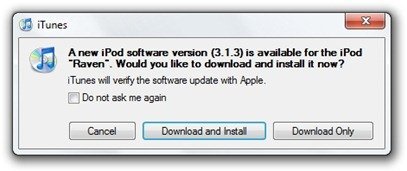
- Download and install iPhone OS 3.1.3 on your iPhone or iPod Touch using iTunes.
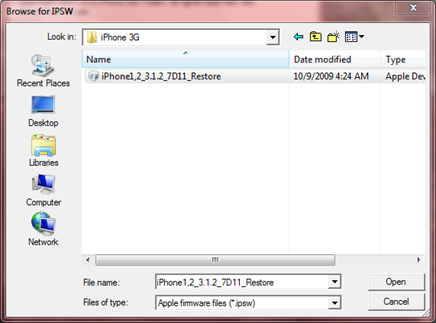
- Navigate to the following location on your computer C:\Users\{your windows user name}\AppData\Roaming\Apple Computer\iTunes\iPod Software Updates and copy the iPhone OS 3.1.2 IPSW file (iPhone OS firmware) file to your desktop for easy access.

- Run redsn0w 0.9.4 and click on browse. Point it to the iPhone OS 3.1.2 firmware you just copied to your desktop.
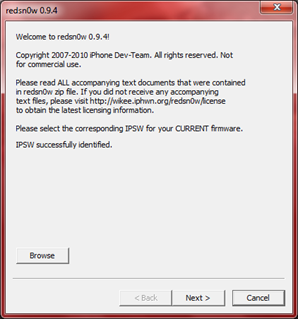
- After redns0w has validated the firmware, it will show some options such as Install Cydia, Verbose boot etc. Make sure to check Install Cydia and Already pwned.
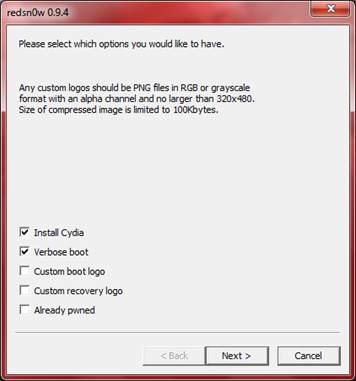
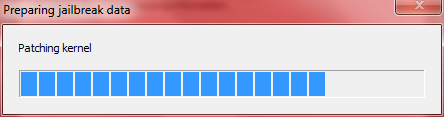
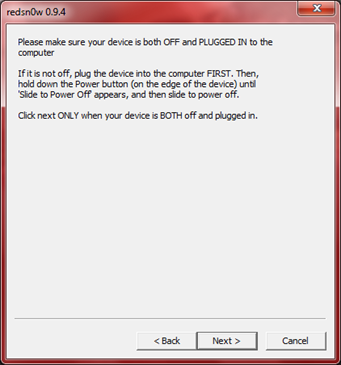
- Turn off your iPhone or iPod Touch and connect it to your PC. Hit next in redsn0w. It’ll start patching the kernel of your iPhone firmware file.
- Start your iPhone or iPod Touch in recovery mode by pressing both the power and home button until the help message on redsn0w disappears. If you had shut down your device as told in step 7, this process will be faster.
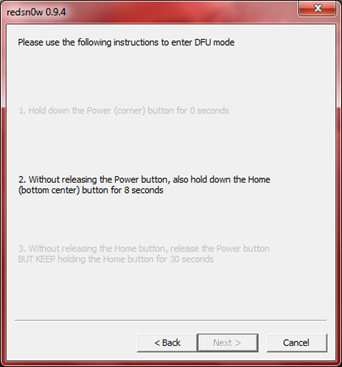
- Click next again. Now you’ll have to hold the power and while holding it, press the home button but don’t release it. After a few seconds, let go of the power button but keep the home button pressed until the firmware installation starts.
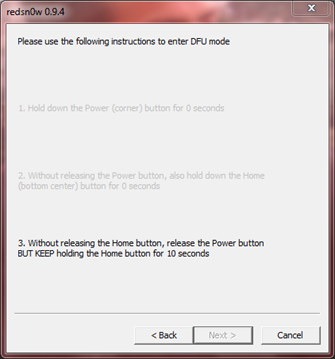
- Now it’ll take some time for the process to complete.


As noted above, don’t try this on your iPhone 3G if you don’t want to lose the unlock. So stay away from OS 3.1.3 till then!
[Thanks to iHackintosh for the screenshots!]
Download Links:
Download iTunes 9.0.3
Download redsn0w 0.9.4
Download iOS 3.1.2 for iPhone 2G
Download OS 3.1.2 for iPhone 3G


the link to download redsn0w does not work. when i click it says it is Forbidden.
the link to download redsn0w does not work. when i click it says it is Forbidden.
Are there instructions for mac users?
Are there instructions for mac users?
Follow these same instructions on a Mac
hey I,ve looked for the update thing but i cant find it the folder the instructions say to look in is empty and my ipod already had 3.1.3 on it can i do it without the upate thing?
hey I,ve looked for the update thing but i cant find it the folder the instructions say to look in is empty and my ipod already had 3.1.3 on it can i do it without the upate thing?
when i try to download redsnow it goes to a new page and says 403- forbiden
what should i do?
if this does not work for you make sure that you do not select Already pwned in step 6 as this will make you iPhone stick at lit screen
In step 6 only select cydia option
Is this proposed Jailbreak solution a tethered or non-tethered Jailbreak? I have a new Iphone (5 days old) with 3.1.3 on it now. When it was a 3.1.2 phone, I tried to run BlackRa1n on it but I learned the hard way about the difference between tethered and non-tethered Jailbreaking solutions.
I am looking for a non-tethered Jailbreak solution because I cannot afford to be caught away from my computer when my phone needs to be rebooted.
Please advise….
Bikini Browser
Is this proposed Jailbreak solution a tethered or non-tethered Jailbreak? I have a new Iphone (5 days old) with 3.1.3 on it now. When it was a 3.1.2 phone, I tried to run BlackRa1n on it but I learned the hard way about the difference between tethered and non-tethered Jailbreaking solutions.
I am looking for a non-tethered Jailbreak solution because I cannot afford to be caught away from my computer when my phone needs to be rebooted.
Please advise….
Bikini Browser
So my old 2 g can still be unlocked sweet how sad we only remember geohot and the frodo look alike dude when apple decides to throw us he finger. Thanks frodo and geohot maybe is better to wait until ipad is released
blackra1n doesn’t work for me, only supports 3.1.2. I have an iPod Touch 2G, followed the steps until browsing for the firmware (mine is called iPod2,1_3.1.3_7E18_Restore.ipsw) and like some people above me, it says Unable to recognize specified IPSW. Wish there could be a fix, or more precise directions on this matter.
Wait a second, this is for a 3.1.2 firmware crack, isn’t it?
Not working for me so far (3G). It doesn’t show the screen after step 9 (“Please use the following instructions to enter DFU mode”). Any ideas what I’m doing wrong?
Doesn’t go to step 9 (DFU mode)
Doesn’t go to step 9 (DFU mode)
Ok so I got passed everything (after several attempts) but it says “uploading ramdisk”. It has been about a minute. I have no idea if I have itouch 3g but I bought it in November. Will it work? I too had the problem about recognizing the ISPW. But somehow I got through that. How long should it take?
accidentally upgraded to 3.1.3, and this
does not work on my iphone 3gs 16gb – I am stuck here for a bit I guess.
but I have to say this 3.1.3 firmware is at least a bit more stable then 3.1.2
I am waiting for the blackra1n to come out!!!
After updating to 3.1.3., the 3.1.2 firmware is no longer inside the iPod Software Updates folder. Are we supposed to retrieve that to complete this jailbreak?
I accidentally updated my just bought iPhone 3Gs to OS 3.1.3 after the new OS was released for 30mins. (how worse can it be?) Is there a way to downgrade the Os to 3.1.2 and jailbreak it? I don’t need the unlock anyway, just the jailbreak and I’m using a windows7. Many thanks.
BTW, I have clicked “make my life easier” once in Cydia in my 1st and only trial of my jailbreak of iPhone 3gs too.