It didn’t take long for the iPhone Dev Team to come up with a jailbreak solution for iPhone OS 3.1.3 which was recently released for iPhone 2G, 3G, 3GS, iPod Touch 2G and 3G. redsn0w 0.9.4 jailbreaks and unlocks iPhone 2G, jailbreaks iPhone 3G, iPod Touch 1G and iPod Touch 2G (non-MC Models). If you have other models, we suggest that you hold back from upgrading to firmware 3.1.3.
Here’s a step by step guide to jailbreaking iPhone 2G and 3G (don’t do it if y
Jailbreak iPhone OS 3.13
- Download iTunes 9.0.3. This is the latest version of iTunes available so upgrade to it before starting to be sure you don’t run into any issues.
- Download redsn0w 0.9.4 ( download link at the end of the post )
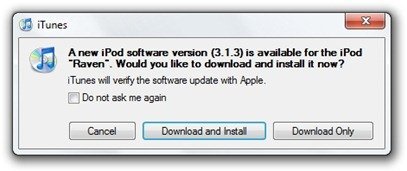
- Download and install iPhone OS 3.1.3 on your iPhone or iPod Touch using iTunes.
- Navigate to the following location on your computer C:\Users\{your windows user name}\AppData\Roaming\Apple Computer\iTunes\iPod Software Updates and copy the iPhone OS 3.1.2 IPSW file (iPhone OS firmware) file to your desktop for easy access.

- Run redsn0w 0.9.4 and click on browse. Point it to the iPhone OS 3.1.2 firmware you just copied to your desktop.
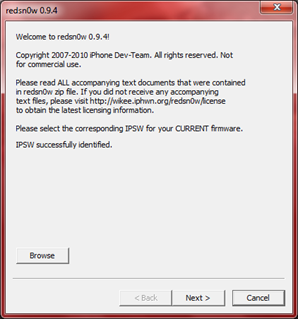
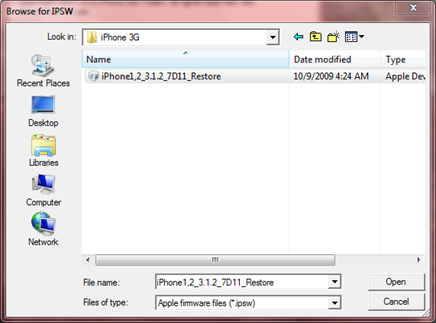
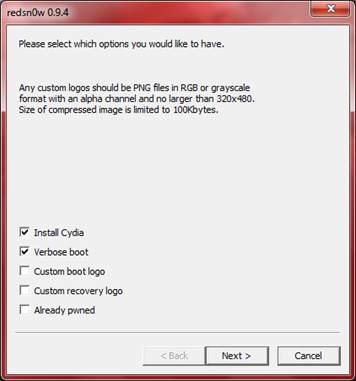
- After redns0w has validated the firmware, it will show some options such as Install Cydia, Verbose boot etc. Make sure to check Install Cydia and Already pwned.
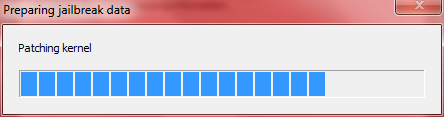
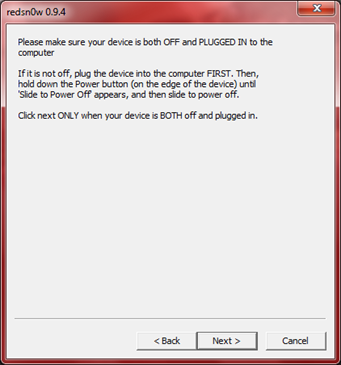
- Turn off your iPhone or iPod Touch and connect it to your PC. Hit next in redsn0w. It’ll start patching the kernel of your iPhone firmware file.
- Start your iPhone or iPod Touch in recovery mode by pressing both the power and home button until the help message on redsn0w disappears. If you had shut down your device as told in step 7, this process will be faster.
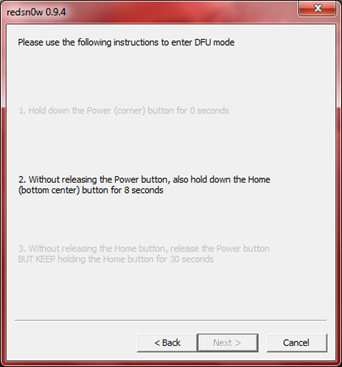
- Click next again. Now you’ll have to hold the power and while holding it, press the home button but don’t release it. After a few seconds, let go of the power button but keep the home button pressed until the firmware installation starts.
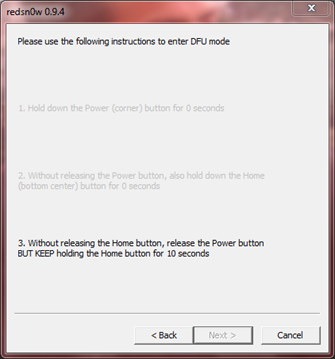
- Now it’ll take some time for the process to complete.


As noted above, don’t try this on your iPhone 3G if you don’t want to lose the unlock. So stay away from OS 3.1.3 till then!
[Thanks to iHackintosh for the screenshots!]
Download Links:
Download iTunes 9.0.3
Download redsn0w 0.9.4
Download iOS 3.1.2 for iPhone 2G
Download OS 3.1.2 for iPhone 3G


Dont use this, it will never work, since the link has 403-forbidden. stick with what you have right now and wait it a trusted/known JAILBREAKER comes out with it.
Are you saying the iPhone Dev-Team aren’t trusted/known jailbreakers? -_-
lol, that’s what I was thinking. The link is for redsn0w 0.9.4, which was made by the iPhone dev-team. They are the most trusted (if not the ONLY trusted) name in iDevice jailbreaking.
George Hotz is another trusted name in jailbreaking.
click only cydia and you have to follow the instruction fast……i hope everybody jailbreak it!
I like this already, but does the iPod touch have to click “already pwned”?
Hey Hussain, whassup, r u still working on an updated software to get those of us u had to update to the new 3.1.3 version that now has the 5.12.1 model firmware on the 3GS iphones? I thought u were the best man, now whas taking you so long, I need my 3GS iPhone to be unlocked not just jailbroken, which didn’t work anyway.
Hope to hear from you soon, until then have a Great Thursday!
Is it solve 3.1.2 ipt3 tethered rebooting into recovery mode?
wth the link to download redsn0w is forbiden is there a different link
Worked up to the running pineapple screen, flashes the NOR all looking good, but then boots in recovery mode.
This is on an iTouch 2g, there isn’t a 3.1.2 fw for the 2g itouch so I used 3.0 which the redsn0w accepts and patches.
Anybody any advice?
Cheers.
can some1 send me the 3.1.3 upgrade cus its already on my ipod and its not in the folder shown!
Maybe this is a stupid question but does this work on my 32gb 3rd gen model nr: A1318EMC2310 iPod Touch?
Sorry if my English is bad I’m not English myself.
Thanks already
As mentioned in the blog post, it doesn’t work with iPod Touch 3G
what i read on rock app and cydia is that the NEW update if a front that will remove all jailbreak apps and that you wont be able to use the two applications again and RECOMMENDS the users NOT TO UPDATE !!!!
I have an iPod Touch 3G and it still has 3.1.2 firmware, if I update it to 3.1.3 will this jailbreak work? I don’t want to risk updating because in your step-by-step guide you didn’t say it works for the iPod Touch 3G, you only said 1G and 2G.
is there another link as im getting 403 error
im getting so streessed with this jailbreaking stuff i did not know what it was till this morning im starting to think with all the information flying round one person saying one thing another saying something else i dont know who to trust i think it is probably not worth it. i cant even seem to find a link any were that works for redsn0w 0.9.4
i give up
im getting so streessed with this jailbreaking stuff i did not know what it was till this morning im starting to think with all the information flying round one person saying one thing another saying something else i dont know who to trust i think it is probably not worth it. i cant even seem to find a link any were that works for redsn0w 0.9.4
i give up
Why is there no answer to the questions about missing 3.1.2 IPSW file in the folder? Does that mean if you upgraded prior to moving a copy (as in the instructions), you have lost the file and cannot jailbreak?
click on Download iPhone OS 3.1.2 for iPhone 2G above to get it
ok, i am obviously not the only one getting the 403 error when clicking to download the redsnow v. 0.9.4 zip file…
can we please answer this? i totally believe it’s going to work fine for me, (i have ipod touch 2g -firmware 3.1.1 and the serial doesnt start with MC) and i’m pretty solid on how to do it, but it’s not going to do me any good if i caan’t download it. i’ve tried links from many different blogs and stuff… the zips that i got don’t work. windows says they’re corrupted.
looking forward to recognizing the hard work of my trusty Dev Team… but only as soon as it works. :P
thanks.
try redsn0w.com
it was the only site that worked for me
omggg i cant find any downloadable redsn0w file!
Jailbreak on iPod Touch 2G with non-“MC” model no. SUCCESSFUL!
Okay guys if you have a 2nd Gen Ipod Touch (non MC version) follow these instructions EXCEPT for where it says to click the “already pwned” DO NOT click that and everything will work fine. I spent 4 hours trying to figure out why my ipod wouldn’t reboot and once I unticked “already pwned” worked perfect.
do as chris said, it worked for me aswell, it didn’t with already pwned. thanks!
This works on G1 ITouch as well. Just make sure you have the IPod 3.1.2 firmware to point to NOT IPhone 3.1.2 and NOT “already pwned”
perfect, Chris ! It Worked very well now ! I tried it many times without a result, but now its fine ! Thank you for the tip !
It works with a iPhone 3GS? Because, with the other jailbreak i’ve done early when i turned it off the iphone didn’t works.