It didn’t take long for the iPhone Dev Team to come up with a jailbreak solution for iPhone OS 3.1.3 which was recently released for iPhone 2G, 3G, 3GS, iPod Touch 2G and 3G. redsn0w 0.9.4 jailbreaks and unlocks iPhone 2G, jailbreaks iPhone 3G, iPod Touch 1G and iPod Touch 2G (non-MC Models). If you have other models, we suggest that you hold back from upgrading to firmware 3.1.3.
Here’s a step by step guide to jailbreaking iPhone 2G and 3G (don’t do it if y
Jailbreak iPhone OS 3.13
- Download iTunes 9.0.3. This is the latest version of iTunes available so upgrade to it before starting to be sure you don’t run into any issues.
- Download redsn0w 0.9.4 ( download link at the end of the post )
- Download and install iPhone OS 3.1.3 on your iPhone or iPod Touch using iTunes.
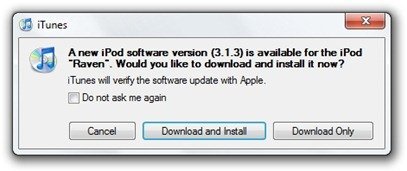
- Navigate to the following location on your computer C:\Users\{your windows user name}\AppData\Roaming\Apple Computer\iTunes\iPod Software Updates and copy the iPhone OS 3.1.2 IPSW file (iPhone OS firmware) file to your desktop for easy access.

- Run redsn0w 0.9.4 and click on browse. Point it to the iPhone OS 3.1.2 firmware you just copied to your desktop.
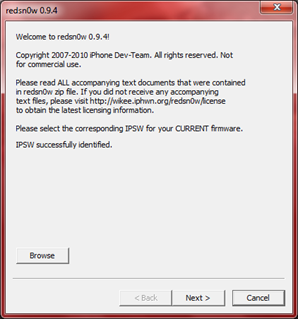
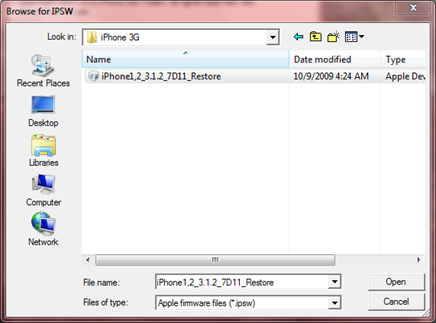
- After redns0w has validated the firmware, it will show some options such as Install Cydia, Verbose boot etc. Make sure to check Install Cydia and Already pwned.
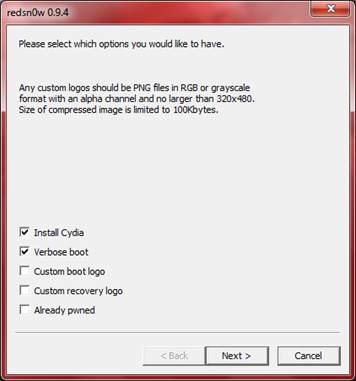
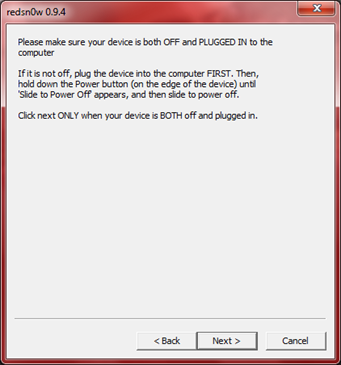
- Turn off your iPhone or iPod Touch and connect it to your PC. Hit next in redsn0w. It’ll start patching the kernel of your iPhone firmware file.
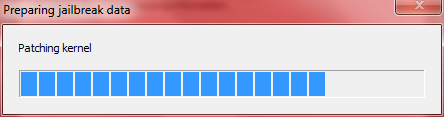
- Start your iPhone or iPod Touch in recovery mode by pressing both the power and home button until the help message on redsn0w disappears. If you had shut down your device as told in step 7, this process will be faster.
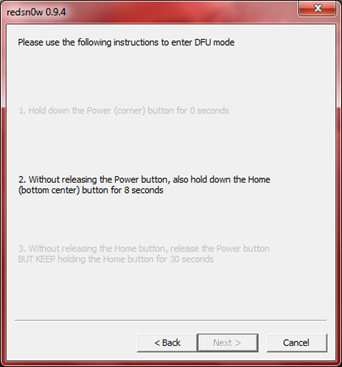
- Click next again. Now you’ll have to hold the power and while holding it, press the home button but don’t release it. After a few seconds, let go of the power button but keep the home button pressed until the firmware installation starts.
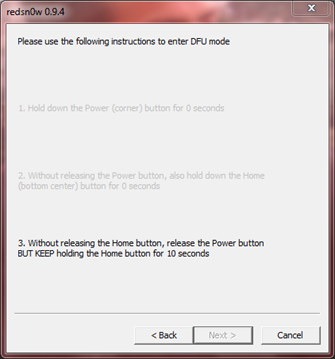
- Now it’ll take some time for the process to complete.


As noted above, don’t try this on your iPhone 3G if you don’t want to lose the unlock. So stay away from OS 3.1.3 till then!
[Thanks to iHackintosh for the screenshots!]
Download Links:
Download iTunes 9.0.3
Download redsn0w 0.9.4
Download iOS 3.1.2 for iPhone 2G
Download OS 3.1.2 for iPhone 3G


Is this how you jailbreak an 2G itouch? (MC model?)
So i just bought my itouch yesterday and i think its an MC model.. Does that mean i cant jailbreak it WHATSOEVER.? Or am i going to have to wait until they find out how to jailbreak it.?
please letme know asap! i wanna jailbreak it!!!
Is this how you jailbreak an 2G itouch? (MC model?)
So i just bought my itouch yesterday and i think its an MC model.. Does that mean i cant jailbreak it WHATSOEVER.? Or am i going to have to wait until they find out how to jailbreak it.?
please letme know asap! i wanna jailbreak it!!!
has anyone confirmed this yet for iphone 3GS?…. working or not?
has anyone confirmed this yet for iphone 3GS?…. working or not?
IPod Touch 3G doesn’t work:
Unable to recognize specified IPSW
Upgraded the IPod Touch to v 3.1.3 which runs fine.
I have the same problem with my ipod touch 3gG
This solution doesn’t work on IPod Touch 3G
We have to wait
xgabo
my iPhone has the 3.1.3 update but I cant find the 3.1.2 I IPSW Im stuck help
im in the same boat help
You have to go download it
email me sab4504@hotmail.com
and I’ll send you file, or the link.
i have no idea idea how to to do this i am desperate please someone walk me thru it
step 5 did not work! redsnow said that the file i selected is wrong or something.. hellp me!
Errm.. What happens if my 3.12 is already jailbroken and I updated it to 3.1.3?
This fella here says the jailbreak files are stuck in my iPod if I do so without UNjailbreaking it first.
http://answers.yahoo.com/question/index?qid=20100205141624AA2vBJk
guys!!….i’m still tryin out the process mentioned above…but the path that involves pasting the iPhone os 3.1.2 resetore.ipsw to the desktop…..i opened the folder and instead of 3.1.2 there s 3.1.3!!!…..now what do i do?…..plz help me out fellas!!
okay after the stages to put into dfu mode, it says prossesing ipod for like 2 hours..should i restore ipod touch and then try again
If you search “iPhone1,2_3.1.2_7D11_Restore.ipsw” on internet you can get copies of this file. (in case it’s missing on your pc. ) But the question is if it’s okay to use these copies. I’m not sure, but I believe it should be the same for everyone. Can anyone confirm?
How long does it take to finish once the setup on the computer is done and the screen goes black on the itouch?
anyone know why it unable to recognize my IPSW file?
did everything like the video said(using ipod touch 2nd gen, non-mc)
1st- i did it without clicking the “already pwned” button in redsn0w jailbreak setup and everytime i did my ipod wouldn’t reboot.
2nd- i then clicked on the “already pwned” button in setup and it went through and i clicked finish, but then my ipod wouldnt do anything but stay on a black screen.
I have no idea what im doing wrong
Alright figured out what i did wrong.
IPOD TOUCH 2nd GEN.(non-MC) models- to sucessfully jailbreak,follow all the instructions above except for these things
-FirstMake sure you have the IPOD TOUCH 3.1.2 ipws file, not the iphone one that this site provides a download link for otherwise it will not work. You have to find it somewhere else on the internet.
-Secondly do not click the “already pwned” button when running redsn0w, it will cause it not to work.
Where did you find an ipod touch 3.1.2 ipsw file? i can’t find one anywhere! thanks.
how long is it going to take to come out with a jailbreak for an itouch 3g MC model? please let me know. thanks.
hey… i understand this is jailbreak works… now for the real question… Does this fix the “tethered” problem 3gs users face with the 3rd 4th and 5th serial numbers being higher than 940? I am currently jailbroken via blackrain and the thethered problem is really starting to get on my nerves… is this a fix for that as well as a new os jailbreak? nobody seems to be commenting on this..
hey… i understand this is jailbreak works… now for the real question… Does this fix the “tethered” problem 3gs users face with the 3rd 4th and 5th serial numbers being higher than 940? I am currently jailbroken via blackrain and the thethered problem is really starting to get on my nerves… is this a fix for that as well as a new os jailbreak? nobody seems to be commenting on this..
omggg i cant find any downloadable redsn0w file!
After entering DFU mode, it’s now stuck in : Please wait while your device is being processed.
Waiting for reboot.
It stays there and does nothing……