It didn’t take long for the iPhone Dev Team to come up with a jailbreak solution for iPhone OS 3.1.3 which was recently released for iPhone 2G, 3G, 3GS, iPod Touch 2G and 3G. redsn0w 0.9.4 jailbreaks and unlocks iPhone 2G, jailbreaks iPhone 3G, iPod Touch 1G and iPod Touch 2G (non-MC Models). If you have other models, we suggest that you hold back from upgrading to firmware 3.1.3.
Here’s a step by step guide to jailbreaking iPhone 2G and 3G (don’t do it if y
Jailbreak iPhone OS 3.13
- Download iTunes 9.0.3. This is the latest version of iTunes available so upgrade to it before starting to be sure you don’t run into any issues.
- Download redsn0w 0.9.4 ( download link at the end of the post )
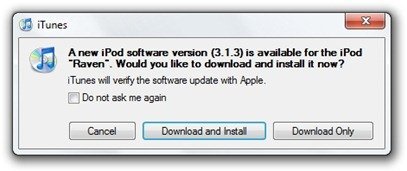
- Download and install iPhone OS 3.1.3 on your iPhone or iPod Touch using iTunes.
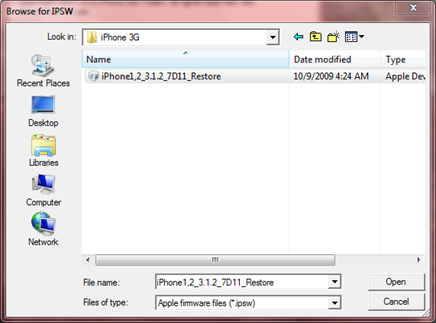
- Navigate to the following location on your computer C:\Users\{your windows user name}\AppData\Roaming\Apple Computer\iTunes\iPod Software Updates and copy the iPhone OS 3.1.2 IPSW file (iPhone OS firmware) file to your desktop for easy access.

- Run redsn0w 0.9.4 and click on browse. Point it to the iPhone OS 3.1.2 firmware you just copied to your desktop.
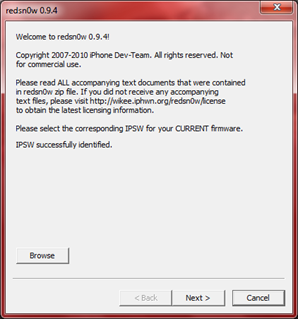
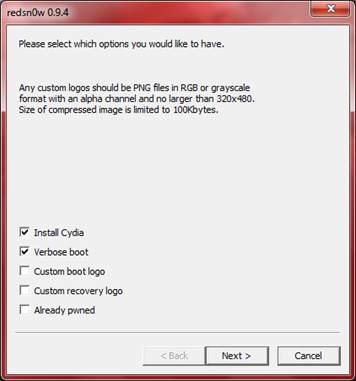
- After redns0w has validated the firmware, it will show some options such as Install Cydia, Verbose boot etc. Make sure to check Install Cydia and Already pwned.
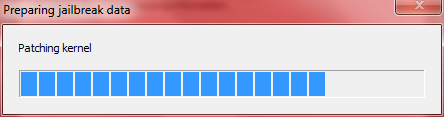
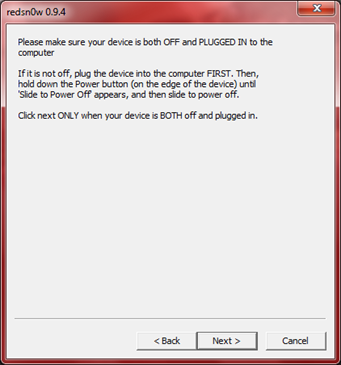
- Turn off your iPhone or iPod Touch and connect it to your PC. Hit next in redsn0w. It’ll start patching the kernel of your iPhone firmware file.
- Start your iPhone or iPod Touch in recovery mode by pressing both the power and home button until the help message on redsn0w disappears. If you had shut down your device as told in step 7, this process will be faster.
- Click next again. Now you’ll have to hold the power and while holding it, press the home button but don’t release it. After a few seconds, let go of the power button but keep the home button pressed until the firmware installation starts.
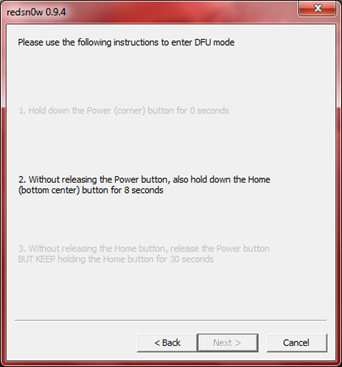
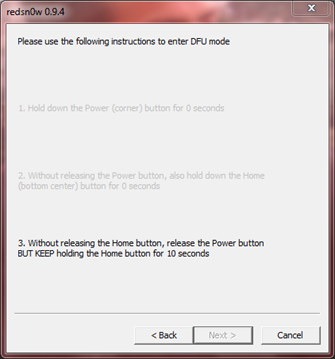
- Now it’ll take some time for the process to complete.


As noted above, don’t try this on your iPhone 3G if you don’t want to lose the unlock. So stay away from OS 3.1.3 till then!
[Thanks to iHackintosh for the screenshots!]
Download Links:
Download iTunes 9.0.3
Download redsn0w 0.9.4
Download iOS 3.1.2 for iPhone 2G
Download OS 3.1.2 for iPhone 3G


i am jailbroken at 3.0 can i skip 3.1.2 jailbreaking and jailbreak straight to 3.1.3? please answer
where do ii press to download?? please awenser
Yeah – I get the 403 error when trying to download redsn0w. :( Fix the links! Fix the Links!
How do you like my name? Hue-Janus. Nice!
thnxxxxxxxxxxx man
thnxxxxxxxxxxx man
Ive installed 3.1.3 for my itouch, but when I browse for the IPSW on Redsn0w it says unable to recognise the specified IPSW.
The IPSW is called: iPod2,1_3.1.3_7E18_Restore
any help?
Oh ive got it u have to download 3.1.2 for the itouch, NOT 3.1.3
does this work on 3GS, 5.12.01 firmware (new bootrom)?
no
Thanks! Worked brilliantly!
(iPhone 3G on 3.1.3)
Hey people I’m here to answer your questions. This DOES NOT work for the new 3.1.3 (7E18) firmware because Apple recently changed the settings so instead of seeing the screen part of the jailbreak, your screen is black. Your going to have to wait for the new update. So, your lucky if you don’t have to restore your device in case you followed the directions incorrectly. Like always, I highly recommend having a backup on iTunes if you so happen to restore your iPod/iPhone
Regards,
Mike
IM ON 3.1.3 O CAN I JAILBREAK ?
I followed every step carefully and I did everything but it says waiting for reboot and it stays forever.I don’t know what is the problem I tryed it like 10 times and it still doesn’t work.
Help pleeeeeeeaaaaaasse
I have iPod touch 1st gen 3.1.3
close itunes and do it
What do you mean why do I have to close itunes how would it help did you have that problem
What if its an unlocked iphone? I mean, it was unlocked when i bought it at the apple store. Will i still loose the unlock?
I have been trying to use redsn0w to jailbreak and everytime i get to the ipsw file… it never recognizes it…although its the same thing you showed…why and how do i fix this?
I have the ipod touch 3g 3.1.3 firmware and it is an mc model is there any jailbreaks out that will work yet?
yeah i have the same problem
SAME
Mr. Imran Hussain I followed every step carefully and I did everything but it says waiting for reboot and it stays forever.I don’t know what is the problem I tryed it like 10 times and it still doesn’t work.
Help pleeeeeeeaaaaaasse if you know what’s the problem.
I have iPod touch 1st gen 3.1.3
Can you turn it off if you have the 3rd generation of an iPod touch?
Unable to recognize specified IPSW when browsing FW
Ihave a 8g ipod touch and i accidently upgraded to 3.1.3, is there jailbreak out for that yet?
Maybe use blackra1n.com – just as good.