It didn’t take long for the iPhone Dev Team to come up with a jailbreak solution for iPhone OS 3.1.3 which was recently released for iPhone 2G, 3G, 3GS, iPod Touch 2G and 3G. redsn0w 0.9.4 jailbreaks and unlocks iPhone 2G, jailbreaks iPhone 3G, iPod Touch 1G and iPod Touch 2G (non-MC Models). If you have other models, we suggest that you hold back from upgrading to firmware 3.1.3.
Here’s a step by step guide to jailbreaking iPhone 2G and 3G (don’t do it if y
Jailbreak iPhone OS 3.13
- Download iTunes 9.0.3. This is the latest version of iTunes available so upgrade to it before starting to be sure you don’t run into any issues.
- Download redsn0w 0.9.4 ( download link at the end of the post )
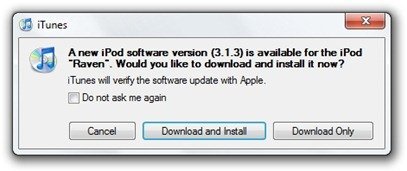
- Download and install iPhone OS 3.1.3 on your iPhone or iPod Touch using iTunes.
- Navigate to the following location on your computer C:\Users\{your windows user name}\AppData\Roaming\Apple Computer\iTunes\iPod Software Updates and copy the iPhone OS 3.1.2 IPSW file (iPhone OS firmware) file to your desktop for easy access.

- Run redsn0w 0.9.4 and click on browse. Point it to the iPhone OS 3.1.2 firmware you just copied to your desktop.
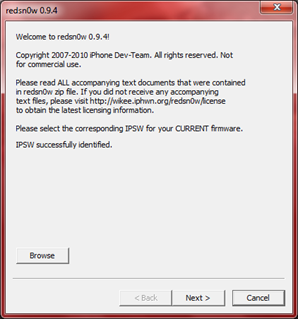
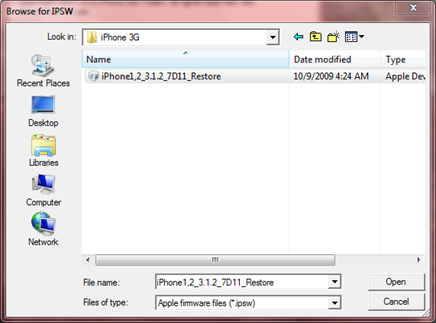
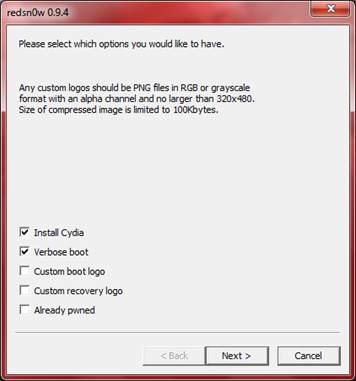
- After redns0w has validated the firmware, it will show some options such as Install Cydia, Verbose boot etc. Make sure to check Install Cydia and Already pwned.
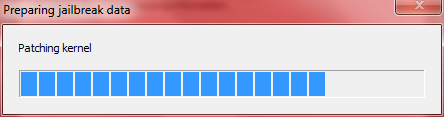
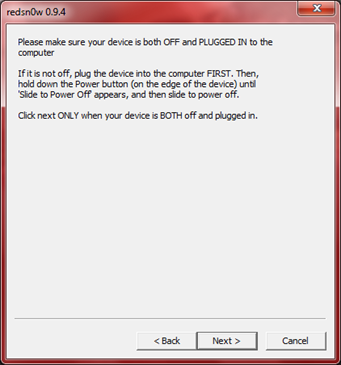
- Turn off your iPhone or iPod Touch and connect it to your PC. Hit next in redsn0w. It’ll start patching the kernel of your iPhone firmware file.
- Start your iPhone or iPod Touch in recovery mode by pressing both the power and home button until the help message on redsn0w disappears. If you had shut down your device as told in step 7, this process will be faster.
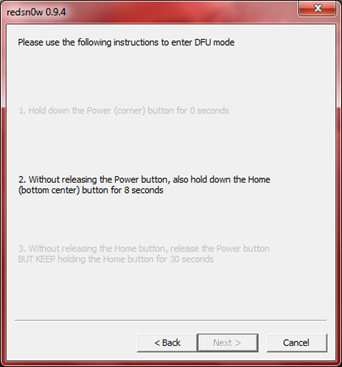
- Click next again. Now you’ll have to hold the power and while holding it, press the home button but don’t release it. After a few seconds, let go of the power button but keep the home button pressed until the firmware installation starts.
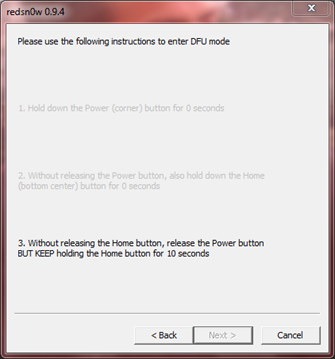
- Now it’ll take some time for the process to complete.


As noted above, don’t try this on your iPhone 3G if you don’t want to lose the unlock. So stay away from OS 3.1.3 till then!
[Thanks to iHackintosh for the screenshots!]
Download Links:
Download iTunes 9.0.3
Download redsn0w 0.9.4
Download iOS 3.1.2 for iPhone 2G
Download OS 3.1.2 for iPhone 3G


I’ve use this program to try to Jailbreak my iPod(1g) with OS 3.1.1 many times now and each time it’s unsuccessful. The IPSW file I am using for the jailbreak is iPod1,1_3.1.2_7D11_Restore.ipsw and it never works. what is the problem?
wait so i cant jail break my mc 2g ipod touch?
when i click the red sn0w 0.9.4 download link, it says ‘403- forbidden’ what shall i do?
hehe says 403- forbidden when downloading redsnow oh well jailbreak isnt that important
THIS DOES WORK! I just bought a iphone 3g which had 3.1.2 straight out the box. I misread updating itunes and I updated to 3.1.3 instead using itunes.
I tries using blackrain and was unsuccessful. Upon countless hours of reading, I stumbled into blacksnow. ( keep in mind, I’m a newbie to this ) I first tried it with blacksnow o.8 thinking it would do it but, no success. Then I see this, blacksnow 0.9.4 which is the next version I think. Anyway, I did exactly like the pics say. downlod blacksnow 0.9.4 and then go crazy finding IPSW in my pc, check the cydia box and the already pwned and everything seemed to go smoothly until it said finished. My iphone stood at a blank screen and did nothing. I finally got it to turn back on and didnt see cydia or anything. So, I decided to give it one more shot. ( now it’s 2:30 in the morning) The second attempt I only checked off cydia ONLY and evrthing went smoothly again accept this time it worked.
How did I find 3.1.2 firmware? I simply right clicked on my C:drive and clicked on search.
On the searched tab I typed 3.1.2 IPSW and it came up right away. I then transfered it to my desktop for easy finding. ( I’m using XP )
How did I find blacksnow 0.9.4? I did a google search for it. I clicked on evry link till I found one that didnt give me that error code and downloaded it. Someone prob posted a link here on Blacksnow 0.9.4
I hope this is enough detail and works for you guys!
I just got an ipod touch for christmas and it came with 3.1.3 and i want to jailbreak it. Will this work for it?
I just got an ipod touch for christmas and it came with 3.1.3 and i want to jailbreak it. Will this work for it?
No it will not, you gotta wait for the new jailbreaking tool to come out just like everyone else..
when i try to download redsnow it says 403 forbidden
. WHy?
hey im having problem to jailbreak with redsnow. im upgraded my ipod 2g to 3.1.3 firmware. i followed the step on redsnow but does nnot work. it come out tethered jailbreak.. when i click next it come out
intall cydia and just boot tethered now, pleasw help
go to another link to find redsn0w0.9.4
@#20 then why is the first sentence of the article:
“t didn’t take long for the iPhone Dev Team to come up with a jailbreak solution for iPhone OS 3.1.3 which was recently released for iPhone 2G, 3G, 3GS, iPod Touch 2G and 3G. redsn0w 0.9.4 jailbreaks and unlocks iPhone 2G, jailbreaks iPhone 3G, iPod Touch 1G and iPod Touch 2G ( non MC Models).”
Same as every one else, can’t find redsn0w0.9.4
I have the same as Ian, only Cydia and tethered. And its redsn0w0.9.4…
Help! it says ‘unable to recognise specified IPSW! I have a 2g ipod with 3.1.3 firmware. Plz Plz HELP!
Hey guys, for ipod touch 2g, non MC models you follow the rules but DO NOT click already pwned, you get redsn0w 0.9.4 by googling it and you will find a link, you get the firmware by googling that also, its not rocket science.
no
Redsnow gives a 403 error for me. anyone else have this problem?
y cant i jailbreak my ipod touch ok so..its 3.1.3 and its mc model : (
you cant do it you retard