It didn’t take long for the iPhone Dev Team to come up with a jailbreak solution for iPhone OS 3.1.3 which was recently released for iPhone 2G, 3G, 3GS, iPod Touch 2G and 3G. redsn0w 0.9.4 jailbreaks and unlocks iPhone 2G, jailbreaks iPhone 3G, iPod Touch 1G and iPod Touch 2G (non-MC Models). If you have other models, we suggest that you hold back from upgrading to firmware 3.1.3.
Here’s a step by step guide to jailbreaking iPhone 2G and 3G (don’t do it if y
Jailbreak iPhone OS 3.13
- Download iTunes 9.0.3. This is the latest version of iTunes available so upgrade to it before starting to be sure you don’t run into any issues.
- Download redsn0w 0.9.4 ( download link at the end of the post )
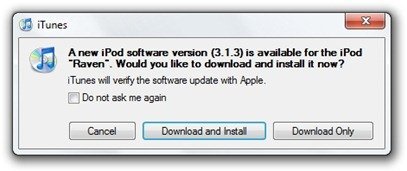
- Download and install iPhone OS 3.1.3 on your iPhone or iPod Touch using iTunes.
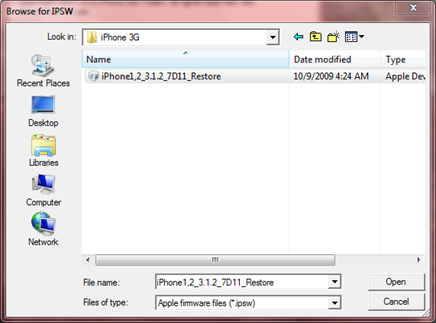
- Navigate to the following location on your computer C:\Users\{your windows user name}\AppData\Roaming\Apple Computer\iTunes\iPod Software Updates and copy the iPhone OS 3.1.2 IPSW file (iPhone OS firmware) file to your desktop for easy access.

- Run redsn0w 0.9.4 and click on browse. Point it to the iPhone OS 3.1.2 firmware you just copied to your desktop.
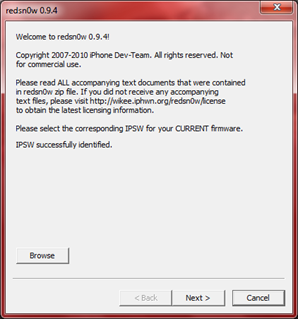
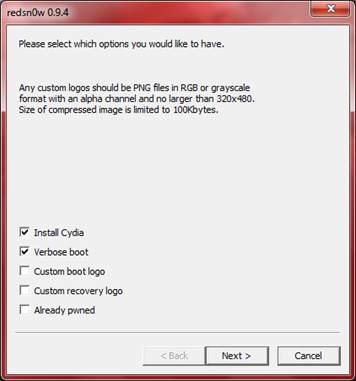
- After redns0w has validated the firmware, it will show some options such as Install Cydia, Verbose boot etc. Make sure to check Install Cydia and Already pwned.
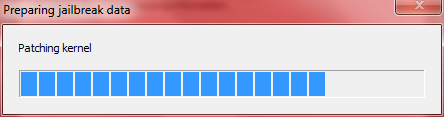
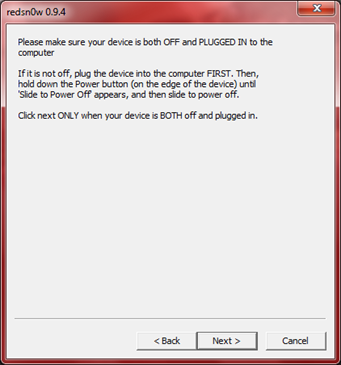
- Turn off your iPhone or iPod Touch and connect it to your PC. Hit next in redsn0w. It’ll start patching the kernel of your iPhone firmware file.
- Start your iPhone or iPod Touch in recovery mode by pressing both the power and home button until the help message on redsn0w disappears. If you had shut down your device as told in step 7, this process will be faster.
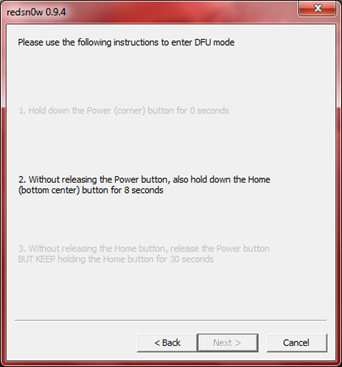
- Click next again. Now you’ll have to hold the power and while holding it, press the home button but don’t release it. After a few seconds, let go of the power button but keep the home button pressed until the firmware installation starts.
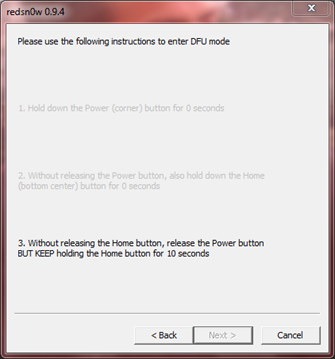
- Now it’ll take some time for the process to complete.


As noted above, don’t try this on your iPhone 3G if you don’t want to lose the unlock. So stay away from OS 3.1.3 till then!
[Thanks to iHackintosh for the screenshots!]
Download Links:
Download iTunes 9.0.3
Download redsn0w 0.9.4
Download iOS 3.1.2 for iPhone 2G
Download OS 3.1.2 for iPhone 3G


I just tried this and redsn0w says “Unable to recognize specified IPSW” What do I do?
I have the iTouch 3G
Windows XP users path would be c:\Documents and Settings\{your windows users name}\AppData\Roaming\… etc.
i’ve asked the iStudio’s staff
and he said we can’t turn off
the iPod 3.1.3 ?
Just downgrade to 3.1.2 and download blackra1n in stead.
i’ve done steps 1 to 9 and then redsn0w was stuck in “Waiting for reboot” part and my ipod’s screen is also black. i’ve been waiting for ages and nothing’s happening D:
How can I get 3.1.2 instead of the 3.1.3 that is on my system? do I have to use the iphone 2g download?
(i have ipod touch 2g B model)
Will i lose songs and apps…?
Is it a tethered jailbreak?
Is it a tethered jailbreak?
blackra1n
guys i have and ipod touch 3g and firmware 3.1.3 how can i jail brake it on my mac?
thanks:)
guys i have and ipod touch 3g and firmware 3.1.3 how can i jail brake it on my mac?
thanks:)
what are you suppposed to do after you click finish? the screen is blank and onlything i can do is restart and when i restart it it isn’t jailbroken
what are you suppposed to do after you click finish? the screen is blank and onlything i can do is restart and when i restart it it isn’t jailbroken
I have tried everything to JB my damn iphone!!! Black rain does not work..it says done and then goes to a black screen and never reboots!! I dont know what to do..i tried redsnow..the app wont even open…i tried pwnage and in the last steps it doesnt go in to some certain mode!!! I tried everything…i have a imac…i cannot figure it out!!!!!! HELP!!!!!!
Does anybody know how to jailbreak iPod touch 3g 3.1.3? I’ve already tried to downgrade it but it never works :(
I had the same problem. But I downgraded the software version to 3.1.2, and then jailbrake it with blackra1n.
I use the firmware version iPod2,3.1.2_7D11,**note** it is not the iPod3— firmware. For some reason Apple stop signing off the firmware 3.1.2 on the ipod touch 3g.
Go to youtube, the are videos of how to downgrade the firmware.
**NOTE** the firmware dowgrade only worked for 8G ipod Toch 3G. the 32G and 64G are out of luck at this time.
Good luck!
what firmeware did you use to downgrade from 3.1.3 to 3.1.2?
the same thing is happening to me :( and i cant still downgraded … and i want to jailbreak it sooo muchhh HELP
download 3.1.2 from a website and then open itunes with your ipod pluged in, click on your ipod. the do Shift+cLick on the restore button and then loacate the 3.1.2 file
Why create a tutorial that is titled jailbreak 3.1.3, then show people that you are installing 3.1.2 firmware into the phone, then go da da! you are now jailbroken with 3.1.3. Makes no sense
You should have OS 3.1.3 installed first. Try reading next time, before making such a comment.
tried the method step by step for several times…but to no avail! at the end of the process redsn0w says the rest of the process will take place in the device and then done! but then when i’m opening itunes a msg is popping up that your device is in the recovery mode click to restore..i tried restoring with 3.1.3 and 3.1.2 firmwares but to no avail..please help!
even before i progress to step 9…redsn0w says that the rest of the process is going to take place on the device and then done! thats it…bt when i’m opening my itunes after that it is showing that my device is in recovery mode and that i shud restore it first…so i had to restore it with original firmware! help!
DO NOT select already pwned then just follow the
tutorial. Note 6 and 7 are in the wrong order.
Basically, DO NOT SELECT ALREADY PWNED!
how do you do it for the 3.1.2
black rain
i install blackrain but doesnt have cydia..so useless.please help me!
ok just to make sure, I have an ipod touch 2g non MC model MB I think. it is running 3.1.3 and has never been jb before. redsn0w 0.9.4 should work right.