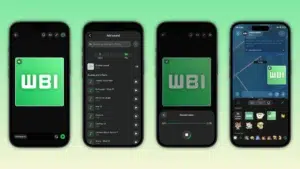
The new Screens laptop mode turns a half-folded iPhone Duo into a pocket-sized workstation, with your remote desktop on the top half and a keyboard and trackpad on the bottom half. Screens 5.10.6 is available now for iOS, iPadOS and visionOS, and the Mac version should follow once Apple approves it.
Edovia, the developer of Screens, announced the update on its blog on November 25. Laptop Mode is built for the iPhone Duo, and it shows how apps are starting to use the folding screen, after Lightroom for iPhone Duo moved its editing tools to a side panel and Halide 3.4 started using the outer screen as a fill flash. Apple says the number of apps optimized for the iPhone Duo has doubled to 200,000.

Screens Laptop Mode Needs a Half Fold
You fold the iPhone Duo halfway, and the remote desktop appears on the upper half of the screen while a custom keyboard and trackpad fill the lower half. The trackpad supports the same gestures you use in other versions of Screens, so you do not have to learn a separate set for the iPhone Duo.
The keyboard supports multiple languages and follows the language you choose for your system keyboard. You can swipe down on a key to type its secondary character, the same way you do on iPad.
If you would rather have physical keys, the Noord keyboard case adds real keys and a trackpad to the iPhone Duo.
Screens 5.10.6 Adds Dictation Options
Screens 5 is a VNC remote desktop app that connects your iPhone to another computer so you can see and control its desktop. The update also changes how you type and how large the remote desktop can be on iPhone.
- You can speak on your iPhone and have the dictated text typed on the remote desktop or pasted from the clipboard, with an option to press Return automatically, under Settings > Controls > Dictation
- High Performance mode supports more flexible desktop sizes on iPhone, including portrait resolutions
- Apple Pencil actions can show and hide the keyboard
- Mouse and trackpad handling is improved
- The update includes usability, stability and performance fixes
Screens 5, listed on the App Store as Screens 5: VNC Remote Desktop, runs on iPhone, iPad, Mac and Apple Vision, and it is free to download with in-app purchases, including a $4.99 monthly subscription, a $29.99 yearly subscription and a $249.99 lifetime option. It requires iOS 17.6 or later on iPhone, iPadOS 17.6 or later on iPad, macOS 14.0 or later on Mac and visionOS 26.6 or later on Apple Vision.
Other Screens Alternatives Already Do This
Several other apps also put your Mac on the iPhone Duo. DuoBook is free and shows your Mac on the top half with a Mac keyboard and trackpad below, and Sailmode uses the same layout but is still in testing.
Yosei reaches your Mac from anywhere through Tailscale and lets you watch an AI agent such as Claude Code work, while Sill is free and shows a single Mac window, or your whole desktop, on an iPhone, iPad or iPhone Duo.
SidePane works differently, because it turns the iPhone Duo into a second display for your Mac.