How to Disable Google Instant Search

Google Instant search has been made available for users by default ( for the regions it is available in ), but a few people aren’t happy with the change. Luckily, Google have provided a simple method of switching it off.

Just look for the option that says ‘Instant is on’ next to the search button. Click on it and in the drop down menu, click on Off.disable Google Instant
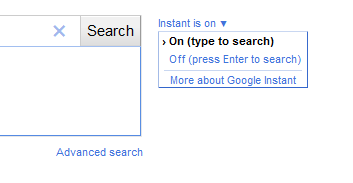
After it’s disable, you’ll have to hit enter every time you want to search something, just like how it used to be ( or still is in other search engines ).

About the Author

Imran Hussain is the founder and editor of iThinkDifferent, which he launched in 2008 to cover Apple news, reviews, and how-to guides. He has spent over 15 years writing about iOS, macOS, and the wider Apple ecosystem, with a focus on hands-on guides - installing developer betas, troubleshooting, and walking through new features on his own devices. Based in Dubai, he also loves to cover photography, gaming, and the tech industry more broadly on his social media profiles.

Leave a comment