Google is introducing a new app called Backup & Sync which will allow users to back up all the data from their computers, and make it available for access from anywhere. The app will let Windows and macOS users set folders to be continuously monitored and backed up to Google Drive so any file change will automatically be synced to the cloud.
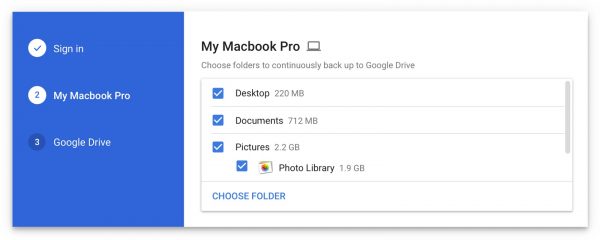
Backup & Sync will be released to users on 28th June and will replace Google Drive and Google Photos desktop uploader. As per the screenshot shared by Google, the tool will let users select which folders they want to be continuously backed up to their Drive account and will keep them in sync. Backup & Sync will play nicely with the Photo Library in macOS which means that users will now be able to keep iCloud and Google Photos in sync.
Google has not announced any reduction in Drive storage costs. Apple doubled the 1 TB tier to 2 TB for iCloud users, while keeping the price at $9.99. Google Drive’s 1 TB costs $9.99 and with the new Backup & Sync app, storage utilization would likely go through the roof.
While Backup & Sync sounds good in theory, it is yet to be seen how effective it would be over the long run. Will it replace something like Time Machine on macOS for users with easy restoration of older file versions? We are not sure and Google has not mentioned anything. Even Google Drive’s main blog or Twitter account do not mention anything about Backup & Sync so expect more details to be revealed soon.
It will be great if Apple steps up and introduces a new version of Time Machine which would backup Macs to iCloud. Considering that 2 TB iCloud storage costs just $9.99, and can be shared with family members, it should be enough to backup a few Macs.


1 comment