By now you must have read our guide on how to jailbreak and unlock iPhone 3G. If you haven’t then you should. Not only does this let you install iOS 4 on your iPhone 3G, it lets you use it with any carrier as well as enable multitasking and backgrounds. One thing that still needs fixing after all this is the Push Notifications which don’t work on hacktivated/unlocked iPhones. Luckily, there’s a free fix for that called Push Doctor.
Follow these simple steps to enable Push Notifications on your unlocked iPhone:
- Make sure you’ve jailbroken and unlocked your iPhone 3G with iOS 4.
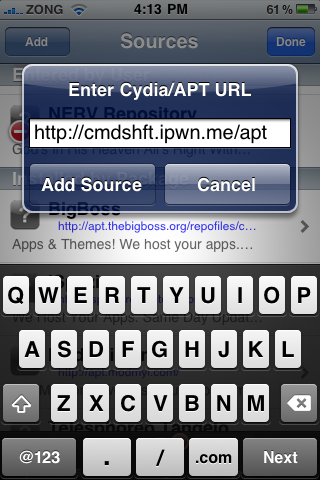
- This is best and easily done on a fresh install of the firmware. Open up Cydia, and add this address to the sources: http://cmdshft.ipwn.me/apt as shown below:
- Once Cydia is done updating, go to the search field and type in Push Doctor. Tap it, and then press install on the top right.
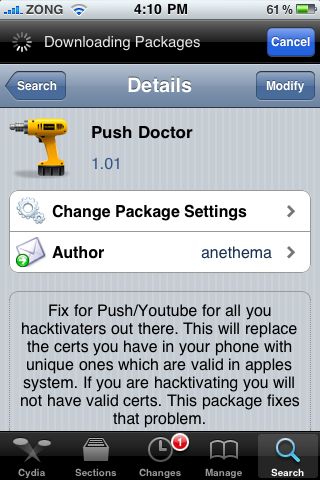
- This takes some time to download and install. Once this is done, restart your iPhone. This is done by holding the power button until the ‘slide to turn off’ message appears. Turn it off and then turn it on again.
- Now you need to add any app from the App Store that uses Push Notifications. Install free apps like Facebook, Meebo, Boxcar etc. When you run them, they’ll tell you that Push Notifications are disabled. Go to settings and enable them. Use the app and allow them to send you Push Notifications when they ask.


That’s it. You should now receive Push Notifications normally. You can test this by using Meebo, the instant messaging app. Send someone a message to send you one back and quickly exit the app. You should get the notification instantly.
Enjoy!
If you have any questions, leave them in the comments below. I’ll be glad to help you out!


Trying to get notifications on my iPhone 3G now running iOS4. When I go to install “Push Doctor” on the confirm screen it says “Note: The requested modifications cannot be applied due to require dependencies or conflitcs that cannot be automatically found or fixed.”
Any ideas? Any other ways that people have got push notifications running?
Thanks for all your help.
i can't install push doctor and i can't add either apt.saurik.com/cydia-3.7 or cmdshft.ipwn.me/apt/. what is happening? and suddenly an icon named terminal shows up in the home screen. what should i do? help me please Imran. Thanks
Is internet working fine on your device? And terminal is an app installed by Cydia. Don't worry, just let it be there.
but the terminal is not working at all. so, can i remove it? will it affect the push notification? and what happened to MMS? help please. thanks
hey Imran. do you know what is happening to MMS? iBooks is totally cool. But MMS is not working. what happened? is there anything i can do to fix it? thanks
No don't remove it. I'm trying to find a fix for MMS. I'll update the guides as soon as I find one.
“Error: Running. Sub-process /usr/bin/dpkg returned an error code (1)”
I have the same erro message as alyshahb.
iOS 4
Fresh install (=> no other app installed)
Firmware 05.11.07
What is wrong?
*iPhone 3G
*Modem 05.11.07
still having problems with facebook push notifications.. my meebo seems working fine.. any tip?? i'm on 3gs running on JB iOS4..
If you're getting push notifications fine with Meebo then the issue must be at Facebook's end. Check settings if push notifications are enabled for Facebook
Im think Facebook hasn't updated to iOS 4 yet… my Beejive wasnt working but they just recently updated and now PUSH works fine.
works thnx 3gs mc model 6.4 bootloader sn0wbreezed
Working like a charm! Thank you!
Installed it & rebooted, but then I went into the app store, and it never loaded. Was this affected by Push Doctor?
It Working!Thank You so much.
don't works anymore
thanks for the info…it finally WORKED but…u REALLY should tell people that after i tried three or four diff fixes(that all seemed to just sit there at the point of downloading for minutes that tuned into hours) turn off your phone, and continue back at the point of looking for pushfix in search(i'm sure it was there after the first time i downloaded and it just sat there….)in cydia and coninuing. THIS info would help ALOT of people that i saw gave up like i almost did…Thanks shane
I have Iphone 2G which i jailbreaked with 3.1.2 , I follow the above procedure and its working fine for me.
Thanks for post
I installed and it was working but after 2 days it didn't work anymore… any ideas?