WhatsApp is rolling out scheduled messages to some iPhone beta testers. You pick a date and time, and WhatsApp sends the message for you, even if the app is closed or your iPhone is offline.

WABetaInfo found the feature in WhatsApp beta for iPhone 26.42.10.19, available through TestFlight. It follows the Android version, which WhatsApp introduced to beta testers last week. On Android, a touch and hold on the send button opens a bottom sheet for the date and time, and scheduled messages are listed in the chat info screen. Scheduling works in individual chats and in group chats.
Touch and hold the send button to schedule a message
Type your message in the chat composer, then touch and hold the send button. WhatsApp opens a scheduling screen with a date and time picker. Scroll to the time you want and tap the green button at the bottom to confirm. The button shows the exact delivery time before you commit.
Once the message is scheduled, WhatsApp shows a confirmation in the chat. Only the person who scheduled the message can see that confirmation.
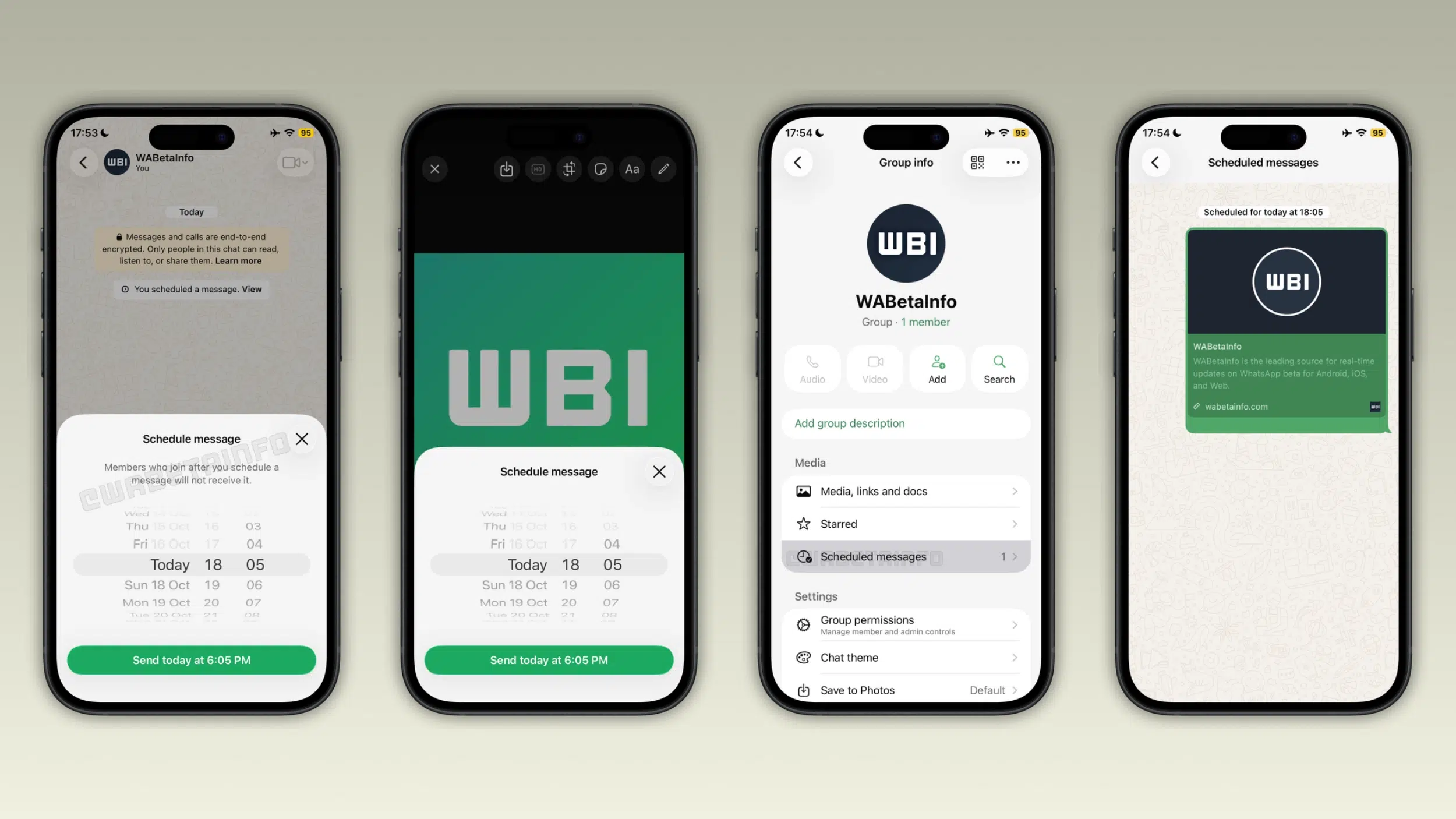
The feature covers text, photos, videos and links. For photos and videos, you can touch and hold the send button right in the drawing editor. You cannot schedule more than one item at once, so each photo or video needs its own scheduled message. Scheduled messages also use end-to-end encryption, the same as any other message in WhatsApp.
Scheduled messages go out between 10 minutes and two weeks later
The shortest delay is 10 minutes from the current time, which leaves you a window to delete the message and change your mind. The longest is two weeks. That is enough range to schedule a birthday greeting days ahead or a quick reminder for later today.
Pending messages sit in a scheduled messages section in the chat info screen. In group chats, the same section is reachable from the group info screen. You can delete a message from there at any time before it is sent, and the recipient does not get a notification when you do.
In group chats, WhatsApp sends a scheduled message only to the members who were in the group when you scheduled it. Anyone who joins afterward does not receive it.
The rollout is limited to some beta testers for now
Scheduled messages are available to some people on the latest TestFlight build, and WhatsApp is adding more accounts gradually. The build number to look for is 26.42.10.19, and you need to be in the WhatsApp TestFlight beta to get it. If the option is missing for you, it should show up over the coming weeks.
WhatsApp has not announced when scheduled messages will reach everyone.