
blackra1n RC3 will be released today for the iPhone 3G and 3GS today and brings hacktivation as a new feature ( check out the change log here) . This is great news for those who had upgraded to 05.11.07 baseband and were waiting for a way to unlock their iPhones! For those who still haven’t jailbroken their iPhone 3G/3GS with OS 3.1.2, here’s a quick guide on how to do that with blackra1n RC3.
- Download iTunes 9 from Apple’s website.
- Upgrade to OS 3.1.2 via iTunes.
- Once your iPhone has upgraded to 3.1.2, download blackra1n. Use Windows XP compatibility mode if you’re using Windows Vista or Windows 7 ( if it crashes ).
- Launch the tool, and click the ‘make it ra1n’ button.
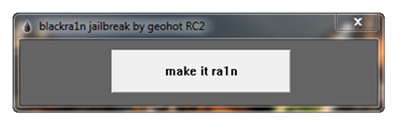
- It’ll take some time while your iPhone is jailbroken. After it’s done, it’ll restart.

- You should see the blackra1n icon on your homescreen now. Open it.
- From here, you can install Cydia, which lets you install jailbreak applications. There is an option to install Rock as well, which is a Cydia alternative.


- Congratulations, you have your iPhone OS 3.1.2 jailbreak up and running.
Note:
- Follow the guide here, if you wish to unlock your iPhone 3G/3GS with blackra1n RC3.
- This guide also applies for jailbreaking iPod Touch. Check this post to see if the jailbreak is tethered or untethered for your iPod Touch model.
If you any problems/issues, let us know in the comments!
For fixing problems and issues, check out our troubleshooting guide:
Fixing issues with iPod Touch and iPhone 3G/3GS OS 3.1.2 jailbreak with blackra1n RC3
Important Note: The new Spirit jailbreak tool has been released which provides an untethered jailbreak. This means that you don’t have to re-jailbreak your iPod Touch 3G or iPhone 3GS after every reboot. Please use this guide to jailbreak all iPod Touch models with OS 3.1.2/3.1.3 untethered using Spirit Jailbreak! and use this one to jailbreak iPhone 3G/3GS with OS 3.1.3/3.1.2 untethered!
Update: iPhone OS 3.1.3 has been released for the iPhone and iPod Touch. We’ve got a new guide up on how to jailbreak iPhone 3.1.3 and iPod Touch 3.1.3 with redsn0w 0.9.4. Don’t upgrade to iPhone OS 3.1.3 if you’re using an unlocked iPhone 3G/3Gs or a jailbroken iPod Touch 2G (MC Model)/3G. The redsn0w guide is for iPhone 2G/3G jailbreak and iPod Touch 1G/2G ( non MC Models) only.


i follow your steps i have a iphone 3g 3.1.2 on a 5.11.7 firmware i click let it snow the phone shuts of and dont turn back on when it says done wait for reboot plz helpp!
Did you try turning it on again manually?
Ok if i decide to do it, and i suceed.,,, can i undo it if it turns out i do not like it… and is it illeagal in ANYWAY
yup as well notin shows up?
do you have to back up your phone in itunes first or will it keep your information on it after jailbroken? also how do you undo jailbreak when you need to?
As soon as I click make it rain, it'll launch into recovery mode and not reboot at all.
Please help! -Sam
x out tunes then try it that worked for me
It does keep the information after jailbreak, but in case the jailbreak isn't successful, it's safer to back up your phone. You can just do a firmware restore to undo the jailbreak.
What issues did you have?
A tethered jailbreak is possible with MC models so far using blackra1n.
LOVELY using uk ipod touch just gotta say LOVELLYYY =D buwahaha not broken or bricken as of YET so very happy LOVELY msn – love_the_poptart@hotmail.co.uk
i have iphone 3g and am running 3.1.2 software. when i click make it rain it turns the phone off and when it reboots it is stuck in the itunes restore mode. the picture of the boy has never poped up and i have to unplug and turn it off and let it reboot
i have iphone 3g and am running 3.1.2 software. when i click make it rain it turns the phone off and when it reboots it is stuck in the itunes restore mode. the picture of the boy has never poped up and i have to unplug and turn it off and let it reboot
mm i tried like 8 times doing this and looking the troubleshoot page. I have ipod touch 2G 16gb. everytime i click the “make it rain button” it just says that restoring message and it never shows the guys face on the ipod. i tried reading all the comments etc and the troubleshooting page, nothing worked.
what other solutions are there?
do you have to back up your phone in itunes first or will it keep your information on it after jailbroken? also how do you undo jailbreak when you need to?
As soon as I click make it rain, it'll launch into recovery mode and not reboot at all.
Please help! -Sam