
George Hotz recently released blackra1n RC 2 for iPhone and iPod Touch which fixed various bugs and issues with the jailbreak tool. A good number of previously disappointed users now have succeeded in jailbreaking their devices. For those who still haven’t jailbroken their iPod Touch, here’s a quick guide on how to do that with blackra1n RC 2.
- Download iTunes 8 from Apple’s website.
- Upgrade to OS 3.1.2 via iTunes. It will be free if you were already using 3.0 on iPod Touch otherwise you’ll have to buy it.

- Once your iPod Touch has upgraded to 3.1.2, download blackra1n. Use Windows XP compatibility mode if you’re using Windows Vista or Windows 7 ( if it crashes ).

- Launch the tool, and click the ‘make it ra1n’ button.
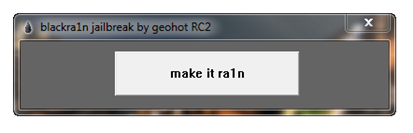
- It’ll take some time while your iPod Touch is jailbroken. You’ll see George’s picture, which means it’s working. After the process is complete, it’ll restart.

- You should see the blackra1n icon in your apps now. Launch it.


- From here, you can install Cydia, which lets you install jailbreak applications. You can also install Rock or Icy as well, which are Cydia alternatives.


- Congratulations, you have your iPod Touch 3.1.2 jailbreak up and running.
Note:
- Only tethered jailbreak is available for iPod Touch 8GB 3G as well as iPhone 3G S, this means that to restart your device after a shutdown, you’ll have to connect it to your Mac or PC and run the jailbreak tool again.
- This will not unlock your iPhone.
- A similar process applies to the Mac version. You will not have to change any compatibility settings, though.
Hope this guide is easy enough for you.
Important: iPhone OS 3.1.3 has been released for the iPhone and iPod Touch. We’ve got a new guide up on how to jailbreak iPhone 3.1.3 and iPod Touch 3.1.3 with redsn0w 0.9.4. Don’t upgrade to iPhone OS 3.1.3 if you’re using an unlocked iPhone 3G/3Gs or a jailbroken iPod Touch 2G (MC Model)/3G. The redsn0w guide is for iPhone 2G/3G jailbreak and iPod Touch 1G/2G ( non MC Models) only.


Can I jailbreak with itune9?
when i run Cydia, it says Reorganising Will close automatically.. is this meant to happen?
how do u do it?????????????????
awesome tool, kudos to George Hotz on a fantastic jailbreak tool.
I didn’t think it would be this easy!
I have an IPod Touch 8g 3rd Gen, with 3.1.2. Just had to restore. I see all my apps in I-Tunes and when I try to sync, some will not sync back onto my touch. Do I have not reinstall these individually or is there another way to get them to all sync back onto my Touch? Thanks
Dude! Thanks! This article is very helpful and Blainra1n jailbroke my iPod Touch quickly and seamlessly.
Does it matter what country you are in when you’re jailbreaking iPod touch?
can this work for ipod touch 2.2.1
Obviously not.
will this still work if i upgrade to iTunes 9?
How do i find the .exe file before i download all that shows up is the make it ra1n screen…my problem is that i cant change to Windows XP compatibility
i jailbroke my iphone with blackrain, everything went well.
i tried to jailbreak my girlfriend’s ipod touch 3g it didnt work
after george’s face, an ipod plug appears and ask me to connect the ipod to itunes.
what can i do to resolve the problem?
cheers
ctrl+alt+dlt and kill all itunes processes
THIS SUCKS I can’t jail brake my i pod because black ra1n is a fagget!!!!!!!!!!!!!!!!!!!!!!!!!!!!!
works great. i used itunes 9 just fine. just one thing…read carefully and follow the instructions!
each time i use blackrain it goes through the process but keeps sayn ihpone cant support sim card and nothing goes through properly after that…please help!
guyz im done.yes really.i ve got ipod touch 3g 8 gig.when i bought it it was on 3.1.1 os but on the way i got it with 3.1.3 upgraded .but i tried to jailbreak it but couldnt.bcoz it got 3.1.3 .for this there is no jail breaking software.but you can jail break it .really .download 2gen ipod touch os,3.1.2, restore it with i tunes.it does accept this firmware. and go for further process to job done
ok so I know how how to go back to 3.1.2!
1. Go to http://www.felixbruns.de/iPod/firmware/
2. Go down to the bottom download button not the Top!
3. click the arrow thing pointing up and down and click iPod 3.1.2 with whichever generation yours is
4. it will bring you to a link and click regular download. You might have to wait a bit for the second thing under premium download to load.
5. when its done downloading open itunes and plug your iPod in.
6. hold shift and click restore. Open the 3.1.2 download and it will restore with 3.1.2.
i clicked make it ra1n, but i’m not seeing the guy’s face… it’s saying to wait for reboot but its not working. Anyone know what i’m doing wrong???
DOOntt work
everything i try dont work, the logo dont show
i have a ipodtouch MC 3rd gen
Helpppppppppppp!! please
i’ll donate to any body that help me
WAO! THIS IS ULTRA SIMPLE
THANKS!
im waiting for the face, so what does it look like? waiting, waiting, waiting!!
I installed blackrain in win7 64 bit with itunes 9 and it worked. I had 3.1.2 firmware installed first and followed the instructions above. My ipod touch is 1st gen. No problems encountered, yet..