The jailbreak for iPod Touch OS 3.1.2 is finally here, and from none other than George Hotz who has been jailbreaking the iPhone since it was first launched. Called blackra1n, this Windows only jailbreak tool works for all iPhones ( 2G, 3G, and 3GS ) as well as iPod Touch 2G and 3G.

Warning 3G and 3GS unlockers, do not upgrade to 3.1.2 using iTunes if you want to keep your unlock. Baseband cannot be downgraded. Check out the dev team’s offerings. Also blackra1n doesn’t hacktivate.
Jailbreak your iPod Touch using blackra1n
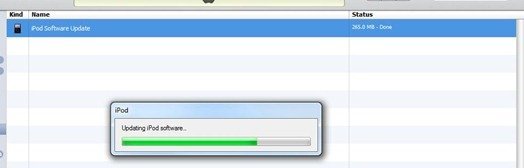
- Upgrade to OS 3.1.2 via iTunes. It’s free if you were already using 3.0 on iPod Touch otherwise you’ll have to buy it.
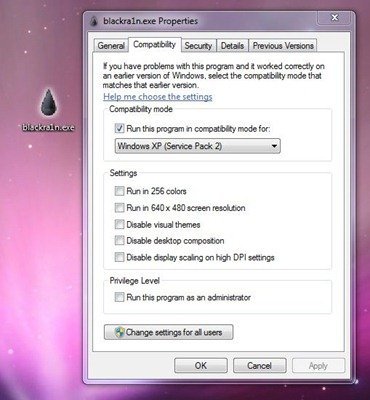
- Once your iPod Touch has upgraded to 3.1.2, download blackra1n. Use Windows XP compatibility mode if you’re using Windows Vista or Windows 7.
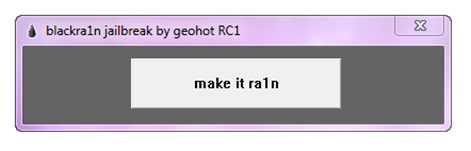
- Launch the tool, and click the ‘make it ra1n’ button.
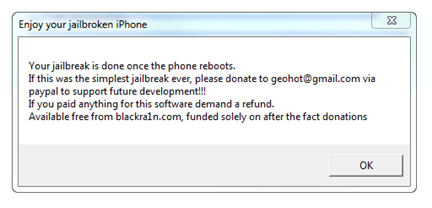
- It’ll take some time while your iPod Touch is jailbroken. You’ll see George’s picture, which means it’s working. After it’s down, it’ll restart.
- You should see the blackra1n icon in your apps now. Launch it.


- From here, you can install Cydia, which lets you install jailbreak applications. You can also try Rock or Icy.


- Congratulations, you have your iPod Touch 3.1.2 jailbreak up and running.
blackra1n isn’t available for OS X yet but expect it soon. If you have any questions, leave them in the comments below.
UPDATE: If your device doesn’t boot again, don’t panic. Just re-run blackra1n while the device is plugged in.
UPDATE 2: Check out the new blog post to fix your issues with jailbreaking iPod Touch.
UPDATE 3: blackra1n for Mac has been released!
UPDATE 4: blackra1n RC2 has been released and contains fixes for many issues.
Important: iPhone OS 3.1.3 has been released for the iPhone and iPod Touch. We’ve got a new guide up on how to jailbreak iPhone 3.1.3 and iPod Touch 3.1.3 with redsn0w 0.9.4. Don’t upgrade to iPhone OS 3.1.3 if you’re using an unlocked iPhone 3G/3Gs or a jailbroken iPod Touch 2G (MC Model)/3G. The redsn0w guide is for iPhone 2G/3G jailbreak and iPod Touch 1G/2G ( non MC Models) only.
Download blackra1n
Here’s an alternate method: How to jailbreak iPod Touch firmware 3.1.2 with Sn0wbreeze
Update 5: Use this guide to jailbreak all iPod Touch models with OS 3.1.2/3.1.3 untethered using Spirit Jailbreak!


same thing happened to me, now its just a black screen
steven that happened to me as well just hold down the power button till it turns off dont worry your data will not be lost. unfortunately black ra1n didnt work for me either
yep same for me. just turn it off then it will come back on just like normal. wonder why it didnt work?
Okay guys you need to read it says to run black rain again if it doesn’t work and it will fix the issue
mine dont reset
mine dont reset
umm 3.1.2 worked for me then i was like so stupid to upgrade now i dotn feel like downgrading it cause i cant find the ipodtouch firmware i can only find the 3.1.2 iphone one but yea tell em if blackra1n gets 3.1.3 firmware ready to go :DDDDDDDDDdd
everything went thru but blackrain app dusn cum up
hellpp!!!!!!!!!!!!11
Dear Blackra1n creaters,
I updated my third generation itouch was upgraded to the OS version 3.1.3 but now I found out about jailbreaking. I’ve tried to down grade my itouch to 3.1.2 but I messed up so it’s still 3.1.3. Please inform me when you create the 3.1.3 jailbreak for the third generation itouch. Thanks for createing blackra1n (which in my opinion is the best jailbreaking system) I appreciate how you made the blackra1n application on the itouch. By!
how long dose it take to rebot
I think you mean ‘Does’.
ok so it juist shows a chord pointing to the itunes logo and i closed black rain than re open now it wont find device pleaseeee help
Erm… do I need wifi for this to work?
will it work for the 3.1.3
Ok, while using blackra1n, I was always stuck at “entering recovery” state. Anyone gets the same problem? any solution to this one? Is it something to do with the OS of my PC?
I upgraded my Ipod Touch 2g to 3.1.2 and now i cant join wifi. i can detect them but i just cant join them
pls help me
7 times nothing
Thanks! This was really easy. Though Cydia took awhile to load, I still am really happy with my results. It has to be the fastest Jailbreak Download around. :)
I have a mc model and 3.1.3 when blackran are u going to have it so I can jailbrak my iPod touch I need help
it work for my itouch…U need to tha have that version 3.1.2 it will not work for that version 3.1.3
when i jailbreack my itouch how do i download the game that i need to pay on i tune and on my itouch could you tell me ???
goto manage on cydia
click edit on top right corner and then click add
type in this url: cydia.hackulo.us
then install “Installous”
you can find most itunes paid apps using this app.
What happens if the jailbreak doesn’t work, cuz I’m seeing alot of negative comments
wow sweet, this worked for me and only took like 2 minutes
!!!
what if it didn’t work? i did it and my ipod doesn’t restore till like 30 minutes later and the blackra1n app does not show, what do i do?