Ed Bott has a good benchmarking review of how Windows 7 handle 512 MB of memory when compared to Windows XP and Windows Vista. I had recently posted about a touchscreen 6000 MHz UMPC with 512 MB running Windows 7 nicely, so it shows that Windows 7 is indeed a step forward in terms of performance on low-end systems. Good news for all you netbook advocates out there ( I’m not one of you, sorry ! ), and bad news for all the Linux zealots as they’ve got competition now. The interesting thing about Ed’s benchmarking is that he used the x64 edition of Windows 7 Beta, x86 version of Windows Vista and don’t know which version of Windows XP.
To keep it fair, he updated all the operating systems with any critical and recommended updates available for them. No third party software was installed apart from Firefox on Windows XP. All these operating systems were testing in a virtual machine. Here are the memory and disk usage results:
 Here’s a graph with numbers normalized with XP = 100:
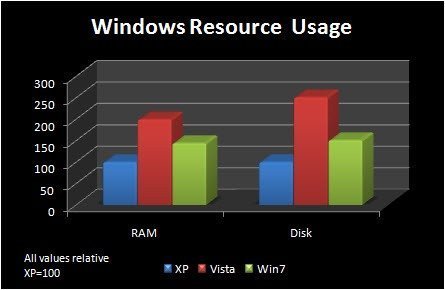
Although the comparison between x64 and x86 version of different operating systems doesn’t seem fair, it does tell a story of how improvements have been made from Vista to 7, and how much of a resource hog Vista was. I wouldn’t take these numbers as the final benchmark, as it’s just a Beta, which Microsoft themselves discouraged users to benchmark. We can hope these numbers to only improve if Microsoft sticks to its game plan with Windows 7. interesting times ahead.


One of the things i don’t like from Vista is the usage of the disk (14.3Gb, that’s wow).
Here we saw the difference between the 3 competitors.
Vista is indeed a resource hog. My games has a far less framerates in Vista than in XP and by example, my system has a score of 5,9 in WEI.
Still XP is much faster than Vista ever could be, even with SP7 or higher.
I don’t depend on servicepacks, but the behaviour of IO throttling which is introduced to deal with the huge overhead.
In XP my memoryprint is a mere 187 MB of 3072 MB and in Vista it is 687 MB without superfetcher.
If I play a game and I close that same game, Vista directly starts to superfetch the freecoming memory to zero. What if I want to play that same game an hour later? Vista should load it again and in XP it stays resident in cache so the game starts insane quickly. What about smart cache?
I wrote a guide to improve Vista’s performance, but XP is still the winner.
I’m curious how Windows 7 will behave on this, but your bench sounds good.
Disc trashing like superfetcher shortens the lifetime of that disc so Vista is expensive too if you must replace that disc. On XP the harddisc keep still and quiet so there’s no load during surfing and during music listening.
But Microsoft still get a chance from me and I’m heading up for version 7 :)
This is a great piece. You really provided a non-biased look at the different OSs. I’m definitely going ot use this as a resource for people with questions in the future.
Cheers,
Ron
Windows Outreach Team
Um. I use win
Hy I m using latest Build of Windows 7 (7201) and its performance is way beyond Vista Even though i have a heavy machine with Core 2 QUAD 4GB Ram and 520 GB hard drive Running XFX 8800 640mb but Vista ultimate was running fine on this machine but few days back i have installed the Latest Build and the Performance of my system is way way up and i m looking forward for the final version
Microsoft keep up the GOOD Work (windows 7 rocks)
With the increased memory and hard drive space required for newer version of windows, it’s hard for me to figure why Vista or even Windows 7 could possibly be an “upgrade” from XP. If what you want is to have your applications run quickly and easily, and what you don’t want is to be worrying about what obnoxious things your operating system is doing, why switch?
If I had a really expensive new computer I probably wouldn’t care, but as it is, the new versions of windows look like a “downgrade” to me! People have hardly even mentioned anything useful you can do with newer windows versions that you can’t do with XP.
Well Microsoft never intended Vista to be an upgrade for certain machines. The machines they were thinking about had the “Vista Capable” sticker on them. Those machines had the DDR2 RAM, for the most part, and could handle 4GB of RAM. If you had a machine that ran this, you should be fine. True, Vista wasn’t the greatest upgrade but it did have some things XP didn’t have. As annoying as it may have been, the UAC wasn’t the demon everyone thinks it is. I repair far less computers with the Vista OS then the XP. Sure, XP has a long run and a lot of people have XP machines but comparing it to the run Vista has had, they both have a large population. UAC has provented some threats, not all, from entering the machine. Sure it’s a pain in the arse to keep hitting continue every time the UAC prompts but I’ve also seen in prompt me when I wasn’t installing anything but something was. Don’t knock it, it was just TO paranoid. Windows 7 has improved on that as it now has four different levels and it’s made so your not always bothered by it.
Windows Vista was ment for entertainment and thats about it. Sure it had a business edition but you can’t deny that it had more for graphics, sound, and video. While business didn’t have it, nor basic which won’t be in Windows 7, Aero was a good idea. It just needed some work which 7 made the improvements needed. Direct X10 was a big one that XP doesn’t have capabilities of. Windows XP has 9.0c and thats it. Sure, nothing right now is out that absolutely needs it but when it does, XP will fail in that department.
Vista wasn’t the upgrade a lot of people thought it would be but it did pave the road for what they wanted. Windows 7 is introducing a lot of things that XP doesn’t have. Disk Encryption for the Professional versions. Also, Windows 7 has been tested on Pentium III’s and does run decently, mind you not great. Windows Vista has been loaded on a machine like this but it struggled.
Considering XP is now legacy and soon to be discontinued for support, I wouldn’t hold on to any XP machine if I was paid to.
Do the research, Windows 7 provides way more then Vista and XP has nothing on it.
So how much of Swap is used together the amount of RAM you listed?
PC players ftw!!