A lot of people have been reporting issues with jailbreaking using the new blackra1n tool by George, especially iPod Touch 3G owners. Some of these issues have to do with the fact that this is a tethered jailbreak for iPod Touch 3G so far. This means that to boot your iPod Touch 3G, it must be plugged into your computer and you must run blackra1n again. For those stuck at a white screen or being unable to boot your device, here are a few important pointers to keep in mind during the process:
- Make sure you’ve updated to 3.1.2. This jailbreak is not for 3.0 or 3.1.
- Download the purplera1n tool to your desktop. Some users have reported issues of the application crashing or having issues with rights on Vista or 7. This should fix those issues. For more convenience. run it as an administrator.
- Make sure no other software is running when you jailbreak to avoid interference.
- If your device doesn’t boot for a long time, hold down the power and home buttons and restart it. If it tells you to connect to iTunes, something must have gone wrong and you might have to restart the process. I know this is annoying, but it has worked for some people after some tries. It does work.
- You won’t lose your data by jailbreaking. Only a fresh firmware restore could mean that your apps might go away, but they can be synced back using iTunes.
- If you have a white screen turn off the device by holding the power and home buttons for 10 seconds and boot it again.
- If iTunes keeps popping up, use CTRL + ALT + DELETE to go to the task manager and kill all iTunes processes which includes iTunesHelper.exe. This can cause interference with the process too.
- Strangely, doing the process on different computers has also worked for some people.
In the end, keep in mind that blackra1n really works. I tried it on my iPod Touch 2G 8GB, and it worked on the first try. It only got stuck when running Cydia for the first time. I had to reboot using the Power + Home buttons trick, but after that, it has been really smooth.
If you have any questions, put them down in the comments below, or you are welcome to start a discussion on our Facebook fan page.
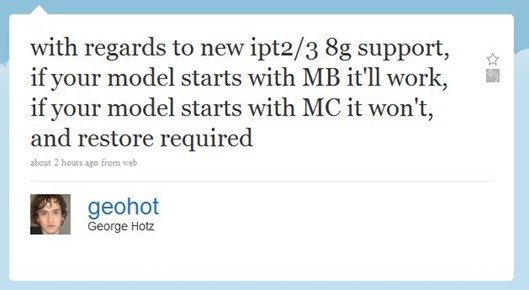
Update: George Hotz has tweeted about an important issue that most people are facing. You’ll have to check if your iPod Touch 2G or 3G, 8GB model starts with MB or MC. For MC it won’t work, so you should restore it back to the old firmware. It works fine for the ones that start with MB. I guess that should answer most of the issues people are facing with blackra1n.
Update 2: blackra1n RC2 has been released which fixes most issues. Read more here.
Important: iPhone OS 3.1.3 has been released for the iPhone and iPod Touch. We’ve got a new guide up on how to jailbreak iPhone 3.1.3 and iPod Touch 3.1.3 with redsn0w 0.9.4. Don’t upgrade to iPhone OS 3.1.3 if you’re using an unlocked iPhone 3G/3Gs or a jailbroken iPod Touch 2G (MC Model)/3G. The redsn0w guide is for iPhone 2G/3G jailbreak and iPod Touch 1G/2G ( non-MC Models) only.
Update: Use this one to jailbreak all iPod Touch models with OS 3.1.2/3.1.3 untethered using Spirit Jailbreak!





i reset setting network my ipod touch to get rid of all my contacts and music etc but it wont work now.the main screen show wire and picture of itunes software.can help me please???
jailbreak it again
i tried jailbreaking my ipod touch 3.1.2 8gb, i tried doing it with black rain i did everything that was said up to the point as run as administator and my itouch got stuck on the itunes wire screen and now it wont do anything what do i do plzz help me!
I have the same problem now, did you fix it ? What did you do ?
Hi, I used the blackrain thing with my ipod touch and when it trys to reboot it get's stuck on a black screen and nothing is happening help plz!
hi i have currently spirit jailbreaked my friends ipod and i have lost the main apps like safar, mail etc how do i get them back?
my phone just entirely broke down since i used blackra1n…. like it wont start anymore… and i really need to fix the thing. so this is what happend: i looked up a tutorial on putting blackra1n on my iphone, i did exactly what was said and it just turned off when i saw the kids face… it wont rebooth anymore… it's a 3.1.2 thing.
omfg it says this device has malfunctioned it cant be readf n cnt turn my itouch off or anything wht do i do
same i need help
i recently jailbroke my 32 gig ipod touch with spirit.. and when i tried to update something for cydia, it said complete at the top then showed a bunch of stuff.. and at the very bottom it said reload springboard. and now its stuck on the loading sign that goes around and around on the page that says reload springboard.. WTF DO I DO?!?????!?!!?!!?!?!? :(
yeah i have a problem like that.. i have a 32 gig and jailbroke it with spirit.. it worked for the first few weeks then i tried to update something for cydia, and now its stuck on the reset springboard screen.. what do i do?
Claire, what you described happened to me lasht week.
The phone (3GS) does not show any signs of operation anymore.
Did you ever get your phone fixed, how ?
Jukka
kso i took jailbreak off my ipod and now its frozen on the apple logo with like a start thingy and wont do anything but shutoff. what do i do?
me to and im freaking wtf do i do its insane its been stuck like this for hours : O
help my ipod touch won’t reboot when i try to use blackra1n it just says waiting for device i been waiting for hours please someone help me i can’t restore it.