JailbreakMe has to be the easiest and simplest jailbreak solution in recent times. Sadly, it doesn’t enable the disabled-by-default-by-Apple iOS 4 features for iPhone 3G and iPod Touch 2G i.e. multitasking and home screen wallpapers. Personally, I wouldn’t dare enabling these features as they take the life out of these devices and slow them down terribly, but some people like to have the option available. You can use zToggle to enable or disable multitasking and background wallpapers on iPhone 3G and iPod Touch 2G on the go.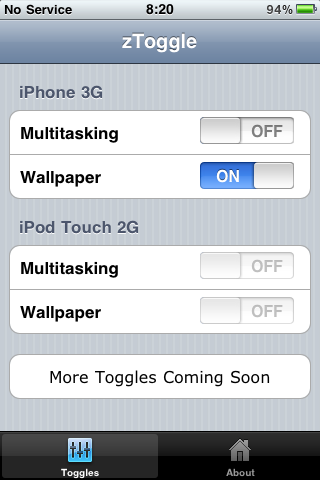
zToggle is available in Cydia for free. It’s a little app that has toggles for multitasking and wallpapers. You can turn either of them on or off after which your iPhone or iPod Touch ill respring and you’ll have that feature working immediately. Pretty neat huh?
![ztoggle2[3]](https://cdn.ithinkdiff.com/wp-content/uploads/2010/08/ztoggle23.png "ztoggle2[3]") This way, you can just enable or disable either of the features or find the right feature that works best for you without sacrificing a lot of performance. Or when things get too slow, just turn them off.
This way, you can just enable or disable either of the features or find the right feature that works best for you without sacrificing a lot of performance. Or when things get too slow, just turn them off.
To use zToggle, you need to have a jailbroken iPhone or iPod Touch running iOS 4. Read more on how to use JailbreakMe to do that.


cool
Brilliant, thank you :D
Dude you a lifesaver!!!!!!!!! Thanks a lot!
It worked for iPod Touch 2g 8Gb. If your iPod is lagging when you use background image just disable it and it won’t lag, multitasking can be turned on if you need it.
Hope this will help to someone!