For all of you who have been waiting with locked iPhone 3G/3GS since ages just because they upgrade their basebands with iPhone OS 3.1.3, the time has come for you to unlock your phones thanks to ultrasn0w 0.93 update by the iPhone Dev team. ultrasn0w 0.93 unlocks basebands 04.26.08, 05.11.07, 05.12.01 and 05.13.04. Here’s a guide on how to jailbreak and unlock your iPhone 3G/3GS with iPhone OS 3.1.3!
- Jailbreak your iPhone 3G/3GS with Spirit. This tool works with OS 3.1.3. Check out our guide here.
- Open up Cydia and tap the Manage button at the bottom. Tap sources, press the edit button on the top and then tap add. Type this repo address in the sources: http://repo666.ultrasn0w.com as shown below.
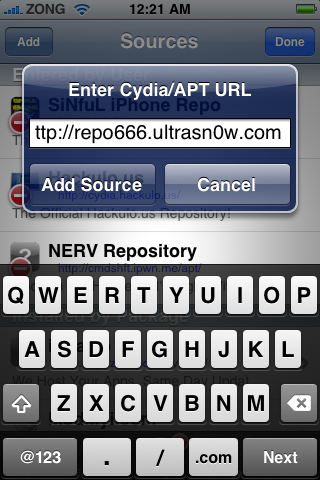
- Tap Add Source and wait for it to upgrade.
- Search for ultrasn0w in the search tab at the bottom. Tap it and press install at the top.
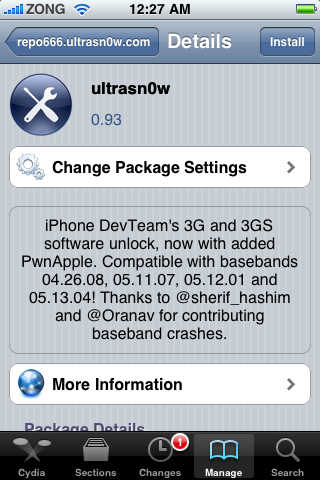
- Wait for it to install and then reboot your iPhone 3G/3GS. When it restarts, you should be able to use it with any carrier you want!


Enjoy!
iOS 4 was released to the public today and already ultrasn0w has been updated to unlock basebands 04.26.08, 05.11.07, 05.12.01 and 5.13.04! The jailbreak tool for iOS 4 isn’t out yet but when it is, we’ll post a complete guide for it! Stay tuned.


Gracias muchachos!
Halelluya, I really looooooooove you guys.You guys roooooooock!!!
It took just five minutes to jailbreak & unlock. LOOOOOOOOVE you guys. You GuyS ROOOOOOOOCK!!!.
Ruben, thxs. I will really appreciate if you could send me link to software you used like spirit and untrasn0w? How do you cydia on your iphone? sorry to be naive but your help will be appreciated.
Mindblowing .. wonderfull thanks a lot …. for all of you who have contributed….
my iphone ius back alive after 5 months…..
yes yes yes finally i unlock my iphone 3g 05.12.01 / 3.1.3 just today using ultrasn0w from cydia weeeeeeeeeeeeee!!!!!!!!!!!!!!!!
how nice.thanks to the dev team.cheers
VERY EASY VERY GOOD UNLOCKING THANK YOU VERY MUCH FOR YOUR ADVICE
Will this work with ITunes 9.2????
Still not working for me. I have Jb'd have cydia. Installed ultrasn0w. Rebooted. Accepts sim with carrier logo but with no reception all calls fail. Plzzzzzzzzzzz help
If your SIM is bring recognized then it's unlocked. I don't see why
you have a reception problem. Try rebooting or rejailbreaking.
Tryd rebooting. No joy. It's even showing my carrier logo and 3g on any sim I put in!! Just won't allow reception. All calls fail.
Frustrating. Will try re-jb and re-do all steps
thanks
I Rebooted and would not recognize the carrier, so I pulled the sim and installed again and it worked!!!! I mean it really worked!!!!!!!!!!! THANK YOU 2 MILLION TIMES!!!@!@!!!!
I know you all are having luck but i wanna make sure that when I follow the steps for my 3g with 3.1.2 and 05.11.07 that after I do the 4.0 OS with the custom restore ipsw that it will re-unlock for me with ultrasnow…
worked like a charm. Thank you. Wish there was something that I could do to return the favor.
hey pls help me i m not recognize the carrier…i tried all Sim card i belongs to India…n calls from last 5 hours…
You aren't the only one having this problem (try searching the issue). I get exactly the same sympoms. 3GS, baseband 05.13.04 on Virgin (operated by T-Mobile). Tried every suggestion I could find (inlcuding disabling 3G)
so how do u install ultrasnow without internet/wifi? help plz i am a noob iphone user
Worked both JB and unlocked. 3gs 3.1.3 5.12.01 thanks!!!!
Hey guys im having a problem with finding ultrasn0w on cydia. It tries to download it but it gives me errors saying “the host couldnt be reach”
Can anyone help me?
I have the same problem, try to add the repo666.ultrasn0w.com and it says it “did not find repository”, how do i fix this???