The WhatsApp Contacts tab is rolling out to some iPhone beta testers, and it takes the place of the Communities tab in the bottom navigation bar. You can still reach your communities through a filter in the Chats tab, so nothing is removed.
The new tab lists your contacts and shows who is online, so you no longer need to open a chat to find out. WABetaInfo found the tab in WhatsApp beta 26.44.10.70 on TestFlight, and WhatsApp is adding more accounts gradually over the coming weeks.
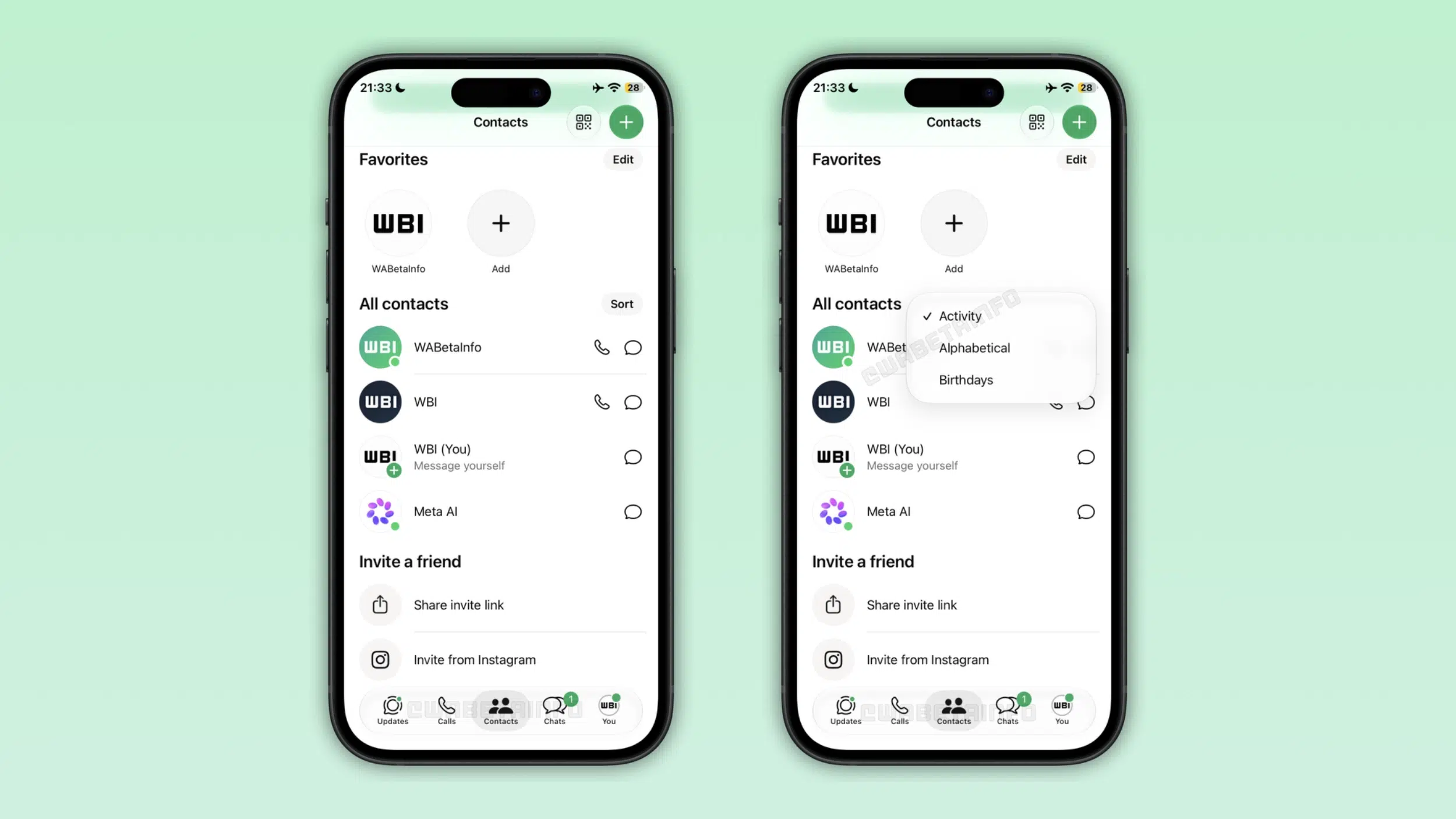
The WhatsApp Contacts Tab Layout
Your favorite contacts sit at the top of the screen, with the full contact list below them. You pick how WhatsApp sorts that list, and the choices are activity, alphabetical order and birthdays.
The activity sort puts contacts who are online right now first, each marked with a green dot. Contacts who were active recently come next, ordered by their last seen time. You can also sort by name, or by whose birthday comes up next.
A green button at the top of the tab opens a new contact screen with fields for first name, last name, phone number and username. With a username saved, you can message someone without asking for their phone number. You can also choose whether WhatsApp saves the new contact to your iPhone address book, and the same screen lets you invite friends to WhatsApp.
Privacy Settings Still Apply
The tab shows a contact’s last seen and online status only when that contact allows it in their privacy settings. If someone hides that information, their entry has no activity data.
The same rule covers you. If you do not share your last seen or online status, other people do not see them in their Contacts tab. You can change these settings from the privacy screen at any time.
Updates Tab Could Be Next
WhatsApp removed the Communities tab from the bar because the Chats tab already has a filter for communities. Status updates have also moved to the top of the Chats tab, and channels may follow. WhatsApp is running experiments in which the Contacts tab eventually replaces the Updates tab, but this build changes only the Communities tab.
You can tell you have the new tab when the Communities tab is gone from the bar and Contacts sits in its place. If it has not appeared on your iPhone yet, keep WhatsApp updated, since the rollout reaches more accounts over time. The Android beta has the Contacts tab as well, and it replaces the Communities tab there too.