By Muhammad Ali  |  143 days ago (October 27, 2009) Microsoft, Windows 7

Fix uTorrent issue for Windows 7

utorrent on Windows 7 It seems that certain Windows 7 users are experiencing problems when running uTorrent. Reports suggest that uTorrent is exceeding memory limits (sometimes reaching the 100% mark), download stops at 99.9%, false reports are produced and so on. In short, uTorrent performance is not up to the mark when running uTorrent with Windows 7. Well AddictiveTips has come up with a potential fix for this problem. We have listed the steps that will solve the problem

How to Fix the Windows 7 uTorrent problem

Following are the steps that will help you in optimizing the uTorrent performance for Windows 7:

  1. Right click uTorrent icon, click on the Properties to open the Property Sheet µTorrent Properties
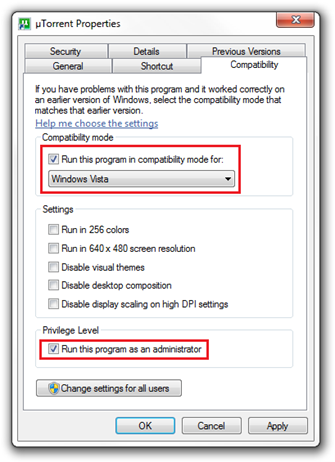
  2. Navigate to the Compatibility Tab
  3. In the Compatibility mode panel, select Windows Vista 
  4. In the Privilege level, Check the "Run this program as an administrator" option
  5. Open the uTorrent app, Go to Options Tab and click on the Preference option.
  6. Now access the Disk Cache  option located under the Advanced branch Preferences (2)
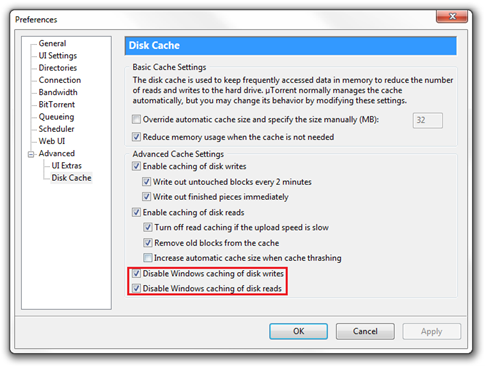
  7. Check "Disable Windows caching of disk writes"
  8. Check "Disable Windows caching of disk reads"
  9. Click Apply button

Also please make sure that uTorrent is added to Firewall Exception

Subscribe to our RSS feed to stay updated with our latest blog posts!

Join our Facebook fanpage or follow us on Twitter to stay up to date on all things different about Microsoft, Apple and the Internet.


11 Responses to “Fix uTorrent issue for Windows 7”

  1. #Windows says:

    Fix uTorrent issue for Windows 7 http://bit.ly/34IPkZ #Microsoft #Windows #Win7 ( hat tip @Addictivetips )(via @imhassan)

  2. Fix uTorrent issue for Windows 7 http://bit.ly/34IPkZ #Microsoft #Windows #Win7 ( hat tip @Addictivetips )

  3. RT @imhassan Fix uTorrent issue for Windows 7 http://bit.ly/34IPkZ #Microsoft #Windows #Win7 ( hat tip @Addictivetips )

  4. Having problems running uTorrent in Windows 7. We got a fix for you http://bit.ly/OzEkM #uTorrent #Windows7

  5. How to Fix uTorrent issue in Windows 7. We got a fix for you http://bit.ly/OzEkM #uTorrent #Windows7

  6. [...] This post was mentioned on Twitter by Imran Hussain and Mark Veldhuis, Muhammad Ali. Muhammad Ali said: Having problems running uTorrent in Windows 7. We got a fix for you http://bit.ly/OzEkM #uTorrent #Windows7 [...]

  7. How to Fix uTorrent issue in Windows 7? I got it for you – http://bit.ly/OzEkM #uTorrent #Windows7

  8. [...] ithinkdifferent Leer más: BitTorrent, problemas, Software, Solución, uTorrent, Windows 7 Enviar a Twitter [...]

  9. [...] Tras ello abre el programa uTorrent ve a opciones y haz clic en preferencias. Pincha en Avanzadas y dentro de avanzadas en caché de disco activa las opciones Desactivar cacheo de escritura de disco de Windows y Desactivar cacheo de lectura de disco de Windows. Para finalizar haz clic en el botón aplicar. [...]

  10. [...] Tras ello abre el programa uTorrent ve a opciones y haz clic en preferencias. Pincha en Avanzadas y dentro de avanzadas en caché de disco activa las opciones Desactivar cacheo de escritura de disco de Windows y Desactivar cacheo de lectura de disco de Windows. Para finalizar haz clic en el botón aplicar. [...]

  11. [...] fouille de lecture de disque de Windows”. Il pique dans le bouton Ok et je liste. Une voie : ithinkdifferent Posted by Vickie J. Denton at 7:54 [...]

Leave a Reply