A lot of users have been sending me in messages lately for a guide on how to root a Samsung Galaxy S with Android 2.2.1 Froyo. The one click root method doesn’t work anymore so you have to put in a little more effort to root your phone now.

Here’s what you need to get started:
- Download Odin3 v1.30
- Download CF-Root package depending on your Android version
- Android 2.2 at least or better, get Android 2.2.1
Also remember to back up your data before you do this. Disable any lag fixes. This is best done on a clean installation of the OS so if you can, back up your data and do a factory reset to avoid any issues what so ever. Done? Here it goes:
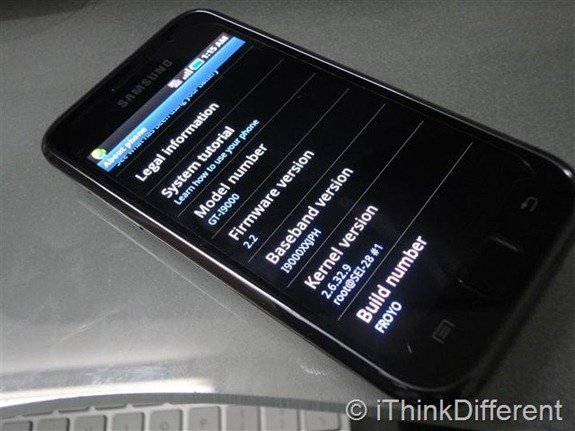
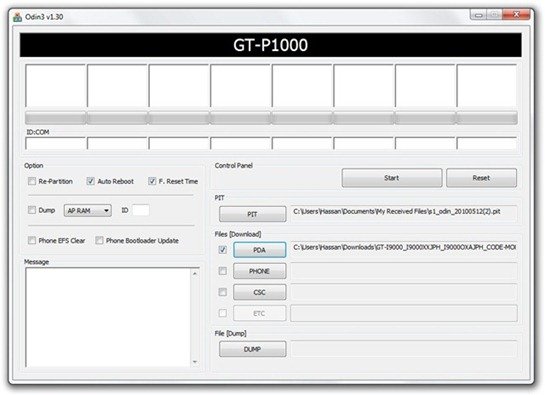
- Start Odin. Click the PDA button and select the CF-Root.tar file from the zip file you downloaded (extract the zip file after you download it). Once again, the downloaded file depends on your Android Baseband version. Check the ending letters of your baseband version in the Settings > About page. It should end in something like JPH or the likes.
- Uncheck re-partition in Odin. Don’t put anything in PIT or any other field. Only PDA is required
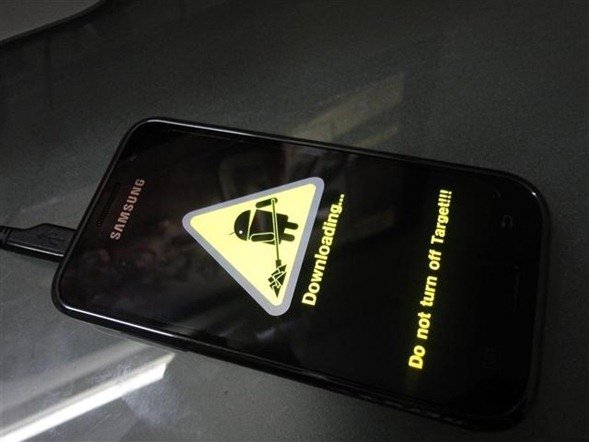
- Now you have to put your phone in download mode. Turn off your Galaxy S. Hold down the power button, volume down button and home button until it shows Downloading… as shown below. The phone is now in Download Mode now. Connect the USB cable to the phone.
- If your phone is connected properly, Odin will highlight that the connection.
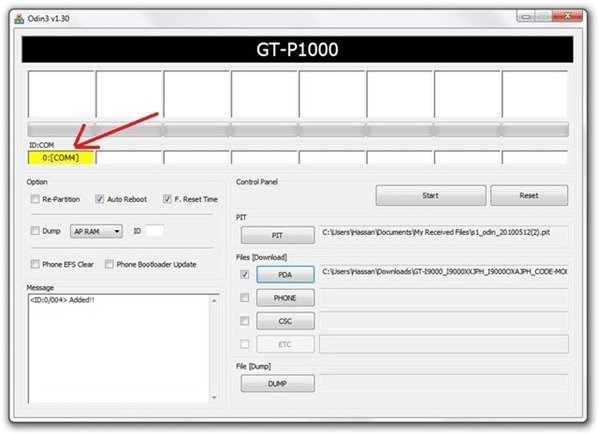
- Now click on start and wait for the process to complete. Your phone should automatically reboot and will be rooted now. To confirm, check if you can see the Superuser icon.


If you run into any problems, do not hesitate to ask us in the comments below.
For more, subscribe to our RSS feed and keep following us on Twitter and Facebook.


is this work with samsung vibrant with t-mobile official froyo 2.2 update
i cant find the CF-Root.tar file?
Which file did u download? I’ll check it for you.
hi, i cant find the right file to download, my build number is FROYO.BOJS5 and i cant find a similar download link for the .tar files. any help would be appreciated! had it rooted before but it went off to repair and came back with froyo 2.2 and auto-updated to 2.2.1 when i connected to my laptop. very annoying lol
if your running a late model of windows, when you unzip the file another .zip file will appear. This is the .tar file. windows see’s it as a .rar file but load it into odin and it will work
I have a Samsung vibrant, it only has Android 2.2 will it still work? If so, what CF-Root file will i need? (Build number: FROYO.UVKA6)
Same here…
Thanks for answering!
Will this method still work if the phone has 2.2, not 2.2.1? Also, will it work on a Vibrant or just the GT-i9000?
i cant get my samsung s 2.2.1 in downloading mode ! can sombody help me ?
does it work with Captivate? or I shoud download a different rom?
Thanks!
I can’t get it onto download mode :(
Yes! this worked on 2.2.1 Galaxy S. Finally a rooted phone. tried so many other ways, Thanks very much.
You’re welcome :)
That 2nd link for CF-Root is to a forum thread with over a 100 pages of posts. The list of specific ROM versions does not include the latest pure stock Froyo 2.2 which is KA6. Seriously, trying to wade through that thread is nuts.
You don’t really need to go through the thread. The links are all included in the first page of that thread. You might have to wait for the latest KA6 for a day or two before it’s rooted with CF-Root.. ( I haven’t checked, don’t have a Galaxy S nowadays )
KA6 is the 2.2 release on the T-Mobile Vibrant. It’s been out over a month. The 100 pages of posts is is an indication of all the problems folks have had, partially due to loading the wrong version of CF-Root. Just a cautionary note.
FYI, here’s a how-to on rooting the Vibrant running the KA6 version of 2.2.
http://forum.xda-developers.com/showthread.php?t=925400
I haven’t done this myself, but others posting in the thread say it works.
(giving back to show I’m not just a complainer)
thanks allot had heaps of trouble then found this site had a bit of trouble then realised i needed to hold the down button to put into download mode then realised i needed to close and re open the program for it to work absolutely genius thx
tryed this. odin failed then disconnected phone and it bricked (i think) shows a phone …..! …. computer
i dont know which cf file to download i have firm 2.1-update 1 baseboard T959UVJI6 Build Eclair.UVJ16 help please
*edited from earlier* hi, i cant find the right file to download, my build number is FROYO.BOJS5 and i cant find a similar download link for the cf files. any help would be appreciated! had it rooted before but it went off to repair and came back with froyo 2.2 and auto-updated to 2.2.1 when i connected to my laptop. very annoying lol. baseband is I9000XXJPY. maybe im looking for the wrong thing, please help me : )
I can’t find the right CF-Root Package. My Firmband is I9000XXJQ1 and I seriously can’t find the right one. And one more thing, I have Samsung Galaxy S with Android 2.2.1
Some one please help!
Sorry for my last message, I meant that my Baseband version is I9000XXJQ1… Please someone read my other message and help me!
did everything as instructed was going find the firmware update was successful the phone rebooted but it is stuck the first part of the reboot with galaxy s gt i9000 on screen constantly i used
CF-Root-JP6-v1.2-Busybox-1.17.1 also tried CF-Root-JPM-v1.2-Busybox-1.17.1 and had the same problem any idea’s where i what went wrong?
I try to root my Galaxy s 2.2.1 with CF root Root\CF-Root-XX_OXA_JVK-v2.4-CWM3RFS.tar
After that it gave me the following messages but the phone never boot,it keep going off and on. Can you help me out or what can i do to get it working back. Thanks.
Added!!
Odin v.3 engine (ID:5)..
File analysis..
SetupConnection..
Initialzation..
Get PIT for mapping..
Firmware update start..
zImage
Removed!!
Completed..
All threads completed. (succeed 1 / failed 0)
Reflash the firmware again and it should work
Hi i’m trying to root in order to install Skype in my phone but i don’t know which steps are the best…(my carrier doesn’t accept that download from the market).
it says:
firmware version 2.2.1
baseband version I9000TUBJP9
kernel version
2.6.32.9 latin.umts@samsung #1
Build number
FROYO.UBJP9
i’ll wait for your answer…
I have a brand new Galaxy S ,
model number SGH-T9959V
with firmware version 2.2.1
Baseband version T959VUVKB5
Kernel Veriosn 2.6.32.9
Build number FROYO.VUVKB5
I can’t find the right root package to download
Any help will be greatly appreciated