A lot of users have been sending me in messages lately for a guide on how to root a Samsung Galaxy S with Android 2.2.1 Froyo. The one click root method doesn’t work anymore so you have to put in a little more effort to root your phone now.

Here’s what you need to get started:
- Download Odin3 v1.30
- Download CF-Root package depending on your Android version
- Android 2.2 at least or better, get Android 2.2.1
Also remember to back up your data before you do this. Disable any lag fixes. This is best done on a clean installation of the OS so if you can, back up your data and do a factory reset to avoid any issues what so ever. Done? Here it goes:
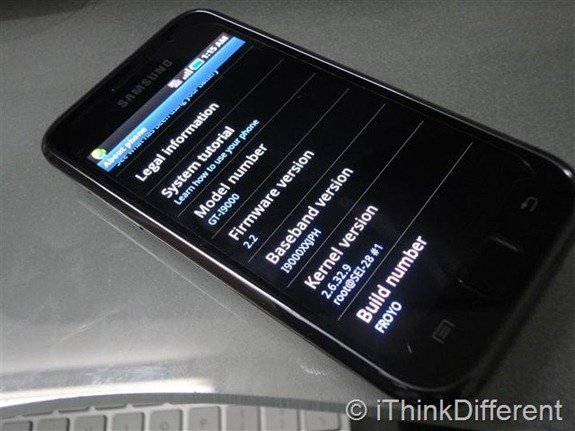
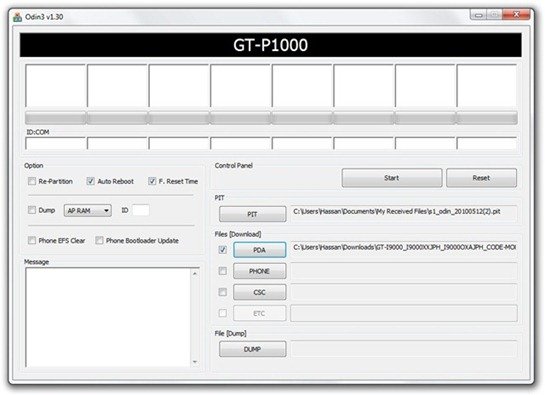
- Start Odin. Click the PDA button and select the CF-Root.tar file from the zip file you downloaded (extract the zip file after you download it). Once again, the downloaded file depends on your Android Baseband version. Check the ending letters of your baseband version in the Settings > About page. It should end in something like JPH or the likes.
- Uncheck re-partition in Odin. Don’t put anything in PIT or any other field. Only PDA is required
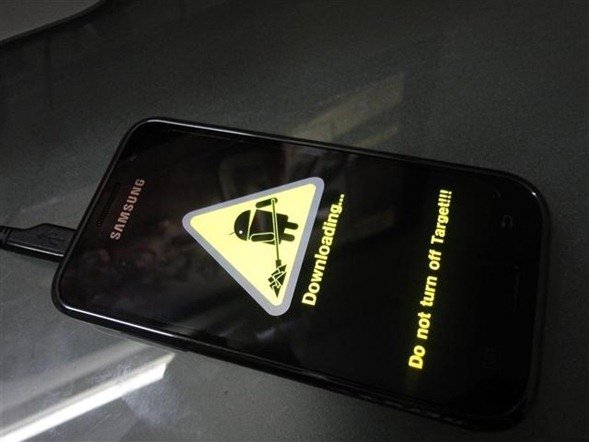
- Now you have to put your phone in download mode. Turn off your Galaxy S. Hold down the power button, volume down button and home button until it shows Downloading… as shown below. The phone is now in Download Mode now. Connect the USB cable to the phone.
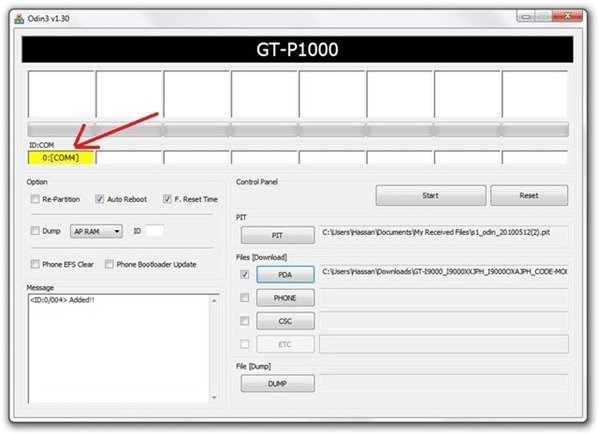
- If your phone is connected properly, Odin will highlight that the connection.
- Now click on start and wait for the process to complete. Your phone should automatically reboot and will be rooted now. To confirm, check if you can see the Superuser icon.


If you run into any problems, do not hesitate to ask us in the comments below.
For more, subscribe to our RSS feed and keep following us on Twitter and Facebook.


i cant find the correct cf-root package
my baseband version is I9000BVJP4
cheers
I have a samsung galaxy S (GT-I9000) (Firmware 2.2) (Baseband Version: I9000JXJPE)
Kernel Version 2.6.32.9 root@SE-S606 #91
Build FROYO.JPJPG
plz Help me to root my phone…which CF-root should i choose….??
Rathish
Hi,
Great stuff Imran! However, I think it should be build version and not baseband version, right? I have baseband: I9000XXJPY and Build FROYO.XWJS5.
/M
Will this work on a Samsung Galaxy S Fascinate SCH-I500, 2.2.1, Froyo? I have tried so many that say it will work for the 2.2.1 Froyo but it never works for the SCH-I500.
How to unroot using this method n Samsung Galaxy s ?
First–thanks, Imran, for the helpful tutorial. Original Froyo 2.2.1 on Vzn Galaxy S SCH-i500 now booting into i9000, boots through to logo, then goes dark. I’m stuck. Can you suggest the next step?
If it’s not booting up, the first step I’ll suggest to you is to boot into recovery and wipe cache etc. If that doesn’t help, try reflashing the ROM. Let me know how it goes
Update on the previous question: Getting an error message on reboot screen: E: can’t mount /dev/blocki/mmcb1k0p1. All this started when I tried to root. Can’t get to SD card with dark screen . . . .
You should reflash the ROM for your phone.
OK–I have not a clue how to reflash the ROM. Can you point me in the right direction?
I have flashed
OK–I have not a clue how to reflash the ROM. Can you point me in the right direction?
I have flashed Stock-1500-VZW-Recovery.tar and have Stock-1500-VZW-Kernel.tar waiting. Avoided everything but PDA. Your help is appreciated more than I can express. I feel like I just got positive news from a biopsy test.
ID:0/005> Added!!
Odin v.3 engine (ID:5)..
File analysis..
SetupConnection..
Initialzation..
Get PIT for mapping..
Firmware update start..
recovery.bin
Removed!!
Completed..
All threads completed. (succeed 1 / failed 0)
Added!!
Removed!!
Added!!
Removed!!
Added!!
Odin v.3 engine (ID:5)..
File analysis..
Enter CS for MD5..
Check MD5.. Do not unplug the cable..
Please wait..
Checking MD5 finished Sucessfully..
Leave CS..
SetupConnection..
Initialzation..
Get PIT for mapping..
Firmware update start..
factoryfs.rfs
Removed!!
Completed..
All threads completed. (succeed 1 / failed 0)
Added!!
Odin v.3 engine (ID:5)..
File analysis..
Enter CS for MD5..
Check MD5.. Do not unplug the cable..
Please wait..
Checking MD5 finished Sucessfully..
MD5 hash value is invalid.
All threads completed. (succeed 0 / failed 1)
All threads completed. (succeed 0 / failed 0)
All threads completed. (succeed 0 / failed 0)
All threads completed. (succeed 0 / failed 0)
Removed!!
Added!!
Odin v.3 engine (ID:5)..
File analysis..
Enter CS for MD5..
Check MD5.. Do not unplug the cable..
Please wait..
Checking MD5 finished Sucessfully..
Leave CS..
SetupConnection..
Initialzation..
Get PIT for mapping..
Firmware update start..
factoryfs.rfs
Removed!!
Completed..
All threads completed. (succeed 1 / failed 0)
Added!!
Odin v.3 engine (ID:5)..
File analysis..
Enter CS for MD5..
Check MD5.. Do not unplug the cable..
Please wait..
Checking MD5 finished Sucessfully..
Leave CS..
SetupConnection..
Initialzation..
Get PIT for mapping..
Firmware update start..
factoryfs.rfs
Removed!!
Completed..
All threads completed. (succeed 1 / failed 0)
Added!!
Odin v.3 engine (ID:5)..
File analysis..
Enter CS for MD5..
Check MD5.. Do not unplug the cable..
Please wait..
Checking MD5 finished Sucessfully..
MD5 hash value is invalid.
All threads completed. (succeed 0 / failed 1)
All threads completed. (succeed 0 / failed 0)
Removed!!
Added!!
Odin v.3 engine (ID:5)..
File analysis..
Enter CS for MD5..
Check MD5.. Do not unplug the cable..
Please wait..
Checking MD5 finished Sucessfully..
MD5 hash value is invalid.
All threads completed. (succeed 0 / failed 1)
All threads completed. (succeed 0 / failed 0)
All threads completed. (succeed 0 / failed 0)
Removed!!
Added!!
Odin v.3 engine (ID:5)..
File analysis..
Enter CS for MD5..
Check MD5.. Do not unplug the cable..
Please wait..
Checking MD5 finished Sucessfully..
MD5 hash value is invalid.
All threads completed. (succeed 0 / failed 1)
Removed!!
Added!!
Odin v.3 engine (ID:5)..
File analysis..
Enter CS for MD5..
Check MD5.. Do not unplug the cable..
Please wait..
Checking MD5 finished Sucessfully..
MD5 hash value is invalid.
All threads completed. (succeed 0 / failed 1)
All threads completed. (succeed 0 / failed 0)
All threads completed. (succeed 0 / failed 0)
Removed!!
Added!!
Odin v.3 engine (ID:5)..
File analysis..
Enter CS for MD5..
Check MD5.. Do not unplug the cable..
Please wait..
Checking MD5 finished Sucessfully..
MD5 hash value is invalid.
All threads completed. (succeed 0 / failed 1)
Removed!!
Added!!
Odin v.3 engine (ID:5)..
File analysis..
Enter CS for MD5..
Check MD5.. Do not unplug the cable..
Please wait..
Checking MD5 finished Sucessfully..
MD5 hash value is invalid.
All threads completed. (succeed 0 / failed 1)
Removed!!
Added!!
Odin v.3 engine (ID:5)..
File analysis..
Enter CS for MD5..
Check MD5.. Do not unplug the cable..
Please wait..
Checking MD5 finished Sucessfully..
MD5 hash value is invalid.
All threads completed. (succeed 0 / failed 1)
Removed!!
Added!!
Odin v.3 engine (ID:5)..
File analysis..
SetupConnection..
Initialzation..
Get PIT for mapping..
Firmware update start..
zImage
recovery.bin
Removed!!
Completed..
All threads completed. (succeed 1 / failed 0)
ROM reflash did it. Thanks again, Imran.
SGS 2.2JPE ; It was the only method that worked on my phone. Now my galaxy s is rooted, clockwork works; thanks a billion.
do have any CF for galaxy s zsjpj froyo?help me
Hello there. i can not find the CF-root for my version: I9000XXJPY – Kernelversion 2,6,32,9 root@DELL105#1 – FROYO.XWJS5
please help me to Root my phone. and later i want to unlock it.
greets,
Mark
Hi,
The root failed, and i accidently removed my usb-cable. Now im stuck with a black screen with a little phone and a little pc. with a little warningsign between them..
can you help me out plz
Laurens
hey. how do i get on the downloading thing? im only get the android system recovery.
i got on the download part but it wont show on odin, is there a new version i have to use?
hi, Imran. I have samsung vibrant and I did by CF-Root-JPH-v1.0
but my phone switching on by I-9000 and it hasnt voice and hasnt market place. so its wrong. and I can not factory reset it bcz its not responding to factory rest.
and I can switch on it to download mode.
please help me.
will this work on my GSG from Telstra it 2.2 froyo dvjp8 I9000tdjp9
???
(I worried to brick my phone so I’ll ask dumb ?? instead its easier to take the NOOB remarks then buy new phone)…..
it sais faild why?@??!!
i did it every thing new and rooted thxx but i don’t see superuser in my apps why plzz help!!!!!
Hi, the link that you provided for the various kernels does not list one for the FROYO.UVKB5 build on my Vibrant. Do you know which kernel i should use?
Do you download the root package to your phone or computer?
i have baseband version i9000jxjpf with 2.2.1 froyo.jpjpm which cf root file i use
I have 2.2.1 and I have been trying to root the phone or atleast flash it through Odin. Never works for me. My cpu doesn’t recognize download mode whatsoever. Yet if I where to use odin and hit Kies Mini on my Samsung Odin recognizes the device.