A lot of users still don’t have access to WiFi. Plus many people, including me, have faced the random death of WiFi on their iPhone 3G recently. While the easiest way to unlock iOS 4 after the jailbreak is to fire up Cydia, download and install ultrasn0w and reboot. There’s yet another simple method to do so, without WiFi, using Cyder II.
Cyder II is a Cydia package manager which lets you connect to your iPhone 3G/3GS and download, install and backup packages and sources using your computer. Sadly, it’s a Windows only app so you can’t follow this guide on a Mac. This guide assumes that you’ve already jailbroken your iPhone 3G or 3GS. Follow our guide here to jailbreak your iPhone 3G and here for iPhone 3GS.
Here’s what to do:
- Download Cyder II
- Connect your iPhone to your computer and launch Cyder II app.
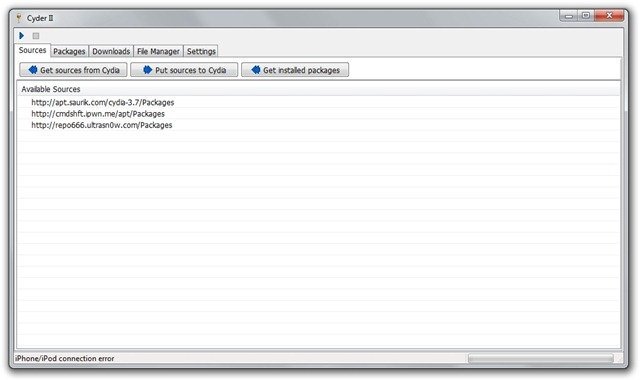
- Add the following repositories in sources by right click anywhere in the field and clicking Add. http://apt.saurik.com/cydia-3.7 and http://repo666.ultrasn0w.com

- Click the play button on the top left. This will download the list of packages from these repositories.

- Switch to the Packages tab and select http://apt.saurik.com/cydia-3.7 in the Source and System in Section. In the list of packages, find Mobile Substrate, right click it and select Download with dependencies.

- Similarly, select http://repo666.ultrasn0w.com in sources and do the same with ultrasn0w. Right click it and select download.
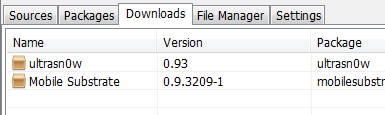
- Now switch to the downloads tab. Right click on each package and download it.
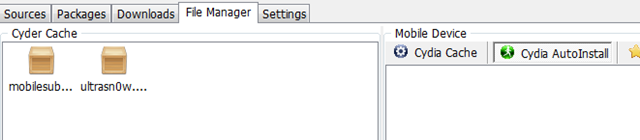
- Switch to the File Manager tab now. Drag and drop the packages from Cyder Cache to the Cydia Auto Install folder.
- Close Cyder.
- The packages will install when you restart your iPhone. You might have to restart the iPhone twice, as in my experience. After the second restart, your phone will find your carrier. Enjoy your unlocked iPhone!


If you have any questions, let me know in the comments. I’ll be glad to help!
Also check out the guides at the following links:
Jailbreak and Unlock iOS 4 on iPhone 3G
Jailbreak iOS 4 on iPod Touch 2G
If you’re using an iPhone 3GS, follow our guide on how to jailbreak and unlock it using PwnageTool.
Push notifications on unlocked and hacktivated iOS 4 on iPhone 3G/3GS can be fixed by following our guide here.


Thanks for posting! I recently moved to Costa Rica from the States and I brought my iPhone – had the plan canceled and thought it would be easy to jailbreak and unlock after the fact (not so much).
Without ability to access wifi, I found out about Cyder 2. I was installing ultrasn0w without the other packages and it was causing my phone to enter the never-ending apple reboot loop after the restart.
So now that I've followed your instructions, the phone is not going into reboot, BUT it does say “no service” and the network is not working, either despite the little wifi logo showing full strength. Just to clarify – I am using an activated SIM card from a local carrier.
Any ideas as to what I should do?
Any solution yet? I got exactly the same problem. No Wifi and Unlock needed. I did reboot twice, the 2nd time results the never-ending apple reboot and keeping reboot again and again.
Have you followed the instructions to Imran’s post?
ahh…pls ignore my previous post. it’s my bad. i got the fix. The package and its dependency are needed to be installed at the same time!
Check Cydia to see if ultrasn0w is installed. You might also want to try restarting again if it's installed.
Hi, I jail broke iOS4 my Iphone using PwnageTool. Previously it was 3.0 and jail broke it but was never able to unlock it. I am facing issue again after jailbreaking iOS4. Cydia is installed on IPhone and when I am using Cyder, its not getting connected to my IPhone..Its giving Iphone/Ipod connection error. Please help.
I am using Windows 7 on Mac using parallel desktop.
Appreciate your help.
Thanks for the article …. it really helped … i have just restarted my iPhone .. lets c
Cooooooooooooooooooool ………………. it workedddddd………
Thanks alot Imaran … you just made my day .. Thanks alot …
Works like a charm! thanks a LOT!
Try doing this from a Windows PC.
You're welcome :)
thank a lots n lots :-) u saved my life
Thanks for the quick reply :)
ultrasn0w is installed and I have restarted a dozen times – still no service.
OMG YESSSS!!! As I was replying, I decided to go into the settings and mess around with options to try and maybe jump start the service somehow since restart did not work and – IT WORKED! I toggled airplane plane off and then on again and suddenly I have service.
You are AWESOME! Thank you soooo much!
great tutorial :P u saved my ass
help….my phone is stll saying invalid sim
thank you so much it works can i use itunes as normal??
mate i cant thank you more.. fixed and is working like a charm. i spent over 9 hours on this so im VERY happy. thank you!
You're welcome! Glad to have helped
IMRAN!! Is there any way to get wifi working? I jailbroke 4.0 with redsnow and unlocked using our method but wifi is still dead. Doesnt come up at all, I reset network settings and still no go. Any Ideas??
This is a known issue with iPhone 3G. The WiFi dies without warning
sometimes. This happened to me too, and I've been unable to find any fix for
it. It's a hardware issue not a software one.
actually tried it and i do not know if it works, my iphone is currrently @ custom ios 4 but the default carrier is at&T but im in canada and uses rogers as sim card now, i lost my at&t sim card and tried this to hopefully work . but it still did not. restarted it heaps but still stuck on the itunes and emergency calls only logo. any help? its much appreciated
Thanks alot dude you relly saved my phone
Hi Imran, I have checked Cydia to see if ultrasn0w is installed, in cydia/sources – empty, any ideas? I am still getting invalid sim
jailbreak with spirit and cyder can see my iphone