A lot of users still don’t have access to WiFi. Plus many people, including me, have faced the random death of WiFi on their iPhone 3G recently. While the easiest way to unlock iOS 4 after the jailbreak is to fire up Cydia, download and install ultrasn0w and reboot. There’s yet another simple method to do so, without WiFi, using Cyder II.
Cyder II is a Cydia package manager which lets you connect to your iPhone 3G/3GS and download, install and backup packages and sources using your computer. Sadly, it’s a Windows only app so you can’t follow this guide on a Mac. This guide assumes that you’ve already jailbroken your iPhone 3G or 3GS. Follow our guide here to jailbreak your iPhone 3G and here for iPhone 3GS.
Here’s what to do:
- Download Cyder II
- Connect your iPhone to your computer and launch Cyder II app.
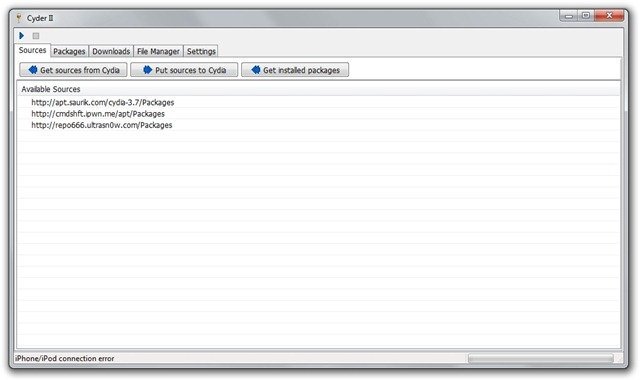
- Add the following repositories in sources by right click anywhere in the field and clicking Add. http://apt.saurik.com/cydia-3.7 and http://repo666.ultrasn0w.com

- Click the play button on the top left. This will download the list of packages from these repositories.

- Switch to the Packages tab and select http://apt.saurik.com/cydia-3.7 in the Source and System in Section. In the list of packages, find Mobile Substrate, right click it and select Download with dependencies.

- Similarly, select http://repo666.ultrasn0w.com in sources and do the same with ultrasn0w. Right click it and select download.
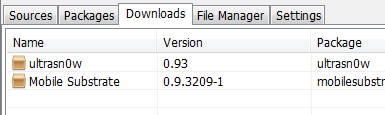
- Now switch to the downloads tab. Right click on each package and download it.
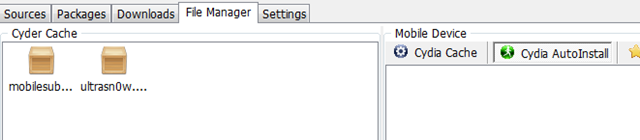
- Switch to the File Manager tab now. Drag and drop the packages from Cyder Cache to the Cydia Auto Install folder.
- Close Cyder.
- The packages will install when you restart your iPhone. You might have to restart the iPhone twice, as in my experience. After the second restart, your phone will find your carrier. Enjoy your unlocked iPhone!


If you have any questions, let me know in the comments. I’ll be glad to help!
Also check out the guides at the following links:
Jailbreak and Unlock iOS 4 on iPhone 3G
Jailbreak iOS 4 on iPod Touch 2G
If you’re using an iPhone 3GS, follow our guide on how to jailbreak and unlock it using PwnageTool.
Push notifications on unlocked and hacktivated iOS 4 on iPhone 3G/3GS can be fixed by following our guide here.


This means that you must have missed a step in the guide. If followed correctly, the ultrasn0w should appear. After copying in Cyder, did u reboot your iPhone?
yes rebooted the phone twice…i even went through the instructions again…i see the packages in cydia auto install tab
I’ve rebooted my phone about seven times, still nothing. I have a flat line where the company name used to be.
I’ve rebooted my phone about seven times, still nothing. I have a flat line where the company name used to be.
finally my iPhone was unlocked…only issue is that springboard keeps on crashing and iPhone is always in safe mode after restart..seems unable to autofix itself.
how do you address this thing?
Seems to be an issue with Cydia, or some jailbreak app. Did u install any?
finally, i got rid of the pesky safe mode issue by uninstalling winterboard..now the 'safe mode' is gone!
thanks to google. :)
Yea that's what I thought. Cydia app messing up.
Hello Please help me out. i have jailbreak with spirit and follow this guide to unlock without wifi and i have re start my iphone many time but still unable to use the T -mobile sim. PLease help =(
update: I used redsn0w rather than spirit to jailbreak and cyder then worked fine
Hi Clockbuyer, i had the same problem using Spirit, so I did a restore then did a jailbreak using RedSn0w rather than Spirit, I then ran Cyder, followed the instructions above and everything worked fine, Hope this helps.
I have the same problem. I found a PC to use (I'm a Mac user), hooked up my iPhone, followed all the steps, and nothing. I'm used Pwnage Tool to jailbreak. My problem is I'm in China. I have wireless on my iPhone, but I can't access saurik's stuff, even with a proxy. Without the proxy nothing downloads; with the proxy, I get a http://1.1 400 error.
hey. after i unlocked the phone, it worked fine once. after that the network bars dont show on the top left. how do i fix this ?
hey. there is also this little issue. the network seems to disconnect after like 1 minute. any suggestions ?
I seriously have to thank you very much. I thought my iPhone was gone. I spent 18 hours working on this until I fould this.. Thanks again.
Imran, i've tried your way, but in sources in Cydia i can't see the files, i think this is because i jailbroke my iphone 3g using Spirit, i just wanted to know, would redst0rm work to jailbreak my iphone, as it has 3.1.3 firmware and 5.12.01 baseband, and i am not sure if redstorm is compatible to jailbreak it, if you can let me know, it would be help me out a great deal. thanks
Thanks a lot, seriously. I tried to actualize to 4.0 without knowing i had lost wifi forever (grey icon) days ago, I thought it was that there were no wifi servers around. So i was totally dissapointed about having an ibrick, jailbroken, but jailbricked. But now i reached your post and light covers my iphone :D Thanks!
thanks for this you save my other iphone 3g without wifi
i have 3G ios4.0 5.11.07 with no wifi. i've tried this method but i just can't Drag and drop the packages from Cyder Cache to the Cydia Auto Install folder. i even think that cyder doesn't make contact with my iphone… anyone who can please help?
Thank you so much.
Worked first try with pwnage tool jailbroken 3G. (from 3.1.2 to 4.0)
Is there a reason why you recommend redsnow for jailbreaking an iPhone 3G, or is this just a personal preference?
Thanks again …
redsn0w works with both Windows and Mac and it’s relatively simpler to use than Pwnagetool which is Mac only. Even the iPhone Dev Team advices to stick with redsn0w if you don’t need the advanced features of Pwnagetool.
redsn0w works with both Windows and Mac and it's relatively simpler to use than Pwnagetool which is Mac only. Even the iPhone Dev Team advices to stick with redsn0w if you don't need the advanced features of Pwnagetool.