A lot of users still don’t have access to WiFi. Plus many people, including me, have faced the random death of WiFi on their iPhone 3G recently. While the easiest way to unlock iOS 4 after the jailbreak is to fire up Cydia, download and install ultrasn0w and reboot. There’s yet another simple method to do so, without WiFi, using Cyder II.
Cyder II is a Cydia package manager which lets you connect to your iPhone 3G/3GS and download, install and backup packages and sources using your computer. Sadly, it’s a Windows only app so you can’t follow this guide on a Mac. This guide assumes that you’ve already jailbroken your iPhone 3G or 3GS. Follow our guide here to jailbreak your iPhone 3G and here for iPhone 3GS.
Here’s what to do:
- Download Cyder II
- Connect your iPhone to your computer and launch Cyder II app.
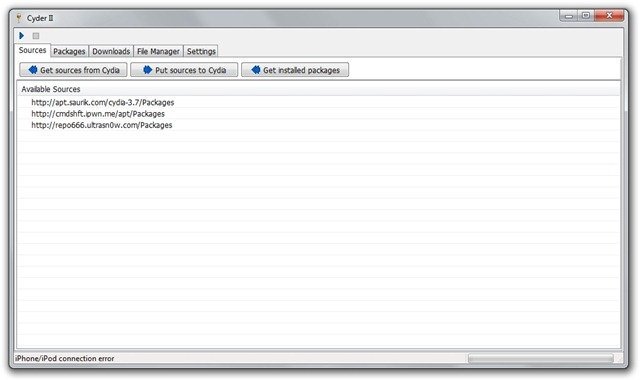
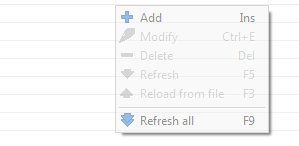
- Add the following repositories in sources by right click anywhere in the field and clicking Add. http://apt.saurik.com/cydia-3.7 and http://repo666.ultrasn0w.com
- Click the play button on the top left. This will download the list of packages from these repositories.

- Switch to the Packages tab and select http://apt.saurik.com/cydia-3.7 in the Source and System in Section. In the list of packages, find Mobile Substrate, right click it and select Download with dependencies.

- Similarly, select http://repo666.ultrasn0w.com in sources and do the same with ultrasn0w. Right click it and select download.
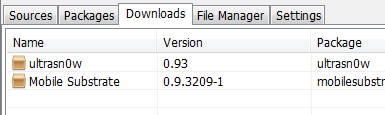
- Now switch to the downloads tab. Right click on each package and download it.
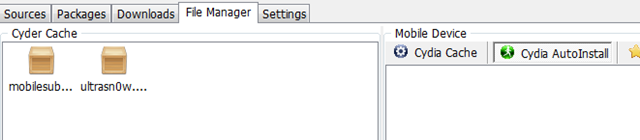
- Switch to the File Manager tab now. Drag and drop the packages from Cyder Cache to the Cydia Auto Install folder.
- Close Cyder.
- The packages will install when you restart your iPhone. You might have to restart the iPhone twice, as in my experience. After the second restart, your phone will find your carrier. Enjoy your unlocked iPhone!


If you have any questions, let me know in the comments. I’ll be glad to help!
Also check out the guides at the following links:
Jailbreak and Unlock iOS 4 on iPhone 3G
Jailbreak iOS 4 on iPod Touch 2G
If you’re using an iPhone 3GS, follow our guide on how to jailbreak and unlock it using PwnageTool.
Push notifications on unlocked and hacktivated iOS 4 on iPhone 3G/3GS can be fixed by following our guide here.


Hey dude you are the best man!! I got this wifi trouble and I did jus what you say and it is working I just want to ask something, do you know if there is a solution for this wifi problem?
It's a hardware issue. Best chances are to get it repaired from an expert.
When select Packages and Ultrasnow, select all, not system, it will show yoz ultrasnow 0.93, and follow further instruction
hey …plz help…i have done the entire process n d cydia application is shown d uptdates also as yellow snow …n saurik bt my phone is still nt unlocked….wat should i do….
Woooooooooooooooooow, you are the best, after a month of trying to unlock the iPhone 3G with OS4 this is the best result :)))))) thanks in a million…………….exactly as it is written step by step, for those who couldn't unlock the phone please read carefully each step while unlocking the phone so it can work :)))))))))))) Thx again
Big hugs for u…..it works man works
ur r my king…
thanks aloooooooooooot, you are the best one,,, thank you very much
no really…. u r the shit.
AMAZING AMAZING AMAZING
Thank you
Had have a hard time…now it works again. Thank you so much. It´s just amazing…
I AM FROM JAMAICA AND I SAY THIS MAN IS THE BEST RESPECT AND THUMBS UP TO U MAN!!!
help!!! i tried this on my iphone 3g version 3.1.3 and my carrier is still locked… pls. help.. i tried the steps above… still no go…
You are the frikin’ MAN!!!!!
Dude…You are awesome…You would not believe I spent 5 days watching youtube video to Unlock my 3G 3.1.3 and none worked.
I tried steps that are above and It worked at the first go…
Thank you so much…
You are too good man. You ROCK !!!
After struggling for so long, your guideance has braought a smile & a Network on my iPhone 3GS with iOS 4.0.2.
I can´t thank you enough!! it´s very clear how to do it and worked perfectly!!
Hey dude, you are the man. I thought this one also the same. But OMG it’s unlocked. man thank you so much and blessing you for saving my money. I don’t have words to say how much I appreciate you. thank you again.
Thanks a ton dude.. you rock.. Can’t thanks you enough.
thank A LOT it feel good to be back on line