A lot of users still don’t have access to WiFi. Plus many people, including me, have faced the random death of WiFi on their iPhone 3G recently. While the easiest way to unlock iOS 4 after the jailbreak is to fire up Cydia, download and install ultrasn0w and reboot. There’s yet another simple method to do so, without WiFi, using Cyder II.
Cyder II is a Cydia package manager which lets you connect to your iPhone 3G/3GS and download, install and backup packages and sources using your computer. Sadly, it’s a Windows only app so you can’t follow this guide on a Mac. This guide assumes that you’ve already jailbroken your iPhone 3G or 3GS. Follow our guide here to jailbreak your iPhone 3G and here for iPhone 3GS.
Here’s what to do:
- Download Cyder II
- Connect your iPhone to your computer and launch Cyder II app.
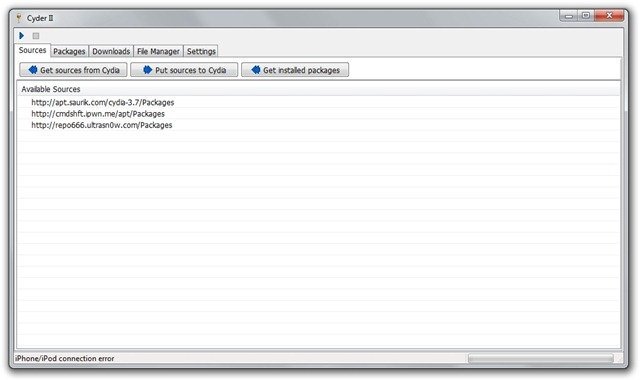
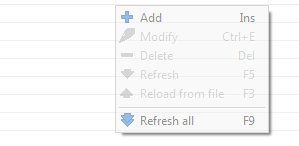
- Add the following repositories in sources by right click anywhere in the field and clicking Add. http://apt.saurik.com/cydia-3.7 and http://repo666.ultrasn0w.com
- Click the play button on the top left. This will download the list of packages from these repositories.

- Switch to the Packages tab and select http://apt.saurik.com/cydia-3.7 in the Source and System in Section. In the list of packages, find Mobile Substrate, right click it and select Download with dependencies.

- Similarly, select http://repo666.ultrasn0w.com in sources and do the same with ultrasn0w. Right click it and select download.
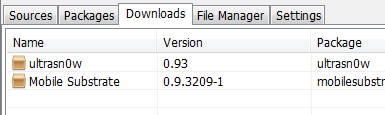
- Now switch to the downloads tab. Right click on each package and download it.
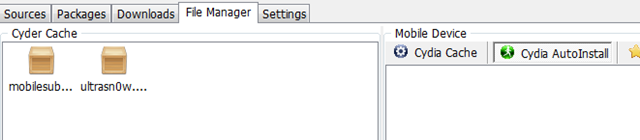
- Switch to the File Manager tab now. Drag and drop the packages from Cyder Cache to the Cydia Auto Install folder.
- Close Cyder.
- The packages will install when you restart your iPhone. You might have to restart the iPhone twice, as in my experience. After the second restart, your phone will find your carrier. Enjoy your unlocked iPhone!


If you have any questions, let me know in the comments. I’ll be glad to help!
Also check out the guides at the following links:
Jailbreak and Unlock iOS 4 on iPhone 3G
Jailbreak iOS 4 on iPod Touch 2G
If you’re using an iPhone 3GS, follow our guide on how to jailbreak and unlock it using PwnageTool.
Push notifications on unlocked and hacktivated iOS 4 on iPhone 3G/3GS can be fixed by following our guide here.


there are no words to discribe how grateful i am, thank you for shareing your knowledge. i have a question if i may, my iphone is unlocked but it still says no service, could it be my sim card? im going to try another one and see. any who? thank you thank you thank you.
HELP!!! please. same thing with ebony after i followed the steps still says no service, when i went to settings>carrier it says ” unable to load network list” and also if go to settings>general>about carrier says Carrier 7.0
please I need your help desperately
Many thanks :)
big thanks works like charm
Hi!
After I restart the iPhone, it recognizes Tmobile in the status bar but remains on the “emergency calls only” screen. do i have to restart the phone with my Tmobile sim card inside?
Sorry.. Im new trying to do this.. and couldnt made my iphone find my carrier after the reseting.
Do I need to do something on the settings tab from Cyder 2?
Hello, me again…
I Restore my iphone 3G with iPhone1,2_4.1_8B117_Restore and then used the redsn0w_win_0.9.6b1 to jailbreak.
The wifi is recognized but didn’t work so I’m following the steps with Cyder II, and can’t get them to my iphone after restarting.
plz give me iphone ios 4.0 unlocker software to unlock my iphone
Dear it really works.
i’ve unlocked my iphone 3g.
thankx a lot.
Thumbs up for Imran, but those who will use this method do not forget to install Debian packager, otherwise u can fail to unlock
i wana try to unlock my iphone 3g 4.0. with cydia
i cant get in ultrasn0w 0.93 in source of http:/repo666.ultrasn0w.com..
plz help me…………
after unlocking…
my iphone still SEARCHING…….
and i got a message ” Unable to load network list”.
what should i do………
plz help me………..
Thanks a lot Imran, I don’t have WiFi here but thanks to your great tutorial i managed to unlock my iphone 3G . I love you man ur the best.
would i be able to do this with the new ultrasnow update? (for 5.14 baseband)
There is no Ultrasn0w package showing up for me.
I have added http://repo666.ultrasn0w.com/Packages as a source, I have refreshed it, I have set search criteria to ‘all’ but no Ultrasn0w.
Any ideas on how to progress from here?
not getting the packages for ultrasn0w i’m i doing something wrong
err i cant find ultrasnow or any packages in http://repo666.ultrasn0w.com/Packages, does anybody know how to solve this??? thanks in advice
i have the same problem. pls help. when i right click on http://repo666.ultrasn0w.com i can’t find Download. pls help. i need this very urgently.
OMG you rock my boat man. OS4.1 upgrade on iPhone 3G (with jailbreak) would not unlock. Used Cyder2 and I am a very happy bunny. Spent many hours trying to fix this!!!!!!!!!!!!!
it works!!!! thank you!!