A lot of users still don’t have access to WiFi. Plus many people, including me, have faced the random death of WiFi on their iPhone 3G recently. While the easiest way to unlock iOS 4 after the jailbreak is to fire up Cydia, download and install ultrasn0w and reboot. There’s yet another simple method to do so, without WiFi, using Cyder II.
Cyder II is a Cydia package manager which lets you connect to your iPhone 3G/3GS and download, install and backup packages and sources using your computer. Sadly, it’s a Windows only app so you can’t follow this guide on a Mac. This guide assumes that you’ve already jailbroken your iPhone 3G or 3GS. Follow our guide here to jailbreak your iPhone 3G and here for iPhone 3GS.
Here’s what to do:
- Download Cyder II
- Connect your iPhone to your computer and launch Cyder II app.
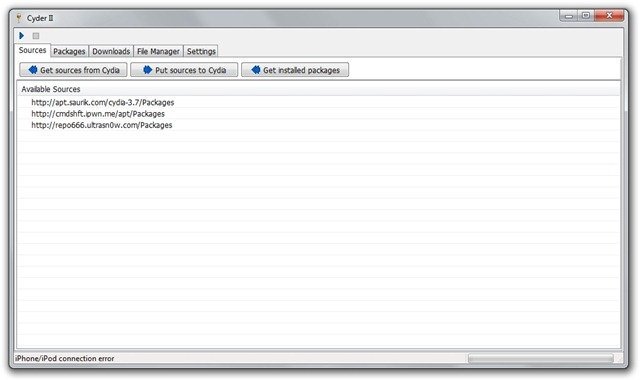
- Add the following repositories in sources by right click anywhere in the field and clicking Add. http://apt.saurik.com/cydia-3.7 and http://repo666.ultrasn0w.com
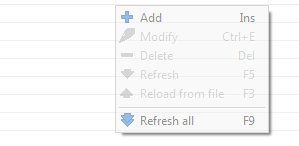
- Click the play button on the top left. This will download the list of packages from these repositories.

- Switch to the Packages tab and select http://apt.saurik.com/cydia-3.7 in the Source and System in Section. In the list of packages, find Mobile Substrate, right click it and select Download with dependencies.

- Similarly, select http://repo666.ultrasn0w.com in sources and do the same with ultrasn0w. Right click it and select download.
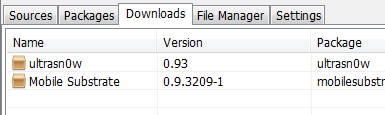
- Now switch to the downloads tab. Right click on each package and download it.
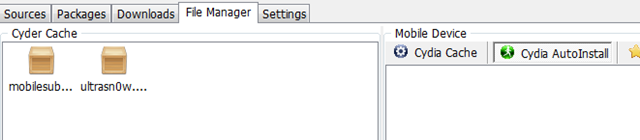
- Switch to the File Manager tab now. Drag and drop the packages from Cyder Cache to the Cydia Auto Install folder.
- Close Cyder.
- The packages will install when you restart your iPhone. You might have to restart the iPhone twice, as in my experience. After the second restart, your phone will find your carrier. Enjoy your unlocked iPhone!


If you have any questions, let me know in the comments. I’ll be glad to help!
Also check out the guides at the following links:
Jailbreak and Unlock iOS 4 on iPhone 3G
Jailbreak iOS 4 on iPod Touch 2G
If you’re using an iPhone 3GS, follow our guide on how to jailbreak and unlock it using PwnageTool.
Push notifications on unlocked and hacktivated iOS 4 on iPhone 3G/3GS can be fixed by following our guide here.


finally this was the option saved me…
only one change, i was not able to download ultrasnow from http://repo666.ultrasn0w.com,
instead i downloaded ultrasnow.deb separately and copied to the downloaded folder manually…and then to auto install..rebooted….it worked
thanks a lot…
you can use apt.178.com as an alternate repository if the ultrasn0w original does not work.
So what do I choose using the apt.178.com when in the Packages tab? Do I choose “Remove Recents” as the system?
I can download from http://apt.saurik.com/cydia-3.7 on the packages tab, but when i select the ultrasn0w tab, the list is empty. i use an iphone 3gs with iOS 4.2.1
what if repo666 doesnt show anything
It was posted here few times,but with out being answered. ultrasnow from http://repo666.ultrasn0w.com is empty, no files being downloaded in Cyder II. I downloaded ultrasn0w.deb file but is there a way to add it manually to Cyder?
thanks in advance
i tried to download softwares from repo666.ultrasn0w.com through cyder 2
but it is unable to load the softwares from repo666.ultrasn0w.com
what should i do???
i am trying to unlock iphone 3g on 4.1 baseband without wifi
THank youuuuuuuuuuuuuuuuuuuuuuuuuuuuuuuuuuuuuuu
Help!! am lost in step
6. Similarly, select http://repo666.ultrasn0w.com in sources and do the same with ultrasn0w. Right click it and select download.
I can’t find ultrsn0w in my Download tab?
What am i doing wrong???
cyder isnt connecting with my iphone :(