It didn’t take long for the iPhone Dev Team to come up with a jailbreak solution for iPhone OS 3.1.3 which was recently released for iPhone 2G, 3G, 3GS, iPod Touch 2G and 3G. redsn0w 0.9.4 jailbreaks and unlocks iPhone 2G, jailbreaks iPhone 3G, iPod Touch 1G and iPod Touch 2G (non-MC Models). If you have other models, we suggest that you hold back from upgrading to firmware 3.1.3.
Here’s a step by step guide to jailbreaking iPhone 2G and 3G (don’t do it if y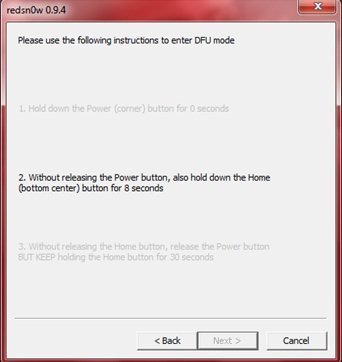 ou need to unlock it as well), iPod Touch 1G and iPod Touch 2G (non-MC models).
Jailbreak iPhone OS 3.13
- Download iTunes 9.0.3. This is the latest version of iTunes available so upgrade to it before starting to be sure you don’t run into any issues.
- Download redsn0w 0.9.4 ( download link at the end of the post )
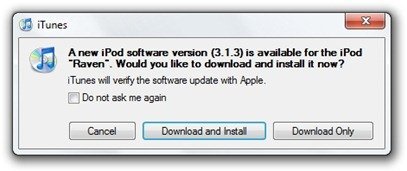
- Download and install iPhone OS 3.1.3 on your iPhone or iPod Touch using iTunes.
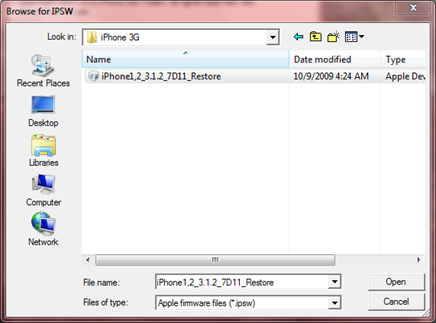
- Navigate to the following location on your computer C:\Users\{your windows user name}\AppData\Roaming\Apple Computer\iTunes\iPod Software Updates and copy the iPhone OS 3.1.2 IPSW file (iPhone OS firmware) file to your desktop for easy access.

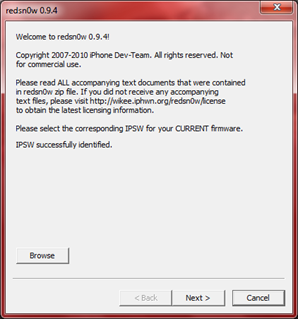
- Run redsn0w 0.9.4 and click on browse. Point it to the iPhone OS 3.1.2 firmware you just copied to your desktop.
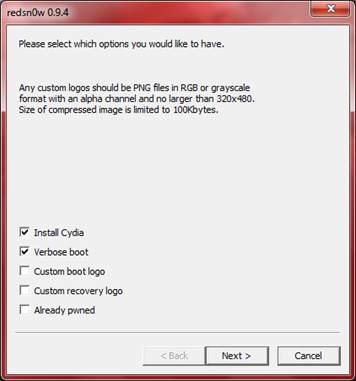
- After redns0w has validated the firmware, it will show some options such as Install Cydia, Verbose boot etc. Make sure to check Install Cydia and Already pwned.
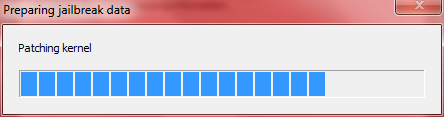
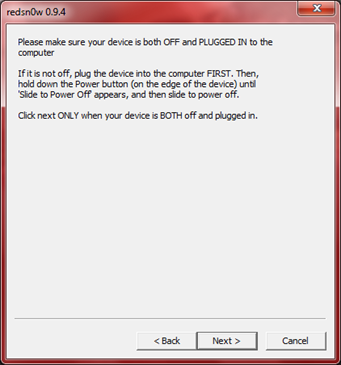
- Turn off your iPhone or iPod Touch and connect it to your PC. Hit next in redsn0w. It’ll start patching the kernel of your iPhone firmware file.
- Start your iPhone or iPod Touch in recovery mode by pressing both the power and home button until the help message on redsn0w disappears. If you had shut down your device as told in step 7, this process will be faster.
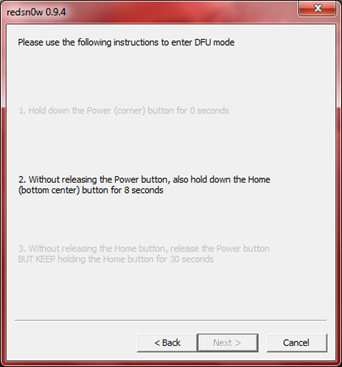
- Click next again. Now you’ll have to hold the power and while holding it, press the home button but don’t release it. After a few seconds, let go of the power button but keep the home button pressed until the firmware installation starts.
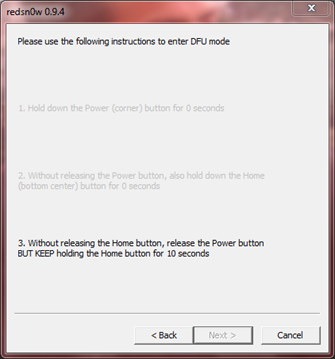
- Now it’ll take some time for the process to complete.
As noted above, don’t try this on your iPhone 3G if you don’t want to lose the unlock. So stay away from OS 3.1.3 till then!
[Thanks to iHackintosh for the screenshots!]
Download Links:
Download iTunes 9.0.3
Download redsn0w 0.9.4
Download iOS 3.1.2 for iPhone 2G
Download OS 3.1.2 for iPhone 3G

Cool that i can jailbreak my iPod touch now^^
Sorry for my bad english :D
are we able to jailbreak a 3gs with the redsn0w if we don’t need the unlock?
No.
sorry…it is a little confusing….If I have just purchased a new 3rd gen Touch, I cant jailbreak if I already updated to 3.1.3?
It clearly says don’t try this on a 3rd gen touch yet. New, old, updated or not doesn’t matter.
ey my iPhone 3Gs updated via iTunes but when I put the file on my Desktop (iPhone2,1_3.1.3_7E18_Restore) then I go to browse via the redsn0w 0.9.4 window, it keeps coming up with, Unable to recognize specified IPSW. So what do I do now cause my T-Mobile Sim card will not work in my phone anymore because of this update.
Hurry Plz Help I need my phone!
Hi Sukii
****Run redsn0w 0.9.4 and click on browse. Point it to the iPhone OS 3.1.2 firmware
Dont point to ((iPhone2,1_3.1.3_7E18_Restore) FIRMWARE
Hi Salem,
I understand what ur saying but how do I get the firmware ipsw cause that is all I saw to download. Can you plz send me the link to download the Firmware?
TY
Sukii
Hey my iPhone 3Gs updated via iTunes but when I put the file on my Desktop (iPhone2,1_3.1.3_7E18_Restore) then I go to browse via the redsn0w 0.9.4 window, it keeps coming up with, Unable to recognize specified IPSW. So what do I do now cause my T-Mobile Sim card will not work in my phone anymore because of this update.
Hurry Plz Help I need my phone!
TY
Read the instructions properly.
I am a certified PC Technical Engineer, I know very well how to follow sensitive instructions. Therefore, I am telling you that I followed the instructions completely & now that my iPhone has been updated to the 3.1.3 version my phone is reading the 5.12.1 firmware & your instructions only produced the stop result of it will not go pass the, Unable to recognize specified IPSW in the redsn0w 0.9.4 window. What should I do now?
LOL … if you knew how to follow instructions mr certified pc technical engineer you wouldv’e read that it doesn’t support the 3GS … lol.
Sukll
Please refer to the part about the downgrade.
By technical engineer do you mean repair man?
by the way buddy… it says to get the 3.1.2 software… idiot…
same problem here but when i go look for the iphone3.1.2 restore but it doesnt show up it only show up the iphone3.1.3 restore only
when can i jailbreak 3rd gen ipodtouch
Didn’t work. Keeps saying unable to recognize specified IPSW. Help?
I agree I have been trying it several times doing as per instructions & I cannot go any further because of the, Unable to recognize specified IPSW. By the way I have WIN 7 on my PC does that matter?
For all of you getting the ‘unable to recognize specified IPSW’ message you should NOT be clicking the 3.1.3 IPSW, you should be clicking the 3.1.2 instead (similar to the 3.0 -> 3.01 situation)
However since Sukii, you appear to have a 3GS this ‘trick’ won’t work
it is only for iPhone 2G/ iPhone 3G / iPod touch 1G and Non-MC ipod touch 2G
…if your on a 3GS you need to downgrade first, and in order to downgrade you need to have grabbed your sig with sauriks util
Bear in mind if you do manage to downgrade and then Jailbreak, you still won’t have an unlock due to upgraded Baseband, same applies for the iPhone 3g until, and if an exploit is released
Mart, you seem smart, what does it mean when a message comes up when you pressed the download redsnow 0.9.4 saying 403- Forbidden
the instructions say to use 3.1.2 software , not 3.1.3 (even though you have updated to 3.1.3, redsn0w 0.9.4 isn’t programmed to recognize the latest firmware, but works properly by using 3.1.2), which is why Imran told you to read the instructions (which was somewhat rude rather than just giving you the answer).. anyhow.. even after you jailbreak it there still isn’t an unlocking tool for you to use your t-mobile sim card, which is again in the instructions. hope this helps
TY so much Pointbrink!
Yes he is rude but thats how some geeks r cause they know we depend heavily on them. However, if he is a real geek then he would’ve had the solution for those of us who lost our unlocked 3GS phones due to this Apple upgrade.
Have a good one & if you get any good news for unlocking the 3GS new versions plz holla @ me!
Thanx again!
Sukii,
maybe the author is rude ( i honestly dont think so, because all he did was tell you to use your little brain and READ the article – is that so hard for you? or do you have to be baby-fed? ), maybe he is a geek ( although, you stated that you are a certified PC technical engineer ( a geek ) – LOL – and you can’t follow a simple guide? – in my mind that makes you a deek ), but YOU are clearly incapable of doing simple tasks as reading and following a guide.
Besides, i dont think you know squad about “pc technical engineering” so lets just say you’re a liar. And it’s people like you that make my day by fking up their precious iPhone.
To get on topic – thank you Imran for this extremely EASY to follow guide.
Oh Ok. Sorry. Mine is a 3rd gen so I guess that’s why :(
yo i tried this process and it just stays on the waiting for reboot and thats about it, i tried the steps and just stays theres
make sure you have got the correct 3.1.2 firmware file for your device I have been making that mistake for a day or two now and finally realised and it worked first time
I have been trying to jailbreak my 3g. My redsn0w doesnt tell me to hold any buttons for 10 seconds it only says hold power and home buttons till you see the help message. after that it does it’s thing but the iphone screen goes blank. and then finally it tells me that the rest of the process takes place on my iPhone. and its done my screen is still blank and stays blank. any help?
IT CLEARLY SAYS DON’T TRY WITH IPHONE 3GS, JUST 3G!!!!!! sukii ur screwed!!!!!!
Dear All,
I believe they say to use redsn0w on firmware version 3.1.2 and not 3.1.3. We are only expected to upgrade to 3.1.3 but reds0w is to be used on 3.1.2 firmware.
Steven
Hi, where can I get the 3.1.2 ipsw file from? In my appdata, I accidently updated to 3.1.3, so now there is no 3.1.2 file there :(
Please help me, as I am unable to use any of my cracked apps now :(
Should Verbose boot be checked? In the screen shot it is, but in the instructions it is not mentioned as a must
I’ve tried this process now three times with my 2G iPhone and I keep getting the same results.
After I see progress bars on my WinXP PC for patching the kernel and restarting my device, RedsnOw greets me with the message “The rest of this process tkaes place on your device. Done!” with the option to Finish.
The screens pictured above in steps 8-9 are never visible.
Once I click finish my phone reboots and it displays the “connect to iTunes” screen.
Help please?
Yah , i confirm the jailbreak doesnt work on a ipod touch 3g on MC series !!!! Blackrain stay the best for jailbreak !! be patient !!!! Go work GeoHot !!!!! we wait for Rc4 ;P
ok it tells you where to look for the software updates for vista and win 7,where would i find this in XP?
i hava an iphone 3gs 32gb, and i updated it to 3.1.3 without noticing what will happen..
i tried everything like the instructions, and after the program says ‘done.’ e pressed finish, and nothing happaned. now i have turned it off and turned it on again and its the same..
i need it unlocked.. what can i do?
do i have to wait for new software or what?
hug.
So my old 2 g can still be unlocked sweet how sad we only remember geohot and the frodo look alike dude when apple decides to throw us he finger. Thanks frodo and geohot maybe is better to wait until ipad is released
For all of you getting the ‘unable to recognize specified IPSW’ message you should NOT be clicking the 3.1.3 IPSW, you should be clicking the 3.1.2 instead (similar to the 3.0 -> 3.01 situation)
However since Sukii, you appear to have a 3GS this ‘trick’ won’t work
it is only for iPhone 2G/ iPhone 3G / iPod touch 1G and Non-MC ipod touch 2G
…if your on a 3GS you need to downgrade first, and in order to downgrade you need to have grabbed your sig with sauriks util
Bear in mind if you do manage to downgrade and then Jailbreak, you still won’t have an unlock due to upgraded Baseband, same applies for the iPhone 3g until, and if an exploit is released
I don’t have 3.1.2 update, but i do have 3.1.1 and it can’t reconize
I don’t have 3.1.2 update, but i do have 3.1.1 and it can’t reconize
the link to download redsn0w does not work. when i click it says it is Forbidden.
the link to download redsn0w does not work. when i click it says it is Forbidden.
Are there instructions for mac users?
Are there instructions for mac users?
Follow these same instructions on a Mac
hey I,ve looked for the update thing but i cant find it the folder the instructions say to look in is empty and my ipod already had 3.1.3 on it can i do it without the upate thing?
hey I,ve looked for the update thing but i cant find it the folder the instructions say to look in is empty and my ipod already had 3.1.3 on it can i do it without the upate thing?
when i try to download redsnow it goes to a new page and says 403- forbiden
what should i do?
if this does not work for you make sure that you do not select Already pwned in step 6 as this will make you iPhone stick at lit screen
In step 6 only select cydia option
Is this proposed Jailbreak solution a tethered or non-tethered Jailbreak? I have a new Iphone (5 days old) with 3.1.3 on it now. When it was a 3.1.2 phone, I tried to run BlackRa1n on it but I learned the hard way about the difference between tethered and non-tethered Jailbreaking solutions.
I am looking for a non-tethered Jailbreak solution because I cannot afford to be caught away from my computer when my phone needs to be rebooted.
Please advise….
Bikini Browser
Is this proposed Jailbreak solution a tethered or non-tethered Jailbreak? I have a new Iphone (5 days old) with 3.1.3 on it now. When it was a 3.1.2 phone, I tried to run BlackRa1n on it but I learned the hard way about the difference between tethered and non-tethered Jailbreaking solutions.
I am looking for a non-tethered Jailbreak solution because I cannot afford to be caught away from my computer when my phone needs to be rebooted.
Please advise….
Bikini Browser
So my old 2 g can still be unlocked sweet how sad we only remember geohot and the frodo look alike dude when apple decides to throw us he finger. Thanks frodo and geohot maybe is better to wait until ipad is released
blackra1n doesn’t work for me, only supports 3.1.2. I have an iPod Touch 2G, followed the steps until browsing for the firmware (mine is called iPod2,1_3.1.3_7E18_Restore.ipsw) and like some people above me, it says Unable to recognize specified IPSW. Wish there could be a fix, or more precise directions on this matter.
Wait a second, this is for a 3.1.2 firmware crack, isn’t it?
Not working for me so far (3G). It doesn’t show the screen after step 9 (“Please use the following instructions to enter DFU mode”). Any ideas what I’m doing wrong?
Doesn’t go to step 9 (DFU mode)
Doesn’t go to step 9 (DFU mode)
Ok so I got passed everything (after several attempts) but it says “uploading ramdisk”. It has been about a minute. I have no idea if I have itouch 3g but I bought it in November. Will it work? I too had the problem about recognizing the ISPW. But somehow I got through that. How long should it take?
accidentally upgraded to 3.1.3, and this
does not work on my iphone 3gs 16gb – I am stuck here for a bit I guess.
but I have to say this 3.1.3 firmware is at least a bit more stable then 3.1.2
I am waiting for the blackra1n to come out!!!
After updating to 3.1.3., the 3.1.2 firmware is no longer inside the iPod Software Updates folder. Are we supposed to retrieve that to complete this jailbreak?
I accidentally updated my just bought iPhone 3Gs to OS 3.1.3 after the new OS was released for 30mins. (how worse can it be?) Is there a way to downgrade the Os to 3.1.2 and jailbreak it? I don’t need the unlock anyway, just the jailbreak and I’m using a windows7. Many thanks.
BTW, I have clicked “make my life easier” once in Cydia in my 1st and only trial of my jailbreak of iPhone 3gs too.
Dont use this, it will never work, since the link has 403-forbidden. stick with what you have right now and wait it a trusted/known JAILBREAKER comes out with it.
Are you saying the iPhone Dev-Team aren’t trusted/known jailbreakers? -_-
lol, that’s what I was thinking. The link is for redsn0w 0.9.4, which was made by the iPhone dev-team. They are the most trusted (if not the ONLY trusted) name in iDevice jailbreaking.
George Hotz is another trusted name in jailbreaking.
click only cydia and you have to follow the instruction fast……i hope everybody jailbreak it!
I like this already, but does the iPod touch have to click “already pwned”?
Hey Hussain, whassup, r u still working on an updated software to get those of us u had to update to the new 3.1.3 version that now has the 5.12.1 model firmware on the 3GS iphones? I thought u were the best man, now whas taking you so long, I need my 3GS iPhone to be unlocked not just jailbroken, which didn’t work anyway.
Hope to hear from you soon, until then have a Great Thursday!
Is it solve 3.1.2 ipt3 tethered rebooting into recovery mode?
wth the link to download redsn0w is forbiden is there a different link
Worked up to the running pineapple screen, flashes the NOR all looking good, but then boots in recovery mode.
This is on an iTouch 2g, there isn’t a 3.1.2 fw for the 2g itouch so I used 3.0 which the redsn0w accepts and patches.
Anybody any advice?
Cheers.
can some1 send me the 3.1.3 upgrade cus its already on my ipod and its not in the folder shown!
Maybe this is a stupid question but does this work on my 32gb 3rd gen model nr: A1318EMC2310 iPod Touch?
Sorry if my English is bad I’m not English myself.
Thanks already
As mentioned in the blog post, it doesn’t work with iPod Touch 3G
what i read on rock app and cydia is that the NEW update if a front that will remove all jailbreak apps and that you wont be able to use the two applications again and RECOMMENDS the users NOT TO UPDATE !!!!
I have an iPod Touch 3G and it still has 3.1.2 firmware, if I update it to 3.1.3 will this jailbreak work? I don’t want to risk updating because in your step-by-step guide you didn’t say it works for the iPod Touch 3G, you only said 1G and 2G.
is there another link as im getting 403 error
im getting so streessed with this jailbreaking stuff i did not know what it was till this morning im starting to think with all the information flying round one person saying one thing another saying something else i dont know who to trust i think it is probably not worth it. i cant even seem to find a link any were that works for redsn0w 0.9.4
i give up
im getting so streessed with this jailbreaking stuff i did not know what it was till this morning im starting to think with all the information flying round one person saying one thing another saying something else i dont know who to trust i think it is probably not worth it. i cant even seem to find a link any were that works for redsn0w 0.9.4
i give up
Why is there no answer to the questions about missing 3.1.2 IPSW file in the folder? Does that mean if you upgraded prior to moving a copy (as in the instructions), you have lost the file and cannot jailbreak?
click on Download iPhone OS 3.1.2 for iPhone 2G above to get it
ok, i am obviously not the only one getting the 403 error when clicking to download the redsnow v. 0.9.4 zip file…
can we please answer this? i totally believe it’s going to work fine for me, (i have ipod touch 2g -firmware 3.1.1 and the serial doesnt start with MC) and i’m pretty solid on how to do it, but it’s not going to do me any good if i caan’t download it. i’ve tried links from many different blogs and stuff… the zips that i got don’t work. windows says they’re corrupted.
looking forward to recognizing the hard work of my trusty Dev Team… but only as soon as it works. :P
thanks.
try redsn0w.com
it was the only site that worked for me
omggg i cant find any downloadable redsn0w file!
Jailbreak on iPod Touch 2G with non-“MC” model no. SUCCESSFUL!
Okay guys if you have a 2nd Gen Ipod Touch (non MC version) follow these instructions EXCEPT for where it says to click the “already pwned” DO NOT click that and everything will work fine. I spent 4 hours trying to figure out why my ipod wouldn’t reboot and once I unticked “already pwned” worked perfect.
do as chris said, it worked for me aswell, it didn’t with already pwned. thanks!
This works on G1 ITouch as well. Just make sure you have the IPod 3.1.2 firmware to point to NOT IPhone 3.1.2 and NOT “already pwned”
perfect, Chris ! It Worked very well now ! I tried it many times without a result, but now its fine ! Thank you for the tip !
It works with a iPhone 3GS? Because, with the other jailbreak i’ve done early when i turned it off the iphone didn’t works.
Is this how you jailbreak an 2G itouch? (MC model?)
So i just bought my itouch yesterday and i think its an MC model.. Does that mean i cant jailbreak it WHATSOEVER.? Or am i going to have to wait until they find out how to jailbreak it.?
please letme know asap! i wanna jailbreak it!!!
Is this how you jailbreak an 2G itouch? (MC model?)
So i just bought my itouch yesterday and i think its an MC model.. Does that mean i cant jailbreak it WHATSOEVER.? Or am i going to have to wait until they find out how to jailbreak it.?
please letme know asap! i wanna jailbreak it!!!
has anyone confirmed this yet for iphone 3GS?…. working or not?
has anyone confirmed this yet for iphone 3GS?…. working or not?
IPod Touch 3G doesn’t work:
Unable to recognize specified IPSW
Upgraded the IPod Touch to v 3.1.3 which runs fine.
I have the same problem with my ipod touch 3gG
This solution doesn’t work on IPod Touch 3G
We have to wait
xgabo
my iPhone has the 3.1.3 update but I cant find the 3.1.2 I IPSW Im stuck help
im in the same boat help
You have to go download it
email me sab4504@hotmail.com
and I’ll send you file, or the link.
i have no idea idea how to to do this i am desperate please someone walk me thru it
step 5 did not work! redsnow said that the file i selected is wrong or something.. hellp me!
Errm.. What happens if my 3.12 is already jailbroken and I updated it to 3.1.3?
This fella here says the jailbreak files are stuck in my iPod if I do so without UNjailbreaking it first.
http://answers.yahoo.com/question/index?qid=20100205141624AA2vBJk
guys!!….i’m still tryin out the process mentioned above…but the path that involves pasting the iPhone os 3.1.2 resetore.ipsw to the desktop…..i opened the folder and instead of 3.1.2 there s 3.1.3!!!…..now what do i do?…..plz help me out fellas!!
okay after the stages to put into dfu mode, it says prossesing ipod for like 2 hours..should i restore ipod touch and then try again
If you search “iPhone1,2_3.1.2_7D11_Restore.ipsw” on internet you can get copies of this file. (in case it’s missing on your pc. ) But the question is if it’s okay to use these copies. I’m not sure, but I believe it should be the same for everyone. Can anyone confirm?
How long does it take to finish once the setup on the computer is done and the screen goes black on the itouch?
anyone know why it unable to recognize my IPSW file?
did everything like the video said(using ipod touch 2nd gen, non-mc)
1st- i did it without clicking the “already pwned” button in redsn0w jailbreak setup and everytime i did my ipod wouldn’t reboot.
2nd- i then clicked on the “already pwned” button in setup and it went through and i clicked finish, but then my ipod wouldnt do anything but stay on a black screen.
I have no idea what im doing wrong
Alright figured out what i did wrong.
IPOD TOUCH 2nd GEN.(non-MC) models- to sucessfully jailbreak,follow all the instructions above except for these things
-FirstMake sure you have the IPOD TOUCH 3.1.2 ipws file, not the iphone one that this site provides a download link for otherwise it will not work. You have to find it somewhere else on the internet.
-Secondly do not click the “already pwned” button when running redsn0w, it will cause it not to work.
Where did you find an ipod touch 3.1.2 ipsw file? i can’t find one anywhere! thanks.
how long is it going to take to come out with a jailbreak for an itouch 3g MC model? please let me know. thanks.
hey… i understand this is jailbreak works… now for the real question… Does this fix the “tethered” problem 3gs users face with the 3rd 4th and 5th serial numbers being higher than 940? I am currently jailbroken via blackrain and the thethered problem is really starting to get on my nerves… is this a fix for that as well as a new os jailbreak? nobody seems to be commenting on this..
hey… i understand this is jailbreak works… now for the real question… Does this fix the “tethered” problem 3gs users face with the 3rd 4th and 5th serial numbers being higher than 940? I am currently jailbroken via blackrain and the thethered problem is really starting to get on my nerves… is this a fix for that as well as a new os jailbreak? nobody seems to be commenting on this..
omggg i cant find any downloadable redsn0w file!
After entering DFU mode, it’s now stuck in : Please wait while your device is being processed.
Waiting for reboot.
It stays there and does nothing……
After entering DFU mode, it’s now stuck in : Please wait while your device is being processed.
Waiting for reboot.
It stays there and does nothing……
yea same here some1 help why wont it finish? =[
I’m having the same problem… Did you ever get it to work?
I’m trying to jailbreak my ipod and I can’t find the IPod OS 3.1.3 software update file on my computer anywhere! Help?
I have a windows computer.
The “AppData” folder doesn’t exist. :(
Installed 0.9.4 sucesfully at the second attempt, thanks! One comment would be that in step 6 you state “6.After redns0w has validated the firmware, it will show some options such as Install Cydia, Verbose boot etc. Make sure to check Install Cydia and Already pwned.”, but the image shows Verbose selected? it wasnt until I had selected verbose that the install went through in full.
On a seperate note altough it does seem to be installed fine, when starting up the device (3G) I get the apple logo, followed then by the boot record?
Has anyone else experienced this? Is it the norm, can I fix it?
thank you verymuch…………
I have 3.1.3 on my iPhone 3G. Anyone have a working link to download redsn0w 0.9.4 that will work with this firmware? All the links online are broken.
Will this work on a 3G iPod Touch 8GB?
IS there a way to jailbreak my ipod touch (3.1.3) using a MAC yet?
Try the Dev-Team’s Blog. They released a new PwnageTool for 3.1.3, MAC Exclusive program.
will we get back our jailbroken apps
will we hav our jailbroken apps if we did this to a already jailbroken ipod touch 2g
man is this work with itouch 3.1.3 mc model
plzz hel
i used QuickPwn for 2.2.1 for my iPhone 2G, and planning to use redsnow in order to upgrade to 3.1.2
should i select “already pwned”?
THANK YOU THANK YOU THANK YOU!!!!!!!!!!!!!!!!!!!!!
i did everything with “already pwned” and the screen after the redsn0w was done. when my ipod turned on i got nothing.
so i tried without “already pwned” and after redsn0w was done, it said “downloading jailbraking data” or something like that on my ipod for about 10 minutes, after that finished, my ipod turned on and nothing happened to my ipod. no cydia or any change on it. i don’t know what to do. help?
how do you know if it’s done? it just says the rest of the process will take place on your device..done! and there’s a finish button. but last time i clicked it, it disappeared and my ipod was still the same. also there’s a bar there that looks like stuff’s supposed to be loading but nothing’s happening….
I can’t find the firmware 3.1.3 file because I updated it on my friend’s iTunes because I didn’t want to pay for it. Is there a way to get the firmware file?
I can’t find the firmware 3.1.3 file because I updated it on my friend’s iTunes because I didn’t want to pay for it. Is there a way to get the firmware file?
my ipod stuck in black screen,nothing happened whats wrong? i follow the instructions step by step but nothing happen my ipod is 1st gen. help please
im having the 403 error…how do i fix it? i just upgraded to the ipod touch 3.1.3.
im having the 403 error…how do i fix it? i just upgraded to the ipod touch 3.1.3.
will it work on ipod touch 3g 3.1.3, is so what if im using windows xp
i am jailbroken at 3.0 can i skip 3.1.2 jailbreaking and jailbreak straight to 3.1.3? please answer
where do ii press to download?? please awenser
Yeah – I get the 403 error when trying to download redsn0w. :( Fix the links! Fix the Links!
How do you like my name? Hue-Janus. Nice!
thnxxxxxxxxxxx man
thnxxxxxxxxxxx man
Ive installed 3.1.3 for my itouch, but when I browse for the IPSW on Redsn0w it says unable to recognise the specified IPSW.
The IPSW is called: iPod2,1_3.1.3_7E18_Restore
any help?
Oh ive got it u have to download 3.1.2 for the itouch, NOT 3.1.3
does this work on 3GS, 5.12.01 firmware (new bootrom)?
no
Thanks! Worked brilliantly!
(iPhone 3G on 3.1.3)
Hey people I’m here to answer your questions. This DOES NOT work for the new 3.1.3 (7E18) firmware because Apple recently changed the settings so instead of seeing the screen part of the jailbreak, your screen is black. Your going to have to wait for the new update. So, your lucky if you don’t have to restore your device in case you followed the directions incorrectly. Like always, I highly recommend having a backup on iTunes if you so happen to restore your iPod/iPhone
Regards,
Mike
IM ON 3.1.3 O CAN I JAILBREAK ?
I followed every step carefully and I did everything but it says waiting for reboot and it stays forever.I don’t know what is the problem I tryed it like 10 times and it still doesn’t work.
Help pleeeeeeeaaaaaasse
I have iPod touch 1st gen 3.1.3
close itunes and do it
What do you mean why do I have to close itunes how would it help did you have that problem
What if its an unlocked iphone? I mean, it was unlocked when i bought it at the apple store. Will i still loose the unlock?
I have been trying to use redsn0w to jailbreak and everytime i get to the ipsw file… it never recognizes it…although its the same thing you showed…why and how do i fix this?
I have the ipod touch 3g 3.1.3 firmware and it is an mc model is there any jailbreaks out that will work yet?
yeah i have the same problem
SAME
Mr. Imran Hussain I followed every step carefully and I did everything but it says waiting for reboot and it stays forever.I don’t know what is the problem I tryed it like 10 times and it still doesn’t work.
Help pleeeeeeeaaaaaasse if you know what’s the problem.
I have iPod touch 1st gen 3.1.3
Can you turn it off if you have the 3rd generation of an iPod touch?
Unable to recognize specified IPSW when browsing FW
Ihave a 8g ipod touch and i accidently upgraded to 3.1.3, is there jailbreak out for that yet?
Maybe use blackra1n.com – just as good.
I’ve use this program to try to Jailbreak my iPod(1g) with OS 3.1.1 many times now and each time it’s unsuccessful. The IPSW file I am using for the jailbreak is iPod1,1_3.1.2_7D11_Restore.ipsw and it never works. what is the problem?
wait so i cant jail break my mc 2g ipod touch?
when i click the red sn0w 0.9.4 download link, it says ‘403- forbidden’ what shall i do?
hehe says 403- forbidden when downloading redsnow oh well jailbreak isnt that important
THIS DOES WORK! I just bought a iphone 3g which had 3.1.2 straight out the box. I misread updating itunes and I updated to 3.1.3 instead using itunes.
I tries using blackrain and was unsuccessful. Upon countless hours of reading, I stumbled into blacksnow. ( keep in mind, I’m a newbie to this ) I first tried it with blacksnow o.8 thinking it would do it but, no success. Then I see this, blacksnow 0.9.4 which is the next version I think. Anyway, I did exactly like the pics say. downlod blacksnow 0.9.4 and then go crazy finding IPSW in my pc, check the cydia box and the already pwned and everything seemed to go smoothly until it said finished. My iphone stood at a blank screen and did nothing. I finally got it to turn back on and didnt see cydia or anything. So, I decided to give it one more shot. ( now it’s 2:30 in the morning) The second attempt I only checked off cydia ONLY and evrthing went smoothly again accept this time it worked.
How did I find 3.1.2 firmware? I simply right clicked on my C:drive and clicked on search.
On the searched tab I typed 3.1.2 IPSW and it came up right away. I then transfered it to my desktop for easy finding. ( I’m using XP )
How did I find blacksnow 0.9.4? I did a google search for it. I clicked on evry link till I found one that didnt give me that error code and downloaded it. Someone prob posted a link here on Blacksnow 0.9.4
I hope this is enough detail and works for you guys!
I just got an ipod touch for christmas and it came with 3.1.3 and i want to jailbreak it. Will this work for it?
I just got an ipod touch for christmas and it came with 3.1.3 and i want to jailbreak it. Will this work for it?
No it will not, you gotta wait for the new jailbreaking tool to come out just like everyone else..
when i try to download redsnow it says 403 forbidden
. WHy?
hey im having problem to jailbreak with redsnow. im upgraded my ipod 2g to 3.1.3 firmware. i followed the step on redsnow but does nnot work. it come out tethered jailbreak.. when i click next it come out
intall cydia and just boot tethered now, pleasw help
go to another link to find redsn0w0.9.4
@#20 then why is the first sentence of the article:
“t didn’t take long for the iPhone Dev Team to come up with a jailbreak solution for iPhone OS 3.1.3 which was recently released for iPhone 2G, 3G, 3GS, iPod Touch 2G and 3G. redsn0w 0.9.4 jailbreaks and unlocks iPhone 2G, jailbreaks iPhone 3G, iPod Touch 1G and iPod Touch 2G ( non MC Models).”
Same as every one else, can’t find redsn0w0.9.4
I have the same as Ian, only Cydia and tethered. And its redsn0w0.9.4…
Help! it says ‘unable to recognise specified IPSW! I have a 2g ipod with 3.1.3 firmware. Plz Plz HELP!
Hey guys, for ipod touch 2g, non MC models you follow the rules but DO NOT click already pwned, you get redsn0w 0.9.4 by googling it and you will find a link, you get the firmware by googling that also, its not rocket science.
no
Redsnow gives a 403 error for me. anyone else have this problem?
y cant i jailbreak my ipod touch ok so..its 3.1.3 and its mc model : (
you cant do it you retard
Link broken? “403 forbidden”?
does this work with ipod 3gen ?
İf u ll follow the steps and with right firmware verison its working good Thnks
The Link to redSnow is broken. Gives a 403 forbidden error!
Redsnow wont reboot the system, direction’s are followed, even used with youtube.
Firmware’s 3.1.3
Redsnow 0.9.4
Itunes 9.0.3
Itouch is locked in DFU mode. Any answers?
Everything worked perfectly. However, do not check “already pwned”.
Alright, I did everything that it told me to do.
The only modifications I made were that I downloaded a ““iPhone1,2_3.1.2_7D11_Restore.ipsw” off a downloading site since I did not have it on my own computer; I did not check the “already pwned” box; And I downloaded redsn0w off another downloading site.
The problem is that it is stuck on the “waiting to reboot” screen. What am I doing wrong? Can any one help please?
i have the same problem.
need help!!!
so i got everything but the restore 3.1.2 file doesn’t work with redsn0w and i want to know why someone tell me..
i have a ipodtouch 3rd generation and i have the ipod3,1_3.1.2 and i have the latest itunes, but i still cant get it to work and on step 6 i only get 2 options and they are install cydia and 2nd one is “just boot tethered right now”
im runnin redsn0w 0.9.4
any1 know what im doing wrong?
do i have the right firmware?
HELP plz
go to blackra1n.com….1 click and your done
I am in need of a Jalibreak solution for my Ipod Touch 3rd Generation, 64GB MC Series
Hold power button and home button for about 10 secs it will go off then bk on again
I click make it rain and my ipod goes to black screen and doesnt do anything, ive done this many times before and now it not working plz help
mine has done the same thing.
same with me at blackra1n. this is horrible… i want a jailbroken ipod tuch!
what is better?
redsnow or blackrain??
blackra1n
blackra1n
mine has done the same thing.
i clicked the link but it might be broken?
HELPP!! i really want to jail brake it and ive around the net and nothing pls!
also my ipod touch has been updated to the newest verion is that a problem?
please anyone help me
send me an email at Carlos562240@gmail.com
The redsn0w link is broken and I can’t find an other one anywhere else, could you help me ?
i dont have a folder at C:\Users\{your windows user name}\AppData\Roaming\Apple Computer\iTunes\iPod Software Updates i only have C:\Users\{your windows user name}\
Win XP Pro sp3
what do you do after this ? i mean i dont mean to sound stupid but when it says it is finished my i pod screen stays black and i dont know what to do ?
@FAIL the folder is hidden
In windows explorer, press ALT to get the extra options up and click tools > folder options > view (tab) and select show hidden files, folders and drivers.
I just tried this and redsn0w says “Unable to recognize specified IPSW” What do I do?
I have the iTouch 3G
Windows XP users path would be c:\Documents and Settings\{your windows users name}\AppData\Roaming\… etc.
i’ve asked the iStudio’s staff
and he said we can’t turn off
the iPod 3.1.3 ?
Just downgrade to 3.1.2 and download blackra1n in stead.
i’ve done steps 1 to 9 and then redsn0w was stuck in “Waiting for reboot” part and my ipod’s screen is also black. i’ve been waiting for ages and nothing’s happening D:
How can I get 3.1.2 instead of the 3.1.3 that is on my system? do I have to use the iphone 2g download?
(i have ipod touch 2g B model)
Will i lose songs and apps…?
Is it a tethered jailbreak?
Is it a tethered jailbreak?
blackra1n
guys i have and ipod touch 3g and firmware 3.1.3 how can i jail brake it on my mac?
thanks:)
guys i have and ipod touch 3g and firmware 3.1.3 how can i jail brake it on my mac?
thanks:)
what are you suppposed to do after you click finish? the screen is blank and onlything i can do is restart and when i restart it it isn’t jailbroken
what are you suppposed to do after you click finish? the screen is blank and onlything i can do is restart and when i restart it it isn’t jailbroken
I have tried everything to JB my damn iphone!!! Black rain does not work..it says done and then goes to a black screen and never reboots!! I dont know what to do..i tried redsnow..the app wont even open…i tried pwnage and in the last steps it doesnt go in to some certain mode!!! I tried everything…i have a imac…i cannot figure it out!!!!!! HELP!!!!!!
Does anybody know how to jailbreak iPod touch 3g 3.1.3? I’ve already tried to downgrade it but it never works :(
I had the same problem. But I downgraded the software version to 3.1.2, and then jailbrake it with blackra1n.
I use the firmware version iPod2,3.1.2_7D11,**note** it is not the iPod3— firmware. For some reason Apple stop signing off the firmware 3.1.2 on the ipod touch 3g.
Go to youtube, the are videos of how to downgrade the firmware.
**NOTE** the firmware dowgrade only worked for 8G ipod Toch 3G. the 32G and 64G are out of luck at this time.
Good luck!
what firmeware did you use to downgrade from 3.1.3 to 3.1.2?
the same thing is happening to me :( and i cant still downgraded … and i want to jailbreak it sooo muchhh HELP
download 3.1.2 from a website and then open itunes with your ipod pluged in, click on your ipod. the do Shift+cLick on the restore button and then loacate the 3.1.2 file
Why create a tutorial that is titled jailbreak 3.1.3, then show people that you are installing 3.1.2 firmware into the phone, then go da da! you are now jailbroken with 3.1.3. Makes no sense
You should have OS 3.1.3 installed first. Try reading next time, before making such a comment.
tried the method step by step for several times…but to no avail! at the end of the process redsn0w says the rest of the process will take place in the device and then done! but then when i’m opening itunes a msg is popping up that your device is in the recovery mode click to restore..i tried restoring with 3.1.3 and 3.1.2 firmwares but to no avail..please help!
even before i progress to step 9…redsn0w says that the rest of the process is going to take place on the device and then done! thats it…bt when i’m opening my itunes after that it is showing that my device is in recovery mode and that i shud restore it first…so i had to restore it with original firmware! help!
DO NOT select already pwned then just follow the
tutorial. Note 6 and 7 are in the wrong order.
Basically, DO NOT SELECT ALREADY PWNED!
how do you do it for the 3.1.2
black rain
i install blackrain but doesnt have cydia..so useless.please help me!
ok just to make sure, I have an ipod touch 2g non MC model MB I think. it is running 3.1.3 and has never been jb before. redsn0w 0.9.4 should work right.
Thanks Heaps Bro It Works Perfectly For My Itouch 2G Running 3.1.3 Cheers Mate :)
i have an ipod touch 3rd gen 8gig version 3.1.3 (7E18) can i jailbreak that?
help please!!!
i have followed the instructions carefully. after the process my ipod is working nicely however when i tried syncing applications from my itunes it always says there’s an error.. i was able to transfer music the only prob is the application… mine is a 2g ipod touch model MB..
hope you can help me on this. i badly need some applications to be installed on my ipod..
there is an app in cydia you have to download to take the copyrights off
Redsnow 0.9.4 link is broken…
i have done everything to a t!!!!
When i am done selecting everything and following the “hold buttons” instructions it shows the waiting to reboot window on redsnow, but for some reason it does not work, i have waited for over an hour now, and nothing is working… help please?
how should i know which ipodtouch version i have
i mean 3g, 2g or what
its 8GB and i ahav purchased it 3-4 months ago
could you post a link for the ipod touch 2g 3.1.2 software. i cant find any ones that work.
cant downgrade itouch to 3.1.2
checked youtube, but doesnt work
can u jailbreak itouch 3rd gen 3.1.3
my ipod touch 2g 3.1.3 can not jailbreak with blackra1n.can jailbreak with redsnow ??
what firmeware did you use to downgrade from 3.1.3 to 3.1.2?
I have just bought an ipod 3g and it has the latest software 3.1.3. Redsnow just can’t read the firmware, why?
hey umm…. look the link to download redsnow is broken
and can’t be download…. is there another link???
This sounded hopefull, but I can’t even find AppData on my PC. So it doesn’t look like I can get to the files mentioned. Anyone else? I have a 3G ipod touch with 3.1.3, this article seems say it can be jailbroken. Anyone have any success?
hey is there any way i ca jailbreak my ipod 3g…i bought it a week back…the redsnow link seems to be broken
please reply ASAP!!!!
there is an app in cydia you have to download to take the copyrights off
Are u able to jailbreak an MC model yet, I had it jail broken before with blackrain on 3.1.2 but ran out of battery which ment it went and I had to restore it and lost it so can u give me a guide to JB 3.1.3 MC model pleAse!!!! :( and btw I can’t find where my firmware 3.1.2 is on my pc to downgrade it!!! Ahhhh help me
redsn0ws download link is 404’d
I have iTouch 2g 3.1.3 MC model can I jailbreak this Also wat am I browsing for when i open up redsn0w if I have to download something send me download links at derek.granstrom@yahoo.com
I have iTouch 2g 3.1.3 MC model can I jailbreak this Also wat am I browsing for when i open up redsn0w if I have to download something send me download links at derek.granstrom@yahoo.com
DO NOT select already pwned then just follow the
tutorial. Note 6 and 7 are in the wrong order.
Basically, DO NOT SELECT ALREADY PWNED!
The best thing is to shift click restore and downgrade to 3.1.2 and following this you need to use blackra1n to jailbreak it. And if you are using vista or windows 7 you need to go to the task manager and kill all of the iTunes relates servaces ( one will automatically restart diring jailbreaking and this is needed to you can just exit the task manager ) and when blackra1n starts you need to hold down the home button I’ll it is done ( when it says entering recovery mode ) and then everything should work as it has for me. If it says please conntect to iTunes it’s jammed up. Close the window and retry don’t worry everything is there even if you forgot and it’s 3.1.3 it can still recover it if blackrain says it’s sucessful. It just won’t be jailbroken
When I browse for the file, redsnow says “unable to recognize specified ISPW”. Any help?
I also get this message. The firmware in my folder has _RESTORE at the end. Would that make a difference?
You have to use 3.1.2 firmware for 3.1.3 I think.
How do u download redsnow?
I can’t seem to reach step 9. Anyone can help?
The link to redsn0w didn’t work…
Seems as I cannot find the 3.1.3 update in the AppData folder. I updated my 8GB iPod Touch 3G when my new HDD was working. I already tried the factory settings it kept OS 3.1.3. Thank you Roadie for the link. :)
I have just bought a ipod touch 3.1.3.
But i do not know how to downgrade it to 3.1.2 and download the jailbreak. Can someone help me with it by sending me the links to download the various necessary information and the procedures to do it please via email: milkshake11@gmail.com
Your kindness is appreciated. Thanks.
I have just bought a ipod touch 3.1.3.
But i do not know how to downgrade it to 3.1.2 and download the jailbreak. Can someone help me with it by sending me the links to download the various necessary information and the procedures to do it please via email: milkshake11@gmail.com
Your kindness is appreciated. Thanks.
Hey yeah
if you want to jailbreak 3.1.3 with Redsn0w you need
1) itouch or iphone
*CANNOT BE the itouch 2nd gen MC, itouch 3rd gen, or the iphone 3gs*
2) firmware 3.1.2 (you use it as sort of a loophole)
*Can be Downloaded from >> http://www.felixbruns.de/iPod/firmware/
3) now just follow the steps as shown above! :)
Will it work if the model number starts with MB?
So if you tried to JB a 3rd Gen, what would happen to the device? I was about to do it and saw davin’s comment. I do not want to risk it, as I paid $200 for it, and don’t have the money to get a new one. So I’d be screwed if I JB’d my 3rd Gen.
Also is there one for the 3rd gen yet?
redsn0w wont recognize my firmware. anyone no y??
Can you use this for iPod touch 3rd gen with 3.1.3?
If redsn0w does not see the firmware, you have to make sure it’s a ipsw file, you have to go to folder options and make sure that you can see the file extensions of commong known files or whatever, change it from .zip to .ipsw
then you will find it
http://modmyi.com/forums/iphone-news/687811-blackra1n-released-jailbreak-3-1-2-all-devices.html
this might work for u all
If you have a iPod touch 3gen. and accidentlly updated the version to 3.1.3 (7E18). What version do you use to restore it to its original version?
original version? Do your remember which version did it ship with? You’ll have to find that version of the iPhone OS and restore it.
I did everything correctly, and it took me to the point were the download onto my device began, but its been sitting here saying “Please wait while your device is being processed” with no progress whatsoever. how long is this supposed to take?
i’ve got a iPod Touch 32g, my cousin ended up updating my iPod from 3.1.2 to a 3.1.3… is there ANY way to Jailbreak it?
e-mail me here with links & whatever else;
MiSz_HaRdY@yahoo.com
i’ve got a iPod Touch 32g, my cousin ended up updating my iPod from 3.1.2 to a 3.1.3… is there ANY way to Jailbreak it?
e-mail me here with links & whatever else;
MiSz_HaRdY@yahoo.com
my ipod touch (3.1.3) won’t reboot or turn on. how do i fix this?? like literally it won’t turn on!
my ipod touch (3.1.3) won’t reboot or turn on. how do i fix this?? like literally it won’t turn on!
Can anyone help me.
It seems step 6 and 7 are mixed up in this tut.
If i point redsn0w to the 3.1.2 firmware i get the screen at step 7 then the option to choose what to install mentioned in step 6. If i then start the iPod in recovery Redsn0w does it’s trick, and tells me it will continue on the device itself. And the it stops with out any signs of being complete.
Can anyone help me.
It seems step 6 and 7 are mixed up in this tut.
If i point redsn0w to the 3.1.2 firmware i get the screen at step 7 then the option to choose what to install mentioned in step 6. If i then start the iPod in recovery Redsn0w does it’s trick, and tells me it will continue on the device itself. And the it stops with out any signs of being complete.
Same for me…
same for me aswell…
re: “Navigate to the following location on your computer C:\Users\{your windows user name}\AppData\Roaming\Apple Computer\iTunes\iPod Software Updates”
That’s for Windows… what’s the equivalent on a Mac?
o I open redsn0w 0.9.4 and
1) it doesn’t ask if its non mc. its not but isn’t it supposed to ask?
2) doesn’t do anything after the second waiting for reboot screen. ipod doesn’t turn white or anything.
I manually reboot and… nothing…
help?
What happens if u have a jailbroken iPod and you update to the newer version
u lose ur jailbreak
i have bought new ipod touch 3.1.3 3G running on it ……..can i use redsnow to jailbreak it …….
please help as soon as possible………
ur support is appreciated…….
Downgrade to 3.1.2 and then jailbreak it
Hey i cant downgrade my new one it says file is not compatable
Yes i got new version
Dont do that or ill kill you
does it stuff up ya Ipod????
does this work with iTunes 9.1? on a mac?
Hey i cant downgrade my new one it says file is not compatable
Yes i got new version
Hey,
Iv bought an ipod touch. I think it is 3g… it must be because i only bought it last week. the software version in itunes says 3.1.3. Can i jailbreak it how you have said above? If not how do I downgrade it?
Thanks… you can email me at majid.ahmed@live.co.uk. or I will check here. Thanks alot.
Majid
Hey,
Iv bought an ipod touch. I think it is 3g… it must be because i only bought it last week. the software version in itunes says 3.1.3. Can i jailbreak it how you have said above? If not how do I downgrade it?
Thanks… you can email me at majid.ahmed@live.co.uk. or I will check here. Thanks alot.
Majid
i think i am right but hope there is somone out there who will confirm:
if ur ipod touch 3g was never jailbroken before or u never upgraded to 3.1.3 and never registered with cydia THEN todate there is no solution for jailbreaking 3.1.3 or downgrading to 3.1.2 and jb. WE JUST HV TO WAIT UNTIL THERE IS A JAILBREAK FOR IT OR THERE IS UPGRADE TO 4.0 OR 3.2 FIRMWARE AND A SOLUTION.
i think i am right but hope there is somone out there who will confirm:
if ur ipod touch 3g was never jailbroken before or u never upgraded to 3.1.3 and never registered with cydia THEN todate there is no solution for jailbreaking 3.1.3 or downgrading to 3.1.2 and jb. WE JUST HV TO WAIT UNTIL THERE IS A JAILBREAK FOR IT OR THERE IS UPGRADE TO 4.0 OR 3.2 FIRMWARE AND A SOLUTION.
hey. its been 10 min and im still stuck in waiting for reboot. help please?
patching bar isnt moving. and it`s been actually 15 min. what should i do.please help.
i tryed and it says its done but it has done nothing, any ideas?
Uhhhhhhhhhhhhm, mine finishes, but then it won’t reboot itself ?
I HAVE FOLLOWED THE INSTRUCTION AS OF U HAVE GIVEN ….
BUT NOTHING WORKED,,,
WAT 2 DO NW ?????
ITS JUST SAME AS BEFORE …..
PLZ HELP ME…
I have tried with jailbreaking it but once it says reboot, stays black an eventually I have to turn it on manually. I have a 32 gb iPhone 3gs. Firmware 3.1.3 (7E18)
that is exactly my problem, i have 8gb ipod touchc 3.1.3
how do u downgrade software?
It is stuck at screen where it tells you to hold down home and power. help?
I Appreciate this!!!! It worked perfectly on my IPhone 3G without checking “Already pwned”. I checked “Install Cydia” only.
Help! it says 'unable to recognise specified IPSW! I have a 2g ipod with 3.1.3 firmware. Plz Plz HELP!
reply me asap, plzz
I found out how to restore iPod touches back to 3.1.2.
First. Download the firmware here: http://www.felixbruns.de/iPod/firmware/
then download the file and put it here: [hard drive]:Users[your user name]AppDataRoamingApple ComputeriTunesiPod Software Updates
and then plug in your ipod in and go to itunes.
SHIFT+CLICK the 'restore' tab
and go back into where you put your firmware.
and there ya go. :]]
if you have any questions, email me
jake.burns323@yahoo.com
when i do it it stays at waiting to reboot and it doesnt work
It just say waiting to reboot after iv done it all for ages! how do i fix it! plz help!!!!
does anyone know of a way too jailbreak ipod touch 3g 3.1.3 MC model?… ive searched everywhere and nothing is telling me how to do it… someone please help..
Did it work though? did it restore?
various factors can make the screen stay on blank after red snow 0.9.4 restore. First off it works best on Windows XP vista and 7 you gotta be lucky.Second try changing the usb sync cable new to old old to new if their not working. Third make sure you got the right firmware for ipodtouch and iphone. Fourth follow the instructions exactly as red snow says a lot of people keep confusing DFU with recovery, Red snow asks for both. If you've done many attempts with this have itunes restore it so it can be fresh and try red snow again. If it doesn't work on your computer it may work on another, so switch computers.If you screen remains on a blank screen it will eventually shut off and the phone will restart to normal or you can hold power button and home button for 15 or more seconds to restart it.I hope these tips help.
I got the exact same problem. Have googled around the web but no luck still :(
How did you get past the confirmation process from Apple's servers?
u can downgrade ur ipod than jail break it… and search it up if u want to do this
i have an itouch 3g 32gb with 3.1.3 firmware… im now turning it into 3.1.2 firmware… can I still use redsnow?
how do you do step 4 and where under itunes???
ya da
I don't think you can but you might but if you use the spirit jailbreak, then you can jailbreak you itouch. I also have an itouch 3g with the same firmware and I used the spirit jailbreak and now it is jailbroken and also untethered. the site is spiritjb.com, download and your itouch will be jailbroken.
SO DOES IT WORK OR NOT?!
I’m wondering I have an ipod touch 3G 3.1.3 and it’s a MC model but I don’t know if this will work for my ipod touch plz help me
So what do I do to jailbreak and unlock my iPhone 3GS? I want to buy the new iPhone 4 which I can now my contract is up and want to jailbreak and unlock the 3GS and sell it on ebay. I think I can get a good deal on it but is it safe to unlock and jailbreak phones? I’m hearing from folks here and there and noone seems to want to give me any advice but most folks are doing it. Any help is appreciated …
Does anyone know if you can unlock and jailbreak an iPhone 4G? Either way I have the iPhone 3GS and I love it but I’m tempted to upgrade to the iPhone 4G but something has been keeping me from doing it but I just might upgrade even though it’s got some probs. If I can jailbreak and unlock the iPhone 4G I just might. What do you think?
Hello my Ipod shows version 3.1.3, but my Itunes shows that the Ipod version is 4.0.2.
How must I proceed in step 3 of this jailbreak
Does anyone know how to jailbreak ipod from Safari if so please help me .
Go to Jailbreakme.com
can i jailbreak my ipod touch using Safari
Hi,
Link (for windows) provided above seems not to be existing anymore.
Request if anyone would be able to provide a copy of redsnow 0.9.4 jailbreak.
Rgds,
Raj
Hi
I have I tuch ipod. it was update after it dosent working Wi Fi Plese Tel what the Resan..
try restoring the firmware, else it could be a hardware fault