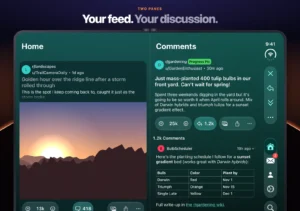
iPhone Duo black bars show up when an app was built for an older version of iOS, and the lasting fix is an update from the developer. An older app sits in the middle of the inner display with empty areas on both sides, and on the outer display it leaves a dead strip beside the status bar and camera.

You get one of three layouts, and the SDK an app was built with decides which, with a different fix for each.
iPhone Duo Black Bars Depend on the SDK an App Was Built With
Apps built with the iOS 26 SDK or earlier run on the phone but do not adapt to its layouts, which is how the iPhone Duo app display modes treat them. With the phone open, the app appears at a familiar size in the center of the inner display, and with the phone closed, the outer display shows it to the left of the status bar and camera.
Apps built with the iOS 27 SDK resize to fill more of the inner display, and apps built with the iOS 27.1 SDK or later are the ones fully built for the phone. That difference explains why two apps on the same phone can look nothing alike.
Update the App and Look for the Made for iPhone Duo Badge
- Open the App Store and update the app, because developers have to rebuild with a newer SDK and the update is where a new layout arrives.
- Open the app’s App Store page and look for the Made for iPhone Duo badge, which marks the apps built for the foldable.
- Read the What’s New text, and if it mentions the iPhone Duo or the inner display, the layout work has shipped.
- Open Settings, tap General, then tap Software Update and install the latest iOS update, such as iOS 27.2.
- Force quit the app and open it again, then fold and unfold the phone once to see whether the layout changed.
On the inner display, an app that has not been updated can be enlarged with the expand button, which Gizmodo’s review says scales the iPhone layout up to fill the screen. The result is a magnified version of the iPhone layout rather than a redesigned one, so the developer’s update is still the lasting fix. Apps with the badge scale proportionally between the two displays, because both share the same aspect ratio. An updated app therefore looks the same on the outer display as on the inner one, and an app without the badge is the one that shows bars.
Split View Shows Older Apps at Their Worst
Apps in Split View on iPhone Duo get a fixed 50/50 layout, so an app that was never updated for the larger display is the one most likely to look cramped next to a newer one. If one app looks wrong and the other looks fine, pair the older app with a different one before suspecting the phone.
The strip beside the camera on the outer display is how older apps are laid out when the phone is closed. It is not a screen fault, and the app’s own update is what changes it.