WhatsApp text actions are rolling out on Android and iPhone, marking phone numbers, dates, addresses and email addresses in a chat with a dotted underline. Tapping the underline opens a short menu of shortcuts for that text, and the detection runs on your phone, so WhatsApp never sees the message.
Text actions are shortcuts based on text formats, so WhatsApp adds one whenever it spots a number, date, address or email. The date shortcut can also start a new event, which connects to the Events hub on Android.
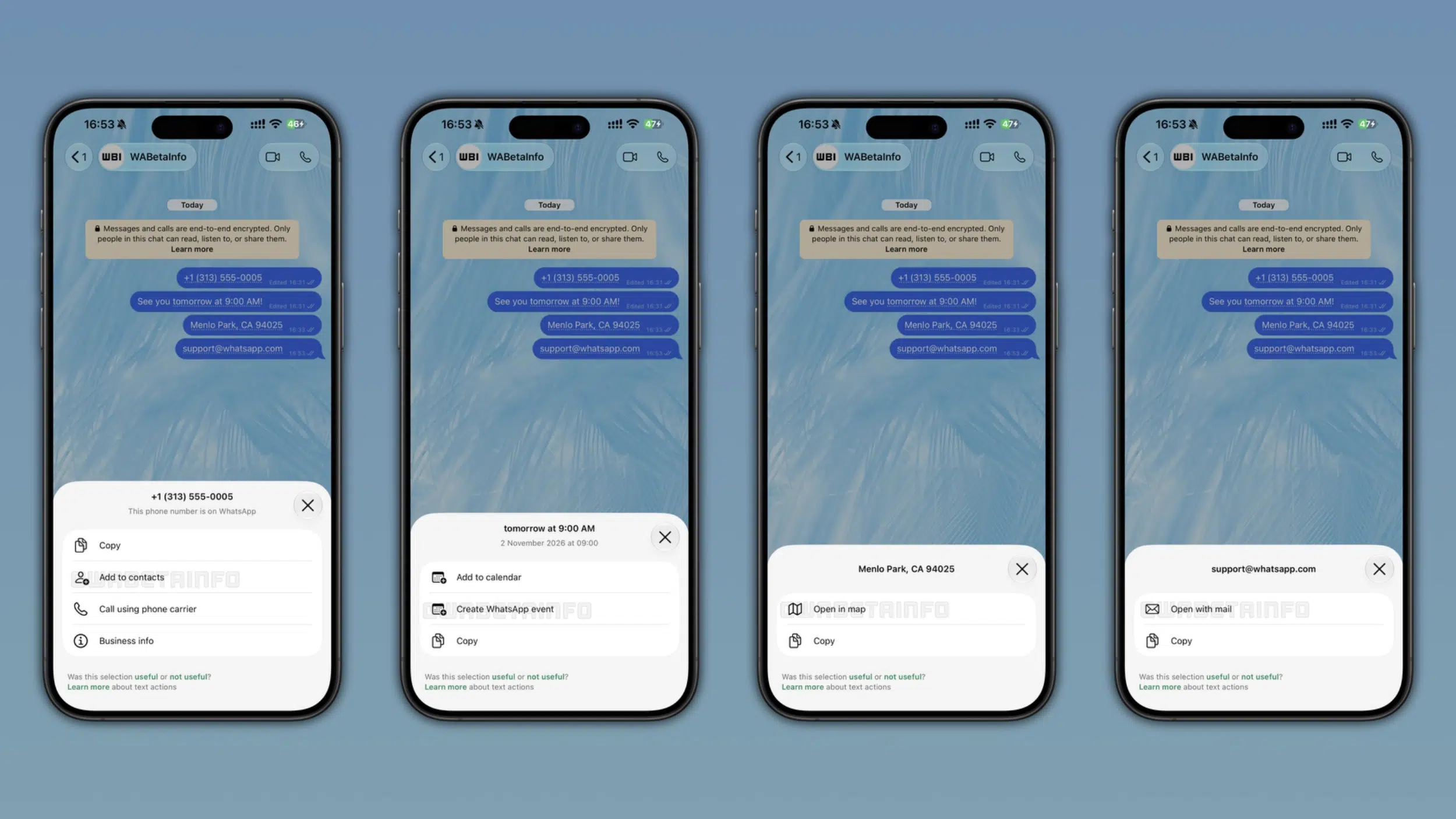
WhatsApp text actions give each type of text its own shortcuts
WhatsApp shows different shortcuts depending on what it detects, and they work on both incoming and outgoing messages:
- Phone numbers can be copied, added to your contacts or called through your carrier.
- Business phone numbers also show the business’s information when tapped.
- Dates and times can be added to your calendar, copied or turned into a new WhatsApp event.
- Addresses can be copied or opened in your maps app.
- Email addresses can be opened in your mail app or copied.
The popup shows the exact text WhatsApp detected at the top, so you can confirm it picked the right one before you act. If you don’t want the shortcut, you can ignore the underline and keep chatting. Some of these actions existed before, but they now sit behind one tap on the underlined text.
Detection happens on your phone and not on WhatsApp’s servers
WhatsApp finds these formats with pattern matching that runs on the device, so it never receives the message content or the suggestion. End-to-end encryption is not affected. WhatsApp already handles message translation on iPhone on the device too.
After you use a shortcut, WhatsApp asks whether it was useful. If you tap not useful, you can say the app detected the wrong text or that the action wasn’t needed. Only a flag goes back to WhatsApp, not the content of the message, which helps it tune how reliably the app spots these formats.
Text actions are reaching some Android and iPhone users first
The feature is available to some users on the latest versions of WhatsApp for Android and iPhone. The rollout is gradual, so the dotted underline may not show up in your chats yet, and WhatsApp has not said when everyone will get it.
If you are on iPhone, update WhatsApp from the App Store and check a chat that contains a phone number or date. Because text actions work on outgoing messages too, you can send yourself a message with a date to see whether the underline appears.