watchOS 27 is less of a visual overhaul and more of a practical cleanup release. Here is a rundown of what is actually worth trying on your Apple Watch.
The highlight features for watchOS 27 include Siri AI, a redesigned Find My app, and Workout Buddy improvements this year, though the update touches quite a bit more than that once you look past the surface.

Turn On Siri AI and Meet the Dedicated Siri App
Siri AI is the headline addition, and it behaves differently enough from the classic Siri that it is worth setting up on purpose.
- The new Siri app syncs conversations across iPhone, iPad, Mac, and Apple Vision Pro, so you can start a question on your phone and finish it on your watch
- Siri AI can pull from personal context, like finding a saved driver’s license number or a door code stored in Notes
- Conversations are saved for later, and Siri can follow up on something you asked earlier or ask you to confirm before sending a message

Processing for Siri AI on Apple Watch is not done on-device, and the more expressive voice option that lets you adjust Siri’s pace and tone specifically needs a paired iPhone Air or iPhone 17 Pro or later. Siri AI is rolling out in English first, with more languages following in October, and it is not available in the EU or China at launch.
Get to Know the Dynamic App Grid and the New Single Tap Gesture
Pressing the Digital Crown no longer opens the old honeycomb of icons.
- A dynamic app grid now shows six large icons, five apps that rotate based on your recent usage and the time of day, plus the Siri app permanently locked in the center
- Tap the icon at the bottom center of the grid to open the full alphabetical app list, since the grid itself has no manual customization option yet
- A new gesture, Single Tap, brings your index finger and thumb together once to select a Smart Stack widget one-handed, useful when your other hand is full
- Smart Stack now surfaces more specific suggestions automatically, including a Parked Car location, a close contact’s birthday, a transit card balance change, or a Noise app alert after a loud environment

Try the New Siri Modular and Pride Luminance Watch Faces
- Siri Modular pairs a rectangular complication that mirrors your top Smart Stack widget with a dedicated Siri complication for quickly invoking the assistant
- Pride Luminance is a new dynamic analog face inspired by multiple Pride flags

Set Up the Consolidated Find My App and Wallet Updates
- Find Devices, Find People, and Find Items are now one map-centric Find My app on watchOS
- Wallet lets you view a card’s balance directly on your watch instead of pulling out your phone
- GymKit, previously limited to the watch itself, now also works from a paired iPhone
- Workout Buddy now works without your iPhone nearby as long as you have a Wi-Fi or cellular connection, delivers more personalized insights on pace, distance, and duration, and is available in Spanish as well as English
- Call Context in the Phone app can proactively surface relevant information during a call, like a confirmation code or reservation number pulled from another app

Apple Watch Series 12 and Apple Watch Ultra 4 Get Exclusive Ambient Listening Features
A handful of features only work on the newest hardware, since they depend on the new S11 chip inside Apple Watch Series 12 and Apple Watch Ultra 4.
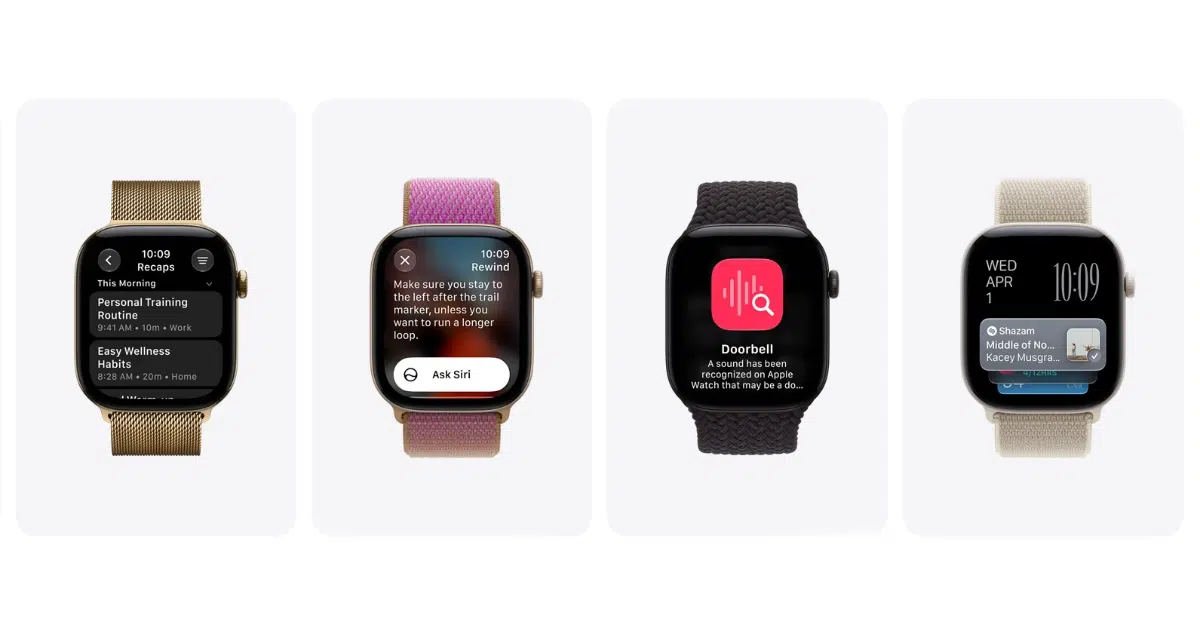
- Sound Recognition can continuously listen for specific sounds, like a doorbell, siren, or crying baby, and notify you with a tactile wrist alert without needing an iPhone nearby
- Live Rewind, triggered by double-pressing the Digital Crown, replays the previous 15 seconds of spoken audio as a text snippet
- Siri Recap automatically generates key points from your recent conversations inside the Siri app
All three of these launch in beta first and support English only, even on Apple Watch Series 12 and Apple Watch Ultra 4.
Two Familiar Features Are Gone, and Older Watches Are Left Behind
Some changes are removals rather than additions. Walkie-Talkie has been removed and Digital Crown behavior has changed, and the classic app switcher is gone in favor of the new dynamic app grid, so budget a few minutes to relearn muscle memory if you relied on either one.
watchOS 27 also drops support for the Apple Watch Series 6, 7, 8, SE 2, and the original Apple Watch Ultra, limiting the update to Series 9 or later, Ultra 2 or later, and SE 3. Installing it also requires the paired iPhone to be running iOS 27 on an iPhone 11 or later, or an iPhone SE (2nd generation) or later.
Read more:
- How to Fix the Most Common watchOS 27 Problems
- How to Fix Apple Watch Battery Drain After the watchOS 27 Update
- watchOS 27 Will Quietly Disable Features You Never Use to Save Battery
- watchOS 27: 40+ New Features and Changes


4 comments