Apple just introduced a feature set on Apple Watch Series 12 and Apple Watch Ultra 4 that changes how the watch listens to the world around you, without ever recording it. It’s called Audio Intelligence, and it covers four separate tools: Sound Recognition, automatic Music Recognition with Shazam, Live Rewind, and Siri Recap.
All four run on the new S11 chip and lean on a mix of on-device processing and Apple’s Private Cloud Compute. Two of the four are available now. The other two are landing as a beta later this year, starting in English.
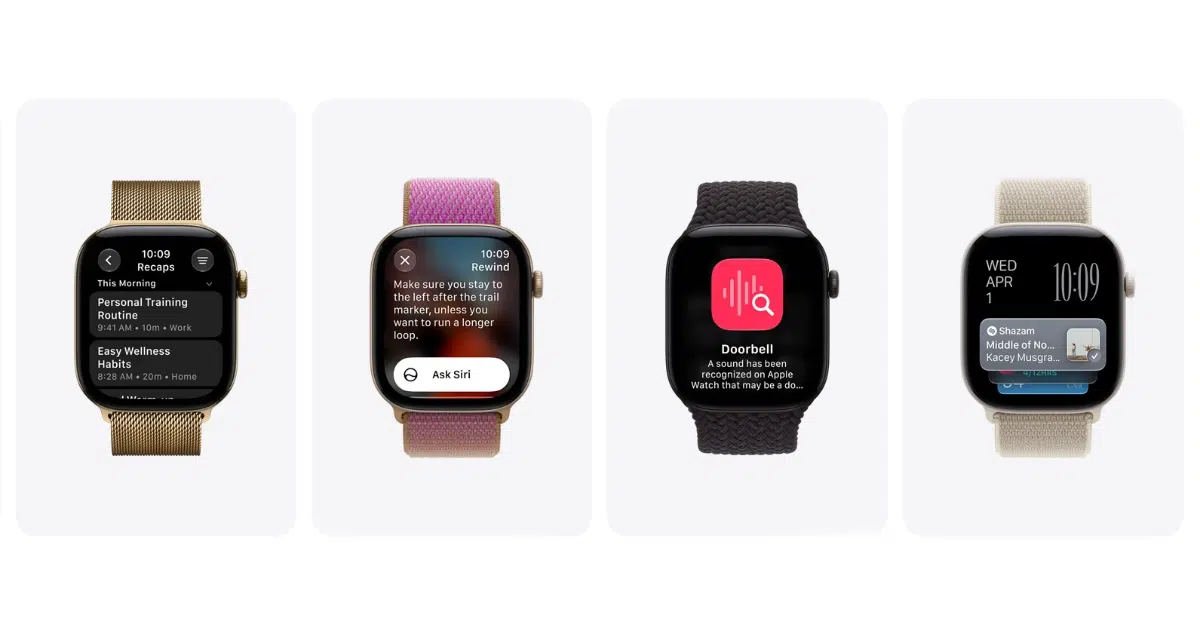
What each Audio Intelligence feature actually does
Sound Recognition
This one’s aimed squarely at accessibility. It listens for sirens, alarms, and doorbells and sends you an alert even if your iPhone is somewhere else. If you’re deaf or hard of hearing, this is the feature that matters most here, and it’s available today.
Music Recognition with Shazam
No more pulling out your phone to ask what’s playing. Your Apple Watch now identifies background music automatically and drops the title and artist straight into your Smart Stack. You don’t even have to tap anything.
Live Rewind
Double-press the Digital Crown and your watch shows you a text snippet of whatever was said in the last 15 seconds. It’s built for those moments when someone says something and you half-catch it. You can ask Siri about it or save it to the Siri app afterward. This one’s launching in beta later this year.
Siri Recap
This is the more ambitious feature of the four. Siri Recap quietly takes notes throughout your day and turns them into short, high-level summaries you can check later, so you’re not the person constantly glancing at your watch during a conversation. Summaries auto-delete after seven days unless you save them. Also arriving in beta later this year.
How Apple is handling the privacy side
Given that this involves your watch listening for sounds and speech throughout the day, Apple built in some real safeguards, and they’re worth understanding before you turn anything on.
- No audio is ever recorded or stored. There’s no file created, so there’s nothing to leak, forward, or hand over even if someone asked.
- Processing happens in a Secure Exclave. Audio flows into a hardware-isolated part of the S11 chip that no app, no operating system process, and not even Apple can access. Once it’s processed, it’s deleted immediately.
- Shazam only sends an acoustic signature. Not the actual audio. Just a compact fingerprint that can’t be reversed back into sound.
- Siri Recap doesn’t produce a transcript. It generates a condensed summary, roughly half the length of the original conversation, with filler and small talk stripped out. That condensed text goes to Private Cloud Compute, which Apple has no access to.
- Nobody gets attributed by name. Live Rewind and Siri Recap don’t label who said what. No “Speaker A” or “John said.” Names only show up if they were actually mentioned in conversation.
- Live Rewind announces itself. A chime plays out loud (even on silent mode), and the display lights up with an animation so people nearby know it’s active.
Everything you save syncs across your devices end-to-end encrypted through iCloud. Apple doesn’t hold the keys, which means nobody outside your own signed-in devices can read it.
How to turn each feature on
Every one of these is opt-in. Nothing activates automatically.
- Sound Recognition: On iPhone, go to Settings, then Accessibility, then Sound & Name Recognition, then Sound Recognition, and turn on “Detect using Apple Watch.” If it’s already on for iPhone, it’ll carry over to your watch automatically.
- Shazam: On Apple Watch, open Settings, tap Smart Stack, and turn on “Music Detection.” You can also just tap the prompt when it shows up in your Smart Stack.
- Live Rewind: Open the Watch app on iPhone, tap Siri, then Live Rewind, and turn on “Double Click Digital Crown.”
- Siri Recap: Also in the Watch app on iPhone, under Siri. You can set it to run on a schedule (say, only during work hours) or toggle it manually, and Control Center always has a quick switch too.
What you’ll need
Sound Recognition and Shazam work with Apple Watch Series 12 or Apple Watch Ultra 4, paired with iPhone 11 or later (or iPhone SE 2nd generation or newer) running iOS 27.
Live Rewind and Siri Recap need the same watches, but a newer iPhone lineup: iPhone 16 through the current iPhone 18 Pro models, plus Apple Intelligence and the new Siri AI (also in beta). These two features aren’t available for anyone under 13, and users under 18 on a Child Account need a parent or guardian to turn them on. English only for now, with more languages coming later.
Should you turn these on?
Sound Recognition is an easy yes, especially if accessibility matters to you or someone in your household. Shazam integration is a genuinely useful convenience with zero downside. Live Rewind and Siri Recap are the ones worth watching more closely once the beta lands, not because the privacy architecture looks weak (it doesn’t), but because how well the summaries actually work in real conversations is something we’ll only know once people are using it daily. We’ll follow up once Live Rewind and Siri Recap go into beta.


