iOS 4 was released today for iPhone and iPod Touch for free. While most people have upgraded easily, some of us have been waiting for a jailbreak. Here’s a simple guide on how to jailbreak your iPod Touch and get features like multitasking and home screen backgrounds that Apple has weirdly disabled for 2G. Make sure you follow the guide correctly and make a backup using iTunes.

Jailbreak iOS 4
- Download iOS 4 for your iPod Touch
- Download redsn0w 0.9.5b5-4 [links at the end]. It’s available for both Mac and Windows.
- Download and install iTunes 9.2
- Connect your iPod Touch to your computer and using iTunes, upgrade to iOS 4. Do this the official way as described here.
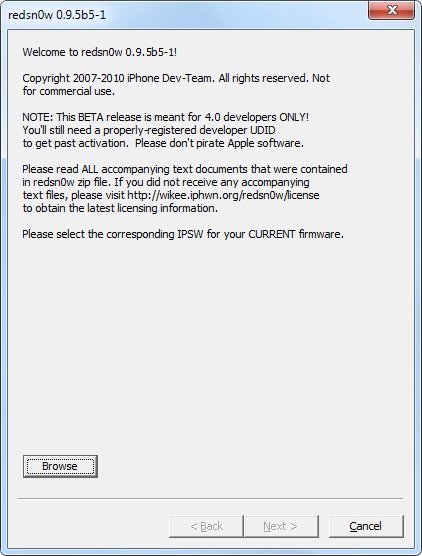
- Now that you have iOS 4 final build on your iPod Touch, you’ll have to jailbreak it by using the iOS 4 GM build with redsn0w 0.9.5 Beta 5. Click browse and point it to iOS 4 firmware and follow the instructions on the screen. Remember to enable battery percentage, wallpapers and multitasking. [Vista users might need to run redsn0w as administrator]
Download redsn0w 0.9.5b5-4
- Mac OSX (x86)
- Windows
If you face any issues, don’t hesitate to ask us in the comments. We’ll be glad to help!
UPDATE: the guide has been updated to reflect the recent release of redsn0w 0.9.5 beta 5-4 which fixes the iBooks issue that users were reporting.
UPDATE: limera1n has been released which jailbreaks all 3rd and 4th generation iOS devices on iOS 4.0/4.1 and beyond. Follow our guides here:
- Jailbreak iPhone 3GS/iPhone 4 on iOS 4.1 using limera1n [Guide]
- Jailbreak iPod Touch 3G/iPod Touch 4G on iOS 4.1 with limera1n [Guide]
- Jailbreak iPad on iOS 3.2.2 using limera1n [Guide]


i have jail broken iOS 4 successfully… when i go onto cydia though it just gets stuck saying Dowloading packages.. i have tried leaving it but after two hours i decided to restore and try the whole process again… it continues with the same problem? help
Is your Internet working fine?
On 3G updated, jailbroken but no internet
i have redsnow 0.9.5 beta 5 for windows. but when i run redsnow it say ipsw not recognise.
Worked perfectly on iPod 2G “MB” model. Thanks!
You're welcome :)
is their already a way to jailbreak ipod touch 2g mc model,
can anyone please tell me when?
my email is rickygames@live.nl
thanks!
Uhm….I did the steps but it is stuck at “Waiting for reboot” and has been like that for like 7 minutes…I am on an ipod touch 2g MB model…what do I do?
that also counts for me
Hello guys! I going to jailbreak my iTouch soon. However, it asks for the IPSW and the file is not included in the redsn0w zipped folder. Where do I get this file from? I'm using windows :)
Anyway, is there any successful jailbreaking yet? Cause all the comments I read about is negative feedbacks about the jailbreak, any successful examples? Lastly, what is the difference between MC and MB iTouch?
Can someone kindly assist, thank you very much!
MC just means some jailbreaks are not compatible all ways check with jailbreak and ipod
to find out if you have a MA-Model, MB-Model or MC-Model goto settings—>general—>about and it will tell you next to model
Restart the process
restart what process exactly? I’ve followed your instructions and am now stuck on the “Waiting for reboot” screen for the past hour. This the same error it seems that the SnowBreeze JB halts on too. Any suggestions?
This is how I try to remedy the situation:
Since I can’t do anything with a dead iPod, I restore the iOS4.0 using iTunes (shift+click on restore and locate the updated firmware). It install’s the update and everything is running fine/smoothly.
Next, I use redsnow and choose “No” for the dialogue box that appears asking whether my iPod is MC or Not. It’s not MC.
I proceed to enable DFU mode and it updates/uploads the updated firmware to the iPod (I am assuming this is what it does) and then proceed to be stuck on the “Waiting for reboot” message.
Any help?
New version of redsnow released: http://sites.google.com/a/iphone-dev.com/files/…
you have to download it separately, there a link on top where it says “Download iOS 4” save this file on your desktop. Once you click Browse on redsn0w look for the file you just downloaded on your desktop, thats pretty much it for that all you have to do now is follow the instructions that it gives you and BAM! its done lol
hope this helped
i got the jailbreak to work but the new multitaskiing was working at the beggining but it wont now after i backed up my stuff from rock are there any programs that could interfere with multitasking i have a ipod touch 2g backgrounder is not on it nor is any other jailbroken multitasking apps
If you have vista, run redsn0w as admin. If it still doesn't work, take out usb cable and plug it back in.
I jailbroke it using this guide – it works fine. But that is contextual – a lot of jailbroken apps don't work very well on iOS4; we have to wait till they're updated. Here's a list: http://spreadsheets.google.com/lv?key=tz1lkTAA…
Multitasking is going well too, considering that this is a 2g
Hi I am using Windows 7, But as soon as I click next after f/w recognition the redsnow s/w closes w/o doing anything. Any suggestions on how to rectigy it
it took about 10 minutes on mine
I did not jailbreak my iPod (2G, MB model) for the usual purpose of jailbreaking. I jailbroke mine to unlock the multitasking, home screen background, and battery percentage features.
same
Do I have to download the update from itunes and the GM version
Can't I use the same update from the itunes update to redsnow?
quik ples cuz I'm now goona update it