iOS 4 was released today for iPhone and iPod Touch for free. While most people have upgraded easily, some of us have been waiting for a jailbreak. Here’s a simple guide on how to jailbreak your iPod Touch and get features like multitasking and home screen backgrounds that Apple has weirdly disabled for 2G. Make sure you follow the guide correctly and make a backup using iTunes.

Jailbreak iOS 4
- Download iOS 4 for your iPod Touch
- Download redsn0w 0.9.5b5-4 [links at the end]. It’s available for both Mac and Windows.
- Download and install iTunes 9.2
- Connect your iPod Touch to your computer and using iTunes, upgrade to iOS 4. Do this the official way as described here.
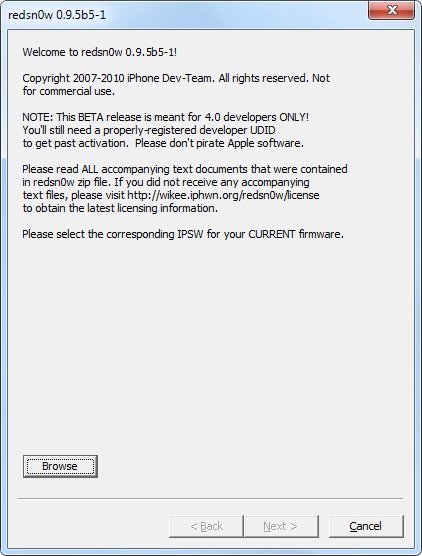
- Now that you have iOS 4 final build on your iPod Touch, you’ll have to jailbreak it by using the iOS 4 GM build with redsn0w 0.9.5 Beta 5. Click browse and point it to iOS 4 firmware and follow the instructions on the screen. Remember to enable battery percentage, wallpapers and multitasking. [Vista users might need to run redsn0w as administrator]
Download redsn0w 0.9.5b5-4
- Mac OSX (x86)
- Windows
If you face any issues, don’t hesitate to ask us in the comments. We’ll be glad to help!
UPDATE: the guide has been updated to reflect the recent release of redsn0w 0.9.5 beta 5-4 which fixes the iBooks issue that users were reporting.
UPDATE: limera1n has been released which jailbreaks all 3rd and 4th generation iOS devices on iOS 4.0/4.1 and beyond. Follow our guides here:
- Jailbreak iPhone 3GS/iPhone 4 on iOS 4.1 using limera1n [Guide]
- Jailbreak iPod Touch 3G/iPod Touch 4G on iOS 4.1 with limera1n [Guide]
- Jailbreak iPad on iOS 3.2.2 using limera1n [Guide]


i tried to jailbreak two ipods, one is an “MB” model and the other is “MC” and when i selected the IOS 4 in redsn0w it said tha it was “UNABLE THE RECOGNIZE ESPECIFIED IPSW” who can help me??
i have download the ios 4 file and now didnt work it in redsnow
i do click browse and no there is not a file named ios 4
help me????
there is no file in redsnow named ios 4
help me
hi! i have a question: this jailbreak works with ipod touch 2g MC?
no, it does not
Question: this jailbreak works with a ipod touch 2g MC??????
no, you can´t jaibreak an mc model 2g ipod touch 8gb not.
you have to wait until there is an jailbreak avaible. the best way to find this out is google
no, you can´t jaibreak an mc model 2g ipod touch 8gb not.
you have to wait until there is an jailbreak avaible. the best way to find this out is google
I tried as the guide instructed but I got error 1604 when restoring with iTunes. Please help..
Me too, running iTouch 2G MC. Need to know if this jailbreak is compatible. Thanks!
can't jailbreak ipod touch 2g IOS 4.0…
I am using windows.
hi you can find this in apple folder but you need to show hidden files first i forgot how i did it but when u have done that you go to your hard drive, then documents and settings then your user name then application data,apple computer,itunes,ipod software update and there u will find your ipsw file hope that helps. tigzi
I have an ipod touch 2g MC model. Is there a jailbreak for this model yet ?
I used the older version redsn0w 0.9.5b5-3 and, of course, my iBooks didn't work. So, I redo the process using redsn0w 0.9.5b5-4. Still no iBooks. The app turns on ok, but the PDF files I have there do not show up. I tried re-syncing the ipod and also restarting it. Nothing.
Everything else works fine. I have multitasking, home page wallpaper, and battery percentage. I just can't get my books in iBooks to show up. Anybody got an idea?
i just jailbroke my ipod touch 2G
everything so far seems fine.. but i cant seem to play some of my music
its really weird, cause for some songs i press play and it takes me back to the list of songs and nothing plays
are you an MC model?
Does your Ipod is an MCmodel courtchar?
Use sn0wbreeze to change the .ispw and it works fine (':
MY IPOd WONT TURN ON!! HELP
work on your grammar
I followed the instructions and it looked good but when i checked nothing happened. The original os is stillthere with no Cydia, multitasking etc..
what is MC?
i cant seem to find the ios 4 firmware when i browse..where might it be saved??
no its not
please help me, i dont know what to do
Where did u download it?