iOS 4 was released today for iPhone and iPod Touch for free. While most people have upgraded easily, some of us have been waiting for a jailbreak. Here’s a simple guide on how to jailbreak your iPod Touch and get features like multitasking and home screen backgrounds that Apple has weirdly disabled for 2G. Make sure you follow the guide correctly and make a backup using iTunes.

Jailbreak iOS 4
- Download iOS 4 for your iPod Touch
- Download redsn0w 0.9.5b5-4 [links at the end]. It’s available for both Mac and Windows.
- Download and install iTunes 9.2
- Connect your iPod Touch to your computer and using iTunes, upgrade to iOS 4. Do this the official way as described here.
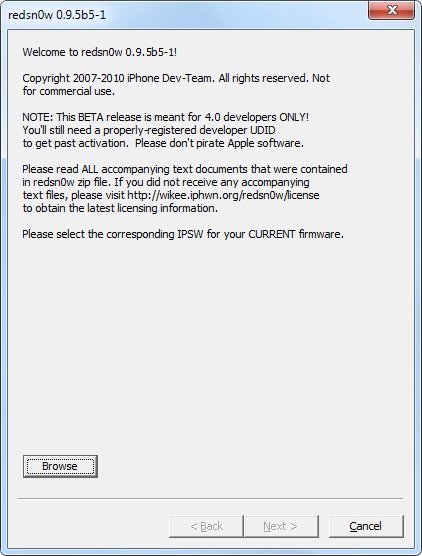
- Now that you have iOS 4 final build on your iPod Touch, you’ll have to jailbreak it by using the iOS 4 GM build with redsn0w 0.9.5 Beta 5. Click browse and point it to iOS 4 firmware and follow the instructions on the screen. Remember to enable battery percentage, wallpapers and multitasking. [Vista users might need to run redsn0w as administrator]
Download redsn0w 0.9.5b5-4
- Mac OSX (x86)
- Windows
If you face any issues, don’t hesitate to ask us in the comments. We’ll be glad to help!
UPDATE: the guide has been updated to reflect the recent release of redsn0w 0.9.5 beta 5-4 which fixes the iBooks issue that users were reporting.
UPDATE: limera1n has been released which jailbreaks all 3rd and 4th generation iOS devices on iOS 4.0/4.1 and beyond. Follow our guides here:
- Jailbreak iPhone 3GS/iPhone 4 on iOS 4.1 using limera1n [Guide]
- Jailbreak iPod Touch 3G/iPod Touch 4G on iOS 4.1 with limera1n [Guide]
- Jailbreak iPad on iOS 3.2.2 using limera1n [Guide]


Simple, follow the guide if you have a non-MC model.
the guide on this post? i have
but for some reason some of my songs wont play
it jumps back to the song list and nothing will play
were your songs working before on your idevice?
try redownloading the song(s) from different sources
I had the same problem just go to https://www.ithinkdiff.com/download-ios-4-for-ip… and select your idevice.
So I don't find any good answer: does it work on 2G MC models? Well, even if I am not sure, if it would work on MC models of 2G, it should work on 3G too, so I just want to be sure.
3g models always are mb ;)
So I have an un-jailbroken iPod Touch 2g with iOS 4 and I'm trying to jailbreak it using this guide. But for some reason I can't find the .ipsw file. I have tried downloading it from many sources and all I get is a compressed folder with no .ipsw file. I have Windows Vista and I have tried showing hidden files.
Can anyone help me?
Ok so now I have the file, but when I browse with redsn0w, it says “Unable to recognize specified IPSW.” I've tried running it in Administrator mode. Can anyone help me? I really want multitasking.
wew! i've been waiting for many days to waiting jailbreak mc model…….. anyone please help? if you found it tell me!><
how do u get itinto a .ipsw file?
when you download it, it ask you if you want to save it or if you want to open the folder. you click on save and at the end of the name of the firmware, you add .ipsw
how do i change it to a .ipsw file
the jailbreak worked great but it wont sync with itunes
what do i do
when you download it, it ask you if you want to save it or if you want to open the folder. you click on save and at the end of the name of the firmware, you add .ipsw
itunes doesn't recognize my ipod after jailbreak how do i fix it/
Yay, after the third try it worked!!!
YES!!!!!!!!
but to get into dfu mode you can simply hold down the home and power buttons at the same time for 10 seconds and then release the power button and hold the home button for 10 more seconds. its much easier than how redsn0w tells you to do it.
have you searched on your user's folder/appdata/roaming/Apple Computer/iTunes or iTunes media/ipod software updates
it doesn't work 4 mc models
How do I upgrade an already Jailbroken iPod Touch 2g 3.0 to iOS4? Can I just run redsn0w with the 4.0 IPSW file, or do I still have to upgrade to 4.0 through iTunes first?
Well the thing is I already updated my iPod, but I didn’t do it manually and I think I deleted the file that contains the iOS4 update. When I try downloading the file again from the link given, I can’t update it manually because my iPod is already updated. So now I can’t jailbreak my iPod. Does anyone know what I should do?
Well the thing is I already updated my iPod, but I didn't do it manually and I think I deleted the file that contains the iOS4 update. When I try downloading the file again from the link given, I can't update it manually because my iPod is already updated. So now I can't jailbreak my iPod. Does anyone know what I should do?
how do we work that then? what is going to happen? is there anything we can do?
plug it up to itunes, then restore it