A lot of users still don’t have access to WiFi. Plus many people, including me, have faced the random death of WiFi on their iPhone 3G recently. While the easiest way to unlock iOS 4 after the jailbreak is to fire up Cydia, download and install ultrasn0w and reboot. There’s yet another simple method to do so, without WiFi, using Cyder II.
Cyder II is a Cydia package manager which lets you connect to your iPhone 3G/3GS and download, install and backup packages and sources using your computer. Sadly, it’s a Windows only app so you can’t follow this guide on a Mac. This guide assumes that you’ve already jailbroken your iPhone 3G or 3GS. Follow our guide here to jailbreak your iPhone 3G and here for iPhone 3GS.
Here’s what to do:
- Download Cyder II
- Connect your iPhone to your computer and launch Cyder II app.
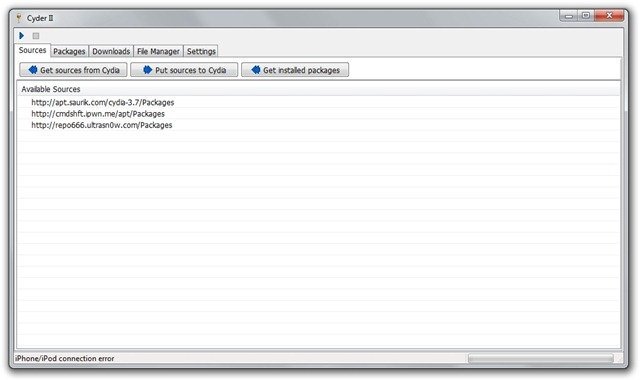
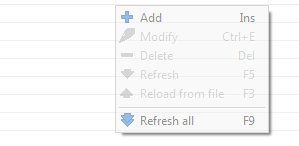
- Add the following repositories in sources by right click anywhere in the field and clicking Add. http://apt.saurik.com/cydia-3.7 and http://repo666.ultrasn0w.com
- Click the play button on the top left. This will download the list of packages from these repositories.

- Switch to the Packages tab and select http://apt.saurik.com/cydia-3.7 in the Source and System in Section. In the list of packages, find Mobile Substrate, right click it and select Download with dependencies.

- Similarly, select http://repo666.ultrasn0w.com in sources and do the same with ultrasn0w. Right click it and select download.
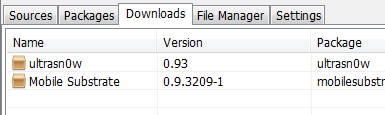
- Now switch to the downloads tab. Right click on each package and download it.
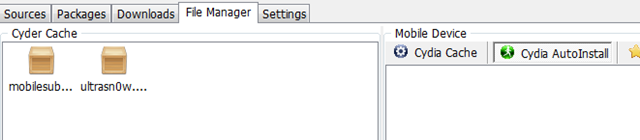
- Switch to the File Manager tab now. Drag and drop the packages from Cyder Cache to the Cydia Auto Install folder.
- Close Cyder.
- The packages will install when you restart your iPhone. You might have to restart the iPhone twice, as in my experience. After the second restart, your phone will find your carrier. Enjoy your unlocked iPhone!
If you have any questions, let me know in the comments. I’ll be glad to help!
Also check out the guides at the following links:
Jailbreak and Unlock iOS 4 on iPhone 3G
Jailbreak iOS 4 on iPod Touch 2G
If you’re using an iPhone 3GS, follow our guide on how to jailbreak and unlock it using PwnageTool.
Push notifications on unlocked and hacktivated iOS 4 on iPhone 3G/3GS can be fixed by following our guide here.

Thanks for posting! I recently moved to Costa Rica from the States and I brought my iPhone – had the plan canceled and thought it would be easy to jailbreak and unlock after the fact (not so much).
Without ability to access wifi, I found out about Cyder 2. I was installing ultrasn0w without the other packages and it was causing my phone to enter the never-ending apple reboot loop after the restart.
So now that I've followed your instructions, the phone is not going into reboot, BUT it does say “no service” and the network is not working, either despite the little wifi logo showing full strength. Just to clarify – I am using an activated SIM card from a local carrier.
Any ideas as to what I should do?
Any solution yet? I got exactly the same problem. No Wifi and Unlock needed. I did reboot twice, the 2nd time results the never-ending apple reboot and keeping reboot again and again.
Have you followed the instructions to Imran’s post?
ahh…pls ignore my previous post. it’s my bad. i got the fix. The package and its dependency are needed to be installed at the same time!
Check Cydia to see if ultrasn0w is installed. You might also want to try restarting again if it's installed.
Hi, I jail broke iOS4 my Iphone using PwnageTool. Previously it was 3.0 and jail broke it but was never able to unlock it. I am facing issue again after jailbreaking iOS4. Cydia is installed on IPhone and when I am using Cyder, its not getting connected to my IPhone..Its giving Iphone/Ipod connection error. Please help.
I am using Windows 7 on Mac using parallel desktop.
Appreciate your help.
Thanks for the article …. it really helped … i have just restarted my iPhone .. lets c
Cooooooooooooooooooool ………………. it workedddddd………
Thanks alot Imaran … you just made my day .. Thanks alot …
Works like a charm! thanks a LOT!
Try doing this from a Windows PC.
You're welcome :)
thank a lots n lots :-) u saved my life
Thanks for the quick reply :)
ultrasn0w is installed and I have restarted a dozen times – still no service.
OMG YESSSS!!! As I was replying, I decided to go into the settings and mess around with options to try and maybe jump start the service somehow since restart did not work and – IT WORKED! I toggled airplane plane off and then on again and suddenly I have service.
You are AWESOME! Thank you soooo much!
great tutorial :P u saved my ass
help….my phone is stll saying invalid sim
thank you so much it works can i use itunes as normal??
mate i cant thank you more.. fixed and is working like a charm. i spent over 9 hours on this so im VERY happy. thank you!
You're welcome! Glad to have helped
IMRAN!! Is there any way to get wifi working? I jailbroke 4.0 with redsnow and unlocked using our method but wifi is still dead. Doesnt come up at all, I reset network settings and still no go. Any Ideas??
This is a known issue with iPhone 3G. The WiFi dies without warning
sometimes. This happened to me too, and I've been unable to find any fix for
it. It's a hardware issue not a software one.
actually tried it and i do not know if it works, my iphone is currrently @ custom ios 4 but the default carrier is at&T but im in canada and uses rogers as sim card now, i lost my at&t sim card and tried this to hopefully work . but it still did not. restarted it heaps but still stuck on the itunes and emergency calls only logo. any help? its much appreciated
Thanks alot dude you relly saved my phone
Hi Imran, I have checked Cydia to see if ultrasn0w is installed, in cydia/sources – empty, any ideas? I am still getting invalid sim
jailbreak with spirit and cyder can see my iphone
This means that you must have missed a step in the guide. If followed correctly, the ultrasn0w should appear. After copying in Cyder, did u reboot your iPhone?
yes rebooted the phone twice…i even went through the instructions again…i see the packages in cydia auto install tab
I’ve rebooted my phone about seven times, still nothing. I have a flat line where the company name used to be.
I’ve rebooted my phone about seven times, still nothing. I have a flat line where the company name used to be.
finally my iPhone was unlocked…only issue is that springboard keeps on crashing and iPhone is always in safe mode after restart..seems unable to autofix itself.
how do you address this thing?
Seems to be an issue with Cydia, or some jailbreak app. Did u install any?
finally, i got rid of the pesky safe mode issue by uninstalling winterboard..now the 'safe mode' is gone!
thanks to google. :)
Yea that's what I thought. Cydia app messing up.
Hello Please help me out. i have jailbreak with spirit and follow this guide to unlock without wifi and i have re start my iphone many time but still unable to use the T -mobile sim. PLease help =(
update: I used redsn0w rather than spirit to jailbreak and cyder then worked fine
Hi Clockbuyer, i had the same problem using Spirit, so I did a restore then did a jailbreak using RedSn0w rather than Spirit, I then ran Cyder, followed the instructions above and everything worked fine, Hope this helps.
I have the same problem. I found a PC to use (I'm a Mac user), hooked up my iPhone, followed all the steps, and nothing. I'm used Pwnage Tool to jailbreak. My problem is I'm in China. I have wireless on my iPhone, but I can't access saurik's stuff, even with a proxy. Without the proxy nothing downloads; with the proxy, I get a http://1.1 400 error.
hey. after i unlocked the phone, it worked fine once. after that the network bars dont show on the top left. how do i fix this ?
hey. there is also this little issue. the network seems to disconnect after like 1 minute. any suggestions ?
I seriously have to thank you very much. I thought my iPhone was gone. I spent 18 hours working on this until I fould this.. Thanks again.
Imran, i've tried your way, but in sources in Cydia i can't see the files, i think this is because i jailbroke my iphone 3g using Spirit, i just wanted to know, would redst0rm work to jailbreak my iphone, as it has 3.1.3 firmware and 5.12.01 baseband, and i am not sure if redstorm is compatible to jailbreak it, if you can let me know, it would be help me out a great deal. thanks
Thanks a lot, seriously. I tried to actualize to 4.0 without knowing i had lost wifi forever (grey icon) days ago, I thought it was that there were no wifi servers around. So i was totally dissapointed about having an ibrick, jailbroken, but jailbricked. But now i reached your post and light covers my iphone :D Thanks!
thanks for this you save my other iphone 3g without wifi
i have 3G ios4.0 5.11.07 with no wifi. i've tried this method but i just can't Drag and drop the packages from Cyder Cache to the Cydia Auto Install folder. i even think that cyder doesn't make contact with my iphone… anyone who can please help?
Thank you so much.
Worked first try with pwnage tool jailbroken 3G. (from 3.1.2 to 4.0)
Is there a reason why you recommend redsnow for jailbreaking an iPhone 3G, or is this just a personal preference?
Thanks again …
redsn0w works with both Windows and Mac and it’s relatively simpler to use than Pwnagetool which is Mac only. Even the iPhone Dev Team advices to stick with redsn0w if you don’t need the advanced features of Pwnagetool.
redsn0w works with both Windows and Mac and it's relatively simpler to use than Pwnagetool which is Mac only. Even the iPhone Dev Team advices to stick with redsn0w if you don't need the advanced features of Pwnagetool.
no help guys?
khaled, use redsn0w rather than spirit to jailbreak your iphone, i had exactly the same problem, try it that way and you will be able to transfer the folder to the cydia auto install folder!
thx for responding ali!
i did that, i jb using latest redsnow, but still exact the same problem, iphone/ipod connection error.
wow…great…it needed the two restarts…now it is working fine…thanks a thousand….
Hi I was wondering something. Can I connect to WiFi after I use Cyder II or should I use PwnageTool 4.0.1 to unlock and jailbreak my Iphone 3Gs? It has Ios 4.
Brilliant!!!!! Worked perfectly. THANK YOU!
Thanks a TON. i got my iPhone working in 2nd Restart
Thank you so much! Just followed the instructions,restarted twice and my device unlocked without Wi-Fi connection!
wow!! THANK YOU SO MUCH!! you saved me.. i was pulling out my hair going crazy for about 12 hours straight trying to unlock my dead wifi iphone THANK YOU SOO MUCHHH I LOVE UUUUUU
When I use cyder to autoinstall my files it gets stuck at the apple logo! I've restored and jb'ed 5 times now today and every time I use cyder 2 it's stuck at the apple logo after the second reboot! please advice!
you're welcome. glad to have helped :)
OMG!!! Thank you for this I was feeling rather hopeless attempting to unlock my iPhone with no wifi connection. You saved my iPhone!
Mobile Substrate not showing up in packages on iPhone
wonderful dude..absolutely amazing! Thanks a lot, buddy!
GOD. BLESS. YOU <3
Hi i did all of that but in cydia on the i phone said to up-date and with the wifi i'm not able to update the three app( http://repo666.ultrasn0w.com, http://apt.saurik.com/cydia-3.7 how could i up date
the sources i put in without a wifi. plz help me thanks
There is no package showing up when I tried to get sources from http://repo666.ultrasnow.com/packages. I did get Mobile Substrate though.
Same thing here. Any help?
help ultrasnow is not installed in cydia i have tried like 40 times…i got 1 bar with no e no nothing i have a tmobile card am im missing something?
thanks so much
it works for me on my 3g after losing wifi in the upgrade to ios 4.0
hi .. sorry but when i do the following ..3.Add the following repositories in sources by right click anywhere in the field and clicking Add. http
://apt.saurik.com/cydia-3.7 and http://repo666.ultrasn0w.com .. it tel me that i have ..( 404 oject not found) what can i do in this case .. thank you
Hey dude you are the best man!! I got this wifi trouble and I did jus what you say and it is working I just want to ask something, do you know if there is a solution for this wifi problem?
It's a hardware issue. Best chances are to get it repaired from an expert.
When select Packages and Ultrasnow, select all, not system, it will show yoz ultrasnow 0.93, and follow further instruction
hey …plz help…i have done the entire process n d cydia application is shown d uptdates also as yellow snow …n saurik bt my phone is still nt unlocked….wat should i do….
Woooooooooooooooooow, you are the best, after a month of trying to unlock the iPhone 3G with OS4 this is the best result :)))))) thanks in a million…………….exactly as it is written step by step, for those who couldn't unlock the phone please read carefully each step while unlocking the phone so it can work :)))))))))))) Thx again
Big hugs for u…..it works man works
ur r my king…
thanks aloooooooooooot, you are the best one,,, thank you very much
no really…. u r the shit.
AMAZING AMAZING AMAZING
Thank you
Had have a hard time…now it works again. Thank you so much. It´s just amazing…
I AM FROM JAMAICA AND I SAY THIS MAN IS THE BEST RESPECT AND THUMBS UP TO U MAN!!!
help!!! i tried this on my iphone 3g version 3.1.3 and my carrier is still locked… pls. help.. i tried the steps above… still no go…
You are the frikin’ MAN!!!!!
Dude…You are awesome…You would not believe I spent 5 days watching youtube video to Unlock my 3G 3.1.3 and none worked.
I tried steps that are above and It worked at the first go…
Thank you so much…
You are too good man. You ROCK !!!
After struggling for so long, your guideance has braought a smile & a Network on my iPhone 3GS with iOS 4.0.2.
I can´t thank you enough!! it´s very clear how to do it and worked perfectly!!
Hey dude, you are the man. I thought this one also the same. But OMG it’s unlocked. man thank you so much and blessing you for saving my money. I don’t have words to say how much I appreciate you. thank you again.
Thanks a ton dude.. you rock.. Can’t thanks you enough.
thank A LOT it feel good to be back on line
there are no words to discribe how grateful i am, thank you for shareing your knowledge. i have a question if i may, my iphone is unlocked but it still says no service, could it be my sim card? im going to try another one and see. any who? thank you thank you thank you.
HELP!!! please. same thing with ebony after i followed the steps still says no service, when i went to settings>carrier it says ” unable to load network list” and also if go to settings>general>about carrier says Carrier 7.0
please I need your help desperately
Many thanks :)
big thanks works like charm
Hi!
After I restart the iPhone, it recognizes Tmobile in the status bar but remains on the “emergency calls only” screen. do i have to restart the phone with my Tmobile sim card inside?
Sorry.. Im new trying to do this.. and couldnt made my iphone find my carrier after the reseting.
Do I need to do something on the settings tab from Cyder 2?
Hello, me again…
I Restore my iphone 3G with iPhone1,2_4.1_8B117_Restore and then used the redsn0w_win_0.9.6b1 to jailbreak.
The wifi is recognized but didn’t work so I’m following the steps with Cyder II, and can’t get them to my iphone after restarting.
plz give me iphone ios 4.0 unlocker software to unlock my iphone
Dear it really works.
i’ve unlocked my iphone 3g.
thankx a lot.
Thumbs up for Imran, but those who will use this method do not forget to install Debian packager, otherwise u can fail to unlock
i wana try to unlock my iphone 3g 4.0. with cydia
i cant get in ultrasn0w 0.93 in source of http:/repo666.ultrasn0w.com..
plz help me…………
after unlocking…
my iphone still SEARCHING…….
and i got a message ” Unable to load network list”.
what should i do………
plz help me………..
Thanks a lot Imran, I don’t have WiFi here but thanks to your great tutorial i managed to unlock my iphone 3G . I love you man ur the best.
would i be able to do this with the new ultrasnow update? (for 5.14 baseband)
There is no Ultrasn0w package showing up for me.
I have added http://repo666.ultrasn0w.com/Packages as a source, I have refreshed it, I have set search criteria to ‘all’ but no Ultrasn0w.
Any ideas on how to progress from here?
not getting the packages for ultrasn0w i’m i doing something wrong
err i cant find ultrasnow or any packages in http://repo666.ultrasn0w.com/Packages, does anybody know how to solve this??? thanks in advice
i have the same problem. pls help. when i right click on http://repo666.ultrasn0w.com i can’t find Download. pls help. i need this very urgently.
OMG you rock my boat man. OS4.1 upgrade on iPhone 3G (with jailbreak) would not unlock. Used Cyder2 and I am a very happy bunny. Spent many hours trying to fix this!!!!!!!!!!!!!
it works!!!! thank you!!
finally this was the option saved me…
only one change, i was not able to download ultrasnow from http://repo666.ultrasn0w.com,
instead i downloaded ultrasnow.deb separately and copied to the downloaded folder manually…and then to auto install..rebooted….it worked
thanks a lot…
you can use apt.178.com as an alternate repository if the ultrasn0w original does not work.
So what do I choose using the apt.178.com when in the Packages tab? Do I choose “Remove Recents” as the system?
I can download from http://apt.saurik.com/cydia-3.7 on the packages tab, but when i select the ultrasn0w tab, the list is empty. i use an iphone 3gs with iOS 4.2.1
what if repo666 doesnt show anything
It was posted here few times,but with out being answered. ultrasnow from http://repo666.ultrasn0w.com is empty, no files being downloaded in Cyder II. I downloaded ultrasn0w.deb file but is there a way to add it manually to Cyder?
thanks in advance
i tried to download softwares from repo666.ultrasn0w.com through cyder 2
but it is unable to load the softwares from repo666.ultrasn0w.com
what should i do???
i am trying to unlock iphone 3g on 4.1 baseband without wifi
THank youuuuuuuuuuuuuuuuuuuuuuuuuuuuuuuuuuuuuuu
Help!! am lost in step
6. Similarly, select http://repo666.ultrasn0w.com in sources and do the same with ultrasn0w. Right click it and select download.
I can’t find ultrsn0w in my Download tab?
What am i doing wrong???
cyder isnt connecting with my iphone :(