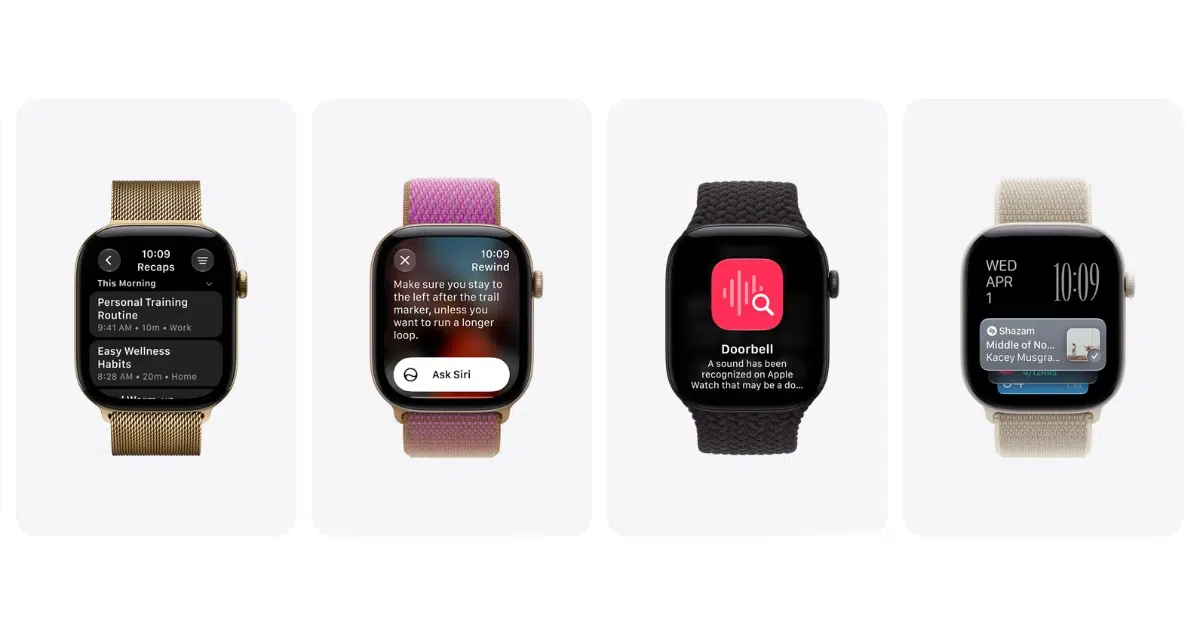
Siri Recap and Live Rewind are now in the watchOS 27.3 beta, bringing two Audio Intelligence features Apple announced in September to the Apple Watch Series 12 and Apple Watch Ultra 4. Both need Siri AI on an iPhone 16 or later, and the iPhone 16e is not supported.
Live Rewind shows the last 15 seconds of speech as text when you double-press the Digital Crown, while Siri Recap summarizes your conversations through the day. iOS 27.3 also includes new animations that introduce Siri Recap, and one X post shows them.
pdfu posted the animations on X, and they pair an Apple Watch with an iPhone. Apple seeded the watchOS 27.3 beta and the iOS 27.3 beta to developers on November 3.
New Siri Recap onboarding animations in iOS 27.3. https://t.co/24RmZEk2lQ
— pdfu (@itspdfu) November 3, 2026
Siri Recap and Live Rewind Work With 12 iPhone Models
The iPhone has to run Apple Intelligence and Siri AI. These are the models that qualify:
- iPhone 16, iPhone 16 Plus, iPhone 16 Pro and iPhone 16 Pro Max
- iPhone 17, iPhone 17e, iPhone 17 Pro and iPhone 17 Pro Max
- iPhone Air, iPhone 18 Pro, iPhone 18 Pro Max and iPhone Duo
Both features start in English only and are not available to anyone under 13. A parent or guardian has to turn them on for a Child Account under 18, and each is opt-in from the Watch app on iPhone.
Live Rewind Text Disappears About 30 Seconds After the Display Dims
A double press on the Digital Crown brings up a text snippet of the last 15 seconds of speech, which helps when you miss a name or an address. The snippet disappears from the watch about 30 seconds after the display dims, unless you tap Ask Siri or save it to the Siri app.
Live Rewind does not keep transcribing in the background, and the speech recognition runs on the Apple Watch and iPhone. The text goes to Private Cloud Compute only if you ask Siri about the snippet or save it.
The watch also warns people nearby when Live Rewind starts. A chime plays from its speaker even in silent mode or with headphones connected, and the display shows a full-screen animation with a microphone indicator.
Siri Recap Summaries Delete After Seven Days
Siri Recap works in the background, so you do not trigger it the way you do Live Rewind. Each summary has a title and key points instead of a transcript.
Summaries delete themselves after seven days unless you save or export them. You can set Siri Recap to run by time, location or both, such as only at work or never at night, and switch it on or off from Control Center. You can view, edit and delete summaries in the Siri app, and export them to apps such as Notes and Journal.
The watch encrypts the audio and passes it to the paired iPhone, which transcribes it and condenses it to less than half its length. That condensed text goes to Private Cloud Compute to generate the summary. Saved summaries sit in the Recaps tab of the Siri app and sync through iCloud with end-to-end encryption when two-factor authentication is on.
Siri Recap is designed to leave out harmful content and sensitive details such as financial data and government-assigned identifiers, and it never labels who said what. Apple also warns that summaries can be incomplete or inaccurate, so important details are worth confirming with the people involved.


