HomeView software runs on tvOS 27.2, and the first build already has swipe typing and a Liquid Glass strength slider. Calendar and many other system apps stay locked until HomeView recognizes your face, so what you see depends on whether you are one of the six people it knows.
Developers Guilherme Rambo and Steve Troughton-Smith had the firmware running in a virtual machine soon after Apple posted it on October 30, and Troughton-Smith shared a run-through of the interface a day later, ahead of the November 13 launch.
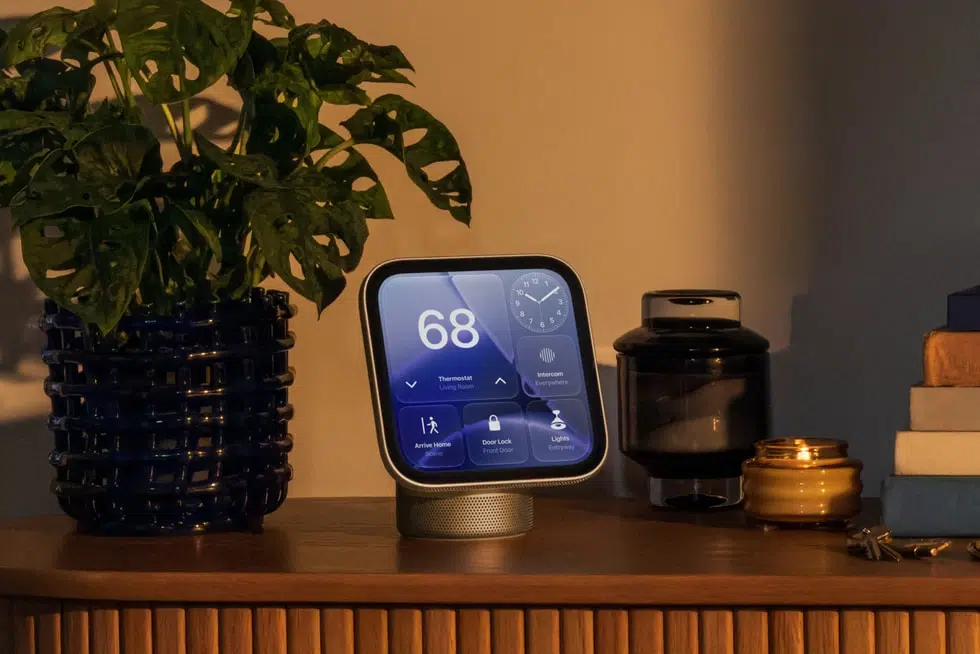
HomeView Software Is tvOS 27.2 with Watch and iPhone Parts
Troughton-Smith found that HomeView identifies itself as tvOS 27.2 with a DeviceFamily of 8, and an unmodified tvOS build of his Broadcasts app launched on it, though the interface rendered very large and broken. He calls the software a real mashup of tvOS, watchOS and iOS at every level, and he ported the watchOS version of Broadcasts to HomeView as a native app using Apple’s PebbleUI additions.
In the run-through video he opens apps, scrolls Settings and edits the clock face as the software appears before anyone is face-authenticated. He says CarPlay for HomeView is called PebblePlay internally. Xcode and Device Hub already build, run and debug HomeView apps, but he expects CarPlay-style apps to come first and doubts native app bundles or an App Store will follow.
Calendar Stays Locked Until HomeView Recognizes You
Apple says HomeView recognizes up to six people and shows personal content only when a paired iPhone or iPad is on the same Wi-Fi network and recently unlocked, and the display recognizes the person by face. Troughton-Smith found that many of the system apps, even Calendar, require that profile authentication, and he recorded a face recognition attempt that hit a too-dark warning and ended in failure.
Guests and unrecognized users can still control smart home accessories, check the weather, set timers and play music. HomeView recognizes each person by face and voice, with the camera and microphone feeds processed in Secure Exclaves on the A18 chip that neither the operating system nor Apple can access. Siri AI runs in beta on the software and works in English to start.
Swipe Typing, a Glass Slider and AirPlay Video Controls Are Already In
Troughton-Smith shows swipe typing working in the search keyboard in Settings, and the appearance settings include a slider for Liquid Glass strength. AirPlay video plays in wide and square layouts with subtitles, plus speed and audio track controls, and the software has its own AirPlay pairing and Now Playing screens.
A 16:9 clip is still letterboxed on the square display, filling about 56 percent of its 1088 by 1088 pixels. HomeView connects over Wi-Fi 6E, Bluetooth 6.0 and Thread, with a USB-C port for power and no Ethernet port.
The tabletop model ships with a 30W power adapter and a 1.5-meter USB-C cable, while the wall-mounted model needs a mount, a USB-C cable and an adapter of at least 20W, all sold separately.


