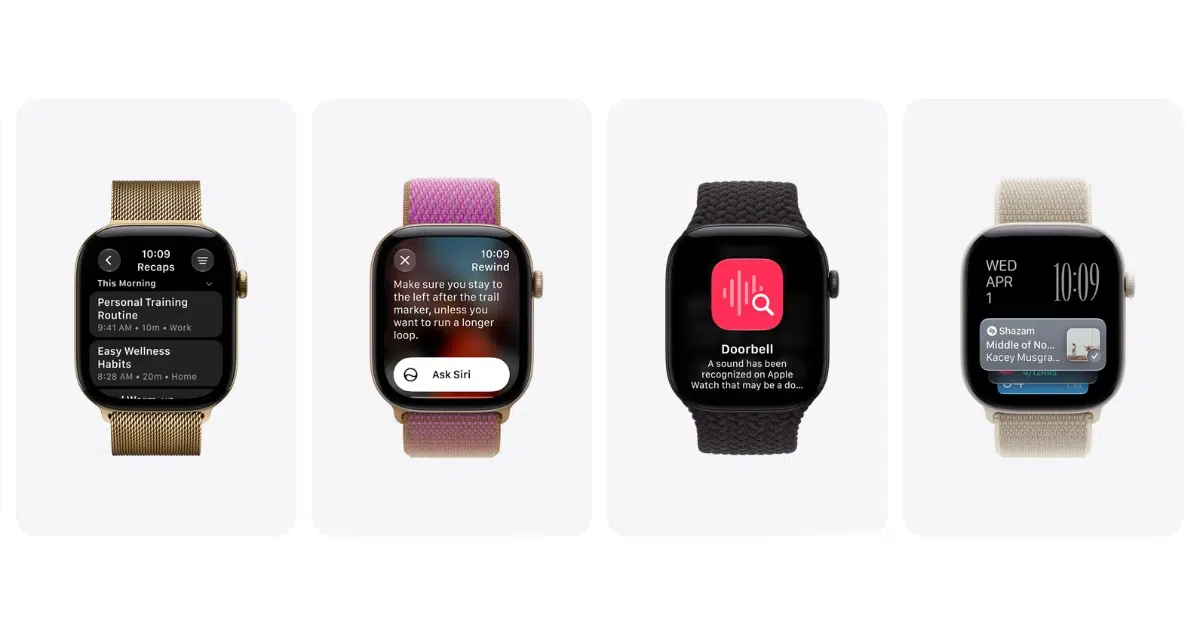
Apple has released the watchOS 27.3 public beta and the tvOS 27.3 public beta builds, two days after the developer builds. Live Rewind and Siri Recap are part of the watchOS build, and both only run on the Apple Watch Series 12 and the Apple Watch Ultra 4.
Anyone enrolled in the Apple Beta Software Program can install them, and Apple released public betas of iOS 27.3, iPadOS 27.3 and macOS Golden Gate 27.3 the same day. The developer betas arrived on November 3, and Apple is expected to release the final updates in December.

Live Rewind and Siri Recap Need an Apple Watch Series 12 or Apple Watch Ultra 4
When you double-press the Digital Crown, Live Rewind shows the last 15 seconds of speech as text. You can ask Siri about the snippet or save it to the Siri app, and it disappears about 30 seconds after the display dims if you do neither.
The watch plays a chime and shows a microphone indicator while Live Rewind runs, so people nearby know it is active. Siri Recap works in the background and turns a conversation into a short summary with a title and key points, and each summary deletes itself after seven days unless you save it.
Both features are off until you turn them on from the Watch app on your iPhone. They start in English and need Siri AI, so your iPhone has to be one of the compatible iPhone models for Siri AI.
Live Rewind runs speech recognition on your Apple Watch and iPhone, and the text only goes to Private Cloud Compute if you ask Siri about the snippet or save it. Siri Recap does use Private Cloud Compute, and it never labels who said what. Saved summaries sync through iCloud with end-to-end encryption, so only you can read them on your trusted devices.
Live Rewind and Siri Recap sit alongside Sound Recognition and automatic music recognition with Shazam in Audio Intelligence. Each of the four features is opt-in.
The watchOS 27.3 Public Beta Installs on Eight Apple Watch Models
The public beta supports the same models as watchOS 27.
- Apple Watch Series 12
- Apple Watch Series 11
- Apple Watch Series 10
- Apple Watch Series 9
- Apple Watch Ultra 4
- Apple Watch Ultra 3
- Apple Watch Ultra 2
- Apple Watch SE 3
The tvOS 27.3 public beta supports the same Apple TV 4K models as tvOS 27, and the oldest is the 2021 model. No new tvOS 27.3 features have been announced yet.
How to Install the watchOS 27.3 and tvOS 27.3 Public Betas
Sign up on the Apple Beta Software Program website, then install each beta from Software Update. On Apple Watch, open the Watch app on the paired iPhone, tap General, then Software Update, then Beta Updates. On Apple TV, go to Settings, then System, then Software Updates.
A beta cannot be downgraded once it is on an Apple Watch.