Dear iPhone Duo owners,
Congratulations on your iPhone Duo, and welcome to what I think is one of the biggest days in the history of the iPhone. Whether you pre-ordered on October 16 or walked into an Apple Store on launch day, you are among the first people in the world to own a foldable iPhone.
I started iThinkDifferent in 2008, the year the App Store opened, and I have been writing about Apple ever since. For nearly two decades the iPhone has been a single flat slab of glass, and Friday, October 23 is the day that changed.
Some of the best iPhone Duo apps shipped updates this week, and plenty more are on the way. The phone itself comes first, though.
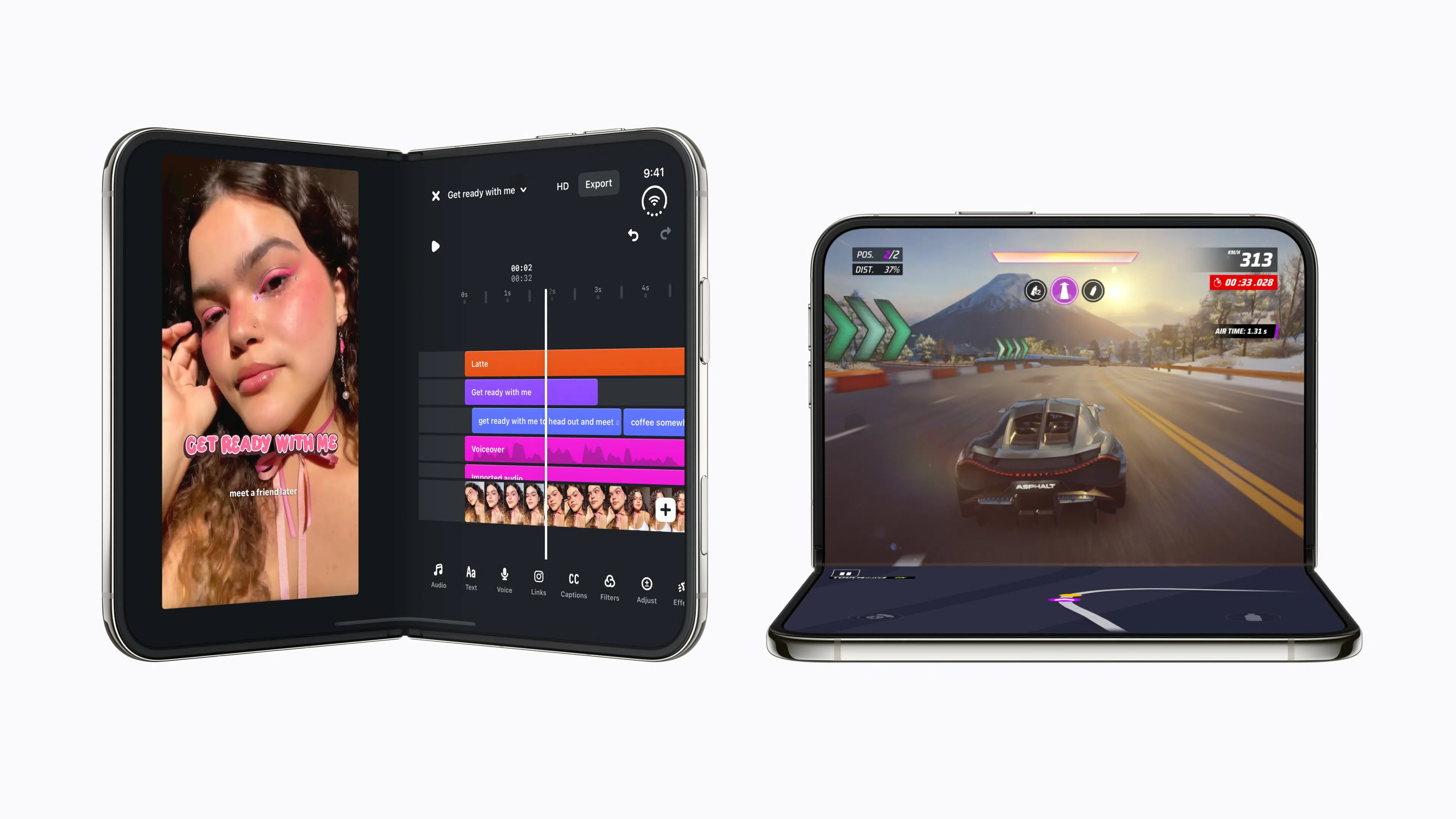
The iPhone Duo Is the Biggest Change to the iPhone Since 2007
Apple unveiled the iPhone Duo on September 9, and CEO John Ternus called it the most transformational change to iPhone since the original. It is Apple’s first foldable, arriving years after foldable phones first went on sale in 2019, and the hinge alone has more than 100 components.
Opened up, it is the thinnest iPhone Apple has made, with the largest display ever on an iPhone at 7.6 inches, and folded shut it is about the size of a passport with a 5.4-inch outer display for quick jobs.
The software changed along with the hardware, since iOS 27 was redesigned for the fold, Split View puts two apps side by side on an iPhone for the first time, and a new hinge API lets apps respond as you open and close the phone.
Reviewers Call It the Best Foldable Yet and Flag a Few Trade-Offs
Early iPhone Duo reviews praised the hidden crease, the battery life and the performance, and several called it the best foldable they have tested. It has also been named one of the best inventions of 2026.
Those same reviews flagged trade-offs worth knowing about, including a weight of 254 grams, a $1,999 starting price and Touch ID instead of Face ID. Many third-party apps also had not been updated for the inner display, which is why the app list below matters.
You made a good choice, and going in with eyes open makes the first week easier.
The Learning Curve Comes From the Poses, Split View and Apps That Have Not Updated
The iPhone Duo does not behave like any other iPhone. Apps respond to whether the phone is closed, flat, half folded like a laptop or propped open like a tent, and you will probably spend the first few days learning which pose suits which job. Five things catch new owners out early.
- Split View is fixed at 50/50. The iPhone Duo is the first iPhone that runs two apps side by side, and the fixed 50/50 layout means you cannot drag the divider. Tap the bar between the two apps to lock a pair, and it shows up in Recents.
- Older apps run in compatibility mode. An app that has not updated stays in a safe area with a black background around it. Check for the Made for iPhone Duo badge on the App Store page before you download.
- The box has no fast charger. Charging to 50 percent in about 20 minutes needs a 60W adapter that Apple sells separately, plus a cable rated for 60W.
- Apple Pencil needs a software update. Apple Pencil with USB-C support is officially coming later this year, but it already works in the iOS 27.2 release candidate. The iPhone Duo ships with iOS 27.1, so check Software Update in Settings.
- A keyboard and mouse work, with one catch. The inner display works as a small tablet with a Bluetooth keyboard, and a mouse needs AssistiveTouch turned on before a pointer appears.
Developers Are Rushing Apps Onto the iPhone Duo This Week
App Store Connect began accepting iPhone Duo optimized apps on October 5, and the updates have been piling up since. Apple says more than 2,000 developers have attended over 50 in-person workshops in 19 cities.
The launch-eve list included Netflix, Prime Video, Instagram Edits, Zoom, Slack and Asphalt Legends, and independent developers shipped on the same schedule. MoneyCoach’s maker went from first sketch to a shipped iPhone Duo update in 19 days.
It feels like the biggest rush of developers onto an Apple platform since the App Store launched. More updates are due throughout the year, so check the Updates tab often.
Skeuomorphic Design Is Making a Comeback on the iPhone Duo
Several apps built around the fold borrow from real objects. MoneyCoach is a 3D leather wallet that opens with the hinge, pico cam slides each photo out of the outer display like a Polaroid, and AltoPaint is a paint tin with a canvas in the lid and pigments in the base.
Deck-Man, an indie app, turns the phone into a cassette player that you open to pick an album and close to play. Tiny Computers puts ten retro machines above a working keyboard, and Toastie has you close the phone to toast a sandwich. Apple’s design team has said paper notebooks inspired the iPhone Duo’s design, so the theme fits.

We are here for it, because years of flat interfaces made every app feel alike and a phone that opens like a wallet or a notebook gives designers a reason to try something different.
One Inner Display Repair Makes AppleCare+ Worth Buying
If you did not buy AppleCare+ with your iPhone Duo, you should have. Add it now if you can, because repair fees without AppleCare+ top out at $1,499.
AppleCare+ costs $19.99 a month, $199.99 a year or $399 upfront. The inner display shows the gap best, since a $999 repair drops to $99 and the upfront plan plus one repair still comes to $498.
| Repair | Without AppleCare+ | With AppleCare+ |
|---|---|---|
| Cover layer | $49 | $19 |
| Back glass | $199 | $29 |
| Outer display | $379 | $29 |
| Inner display | $999 | $99 |
| Other accidental damage | $1,499 | $99 |
| Battery service (below 80% capacity with AppleCare+) | $229 | $0 |
The cover layer above the inner display can be replaced, which makes it the cheapest repair on the list. These are US estimates, Apple sets the final fee after inspecting the phone, and theft or loss claims carry a $149 fee with coverage.
You can usually add AppleCare+ after buying the phone, but the window is limited. Go to General, then AppleCare & Warranty in Settings, or check your device at checkcoverage.apple.com.
These Are the Best iPhone Duo Apps to Buy First
Notes, Calendars and Work
- TypeDraw ($4.99) opens a fresh note the moment you unfold the phone.
- Fantastical, Bear and Things are the calendar, notes and task apps to install first. Fantastical shows calendars, tasks and menus together on the inner display, and Split View puts it next to Cardhop.
- Termius (free, Termius Pro $15 a month or $119 a year) is an SSH client with iPhone Duo support.
- Dashboard: Smart Home & RTSP (free, Premium $9.99 a year or $69.99 once) gives Apple Home an iPad-style paged layout on the unfolded phone.
Creative Apps
- AltoPaint ($4.99 this week, then $5.99) mixes twelve real pigments and has no undo button.
- pico cam (free with in-app purchases) slides instant photos out of the outer display.
- Shareshot (free, Pro $14.99 a year) adds iPhone Duo frames, including landscape frames for the outer screen.
- GarageBand (free) now supports the iPhone Duo and gives Touch Instruments more room on the inner display.
Health, Money and Habits
- MoneyCoach (free with in-app purchases) turns your bank accounts into cards in a leather wallet.
- Gentler Streak (free, Premium optional) has a major update for dual screens.
- Beatcast (14-day free trial, then a one-time purchase) puts a live heart rate reading on the outer display.
- timespent has a separate layout for each of five poses.
Games and Fun
- Delta 2.0 (free with in-app purchases) adds Sega Genesis and controller skins for every pose.
- Penalty Area: Face2Face (free, $4.99 for the full game) puts the goalkeeper on the upper display and the ball on the lower one.
- Tiny Computers ($3.99) packs ten retro computers into the phone.
- Toastie ($2.99) makes the fold the toaster.
- Hinge Angle Meter ($0.99) reads the hinge as a live angle gauge.
Everyday Apps
- Tesla has a two-pane layout for the inner display, rolling out over the next week or two.
- Lyft and Flighty make good use of the room. Lyft shows ride options and the route on a larger map, and Flighty adds a flight-tracking mode for when the phone is propped up.
Microsoft Word and Outlook arrive in the coming weeks, Zenless Zone Zero gets its iPhone Duo update next month and UnGodly launches on the App Store in November. From April 2027, every app submitted to the App Store needs iPhone Duo screenshots.
Take your time with it, try every pose and see which of these apps earns a spot on your Home Screen.
Welcome to the fold,
Imran


